- Home
- Download & Install
- Discussions
- [Win7] Apps can't connect to Adobe servers
- [Win7] Apps can't connect to Adobe servers

Copy link to clipboard
Copied
Afternoon, all.
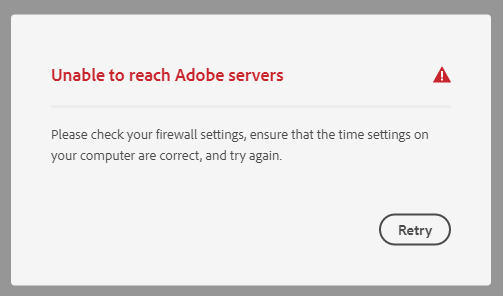
I tried to start up Illustrator yesterday, and was greeted by a "we can't verify your subscription status" error. Annoying, as I have things to do (and yes, my subscription is still active and okay according to the website). Additionally, if I start up Adobe CC, I get a generic "unable to reach Adobe servers" error. During troubleshooting I pinged the Adobe servers listed here: https://helpx.adobe.com/download-install/kb/common-network-connectivity-issues.html and found that they resolved to Akamai servers. I assumed that this issue was related to yesterday's Akamai outage and gave it up.
However, I'm still experiencing the same issues today long after Akamai say that the problem should be resolved. I can't access CC or the software I'm paying for. I have now completed all the troubleshooting steps in this post https://helpx.adobe.com/download-install/kb/common-network-connectivity-issues.html and this one https://helpx.adobe.com/download-install/kb/unable-to-reach-adobe-servers.html with no success. I've changed my DNS servers, flushed and re-registered the DNS, tried repairing CC (it doesn't work as it can't reach the adobe servers, go figure) and even attempted to connect via a VPN.
I contacted live chat, but was told that the dedicated team don't work weekends and I'd have to get in touch again Monday.
Windows 7 x64, and no issues up to this point. TLS 1.2 update's installed and enabled.
Thanks in advance.


 1 Correct answer


See this related discussion which mentions the need to run Microsoft's EasyFix51044.msi.
CONTACT ADOBE SUPPORT:
================
Online Chat: https://helpx.adobe.com/contact.html?rghtup=autoOpen
Phone M-F, during normal business hours: https://helpx.adobe.com/contact/phone.html

 7
Replies
7
7
Replies
7

Copy link to clipboard
Copied
If you already have a support ticket in progress, wait until Monday to reach technical support.
Meanwhile, your local public library may have Creative Cloud service you could use temporarily.

Copy link to clipboard
Copied
SAME ISSUE!

Copy link to clipboard
Copied
Same issue here.
Copy link to clipboard
Copied
Just an update on this, it's still not working for me which kinda rules out the Akamai outage at this stage. I haven't had a chance to sit with Adobe support yet as I've been so busy with other things. I have, however, checked my hosts file (no adobe related entries) and tried connecting via my phone's connection sharing (still no connection to adobe servers). The latter would seem to rule out the problem being with my router settings and suggests that the problem is my PC. I'm all out of ideas at this stage, though. If I can't sort it out I'll have to cancel my sub, as I'm literally paying for software that I can't access!
Copy link to clipboard
Copied
See this related discussion which mentions the need to run Microsoft's EasyFix51044.msi.
CONTACT ADOBE SUPPORT:
================
Online Chat: https://helpx.adobe.com/contact.html?rghtup=autoOpen
Phone M-F, during normal business hours: https://helpx.adobe.com/contact/phone.html
Copy link to clipboard
Copied
Very interesting, I had previously verified that the TLS 1.2 update was installed and working, but I hadn't uncovered mention of the separate easy fix MSI before (which is further down the page on the windows update entry, and separate to the actual update file itself for any future people looking). Now I'm able to get into Illustrator (which is the main thing!) so it seems like this was the missing piece. What's perplexing is that Adobe CC itself still reports unable to reach the Adobe servers, and that I've been able to use CC and it's apps on this computer right up to a couple of weeks ago!
Still, I'll let the mystery go so long as I can actually do the work I need. Thanks very much for this!
Copy link to clipboard
Copied
You're welcome. Glad it worked for you. 🙂


Find more inspiration, events, and resources on the new Adobe Community
Explore Now
 AdChoices