


- Home
- Dreamweaver
- Discussions
- Re: Dreamweaver CC 2017 "Apply Source Formatting" ...
- Re: Dreamweaver CC 2017 "Apply Source Formatting" ...

Copy link to clipboard
Copied
The "Edit > Code > Apply Source Formatting" doesn't work correct for PHP-Code.
I'm using Dreamweaver CC 2017.0.1 Build 9346
Code-Before:
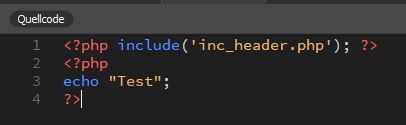
Code-After:
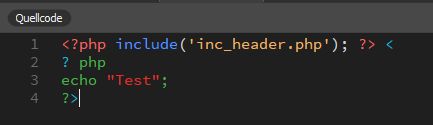
This code doesn't work anymore!


 2 Correct answers


Hi MM-Webconsulting,
Thank you for reporting this issue. The team has logged a bug for it. Stay tuned for updates.
Thanks,
Preran


Hi - Are you talking about spaces in PHP code when apply source formatting? Follow these instructions to reduce the spacing
:
On windows you can locate this file and make a backup, as you are going to edit it:
C:\Program Files\Adobe\Adobe Dreamweaver 2021\www\extensions\default\BracketsDWBeautify\default.jsbeautifyrc
Look at the PHP section at the bottom and some rules you can change to reduce the amount of spacing inserted in PHP code
change:
"space_after_anon_function": true,
to
"space_after_an
 9
Replies
9
9
Replies
9


Copy link to clipboard
Copied
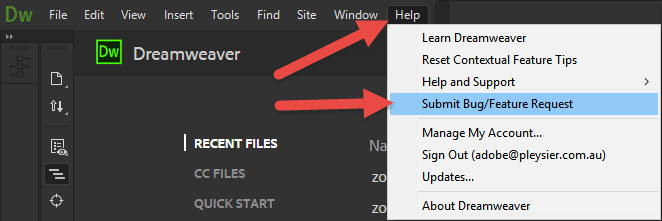
Please pass this on

Copy link to clipboard
Copied
Hello,
We are checking on this with our product team, will update you as soon as get any info.
Stay tuned.
Regards,
Ankush
Copy link to clipboard
Copied
Hi MM-Webconsulting,
Thank you for reporting this issue. The team has logged a bug for it. Stay tuned for updates.
Thanks,
Preran

Copy link to clipboard
Copied

Why everywhere leaves space !!! I started to hate !!!!!
Version 2017.5
Copy link to clipboard
Copied
Is there a solution for the space problem?

Copy link to clipboard
Copied
This is a 4 year old thread that has already been answered.
Please start a new discussion. And state the DW version # and OS you're using.
Thank you.
Copy link to clipboard
Copied
Hi - Are you talking about spaces in PHP code when apply source formatting? Follow these instructions to reduce the spacing
:
On windows you can locate this file and make a backup, as you are going to edit it:
C:\Program Files\Adobe\Adobe Dreamweaver 2021\www\extensions\default\BracketsDWBeautify\default.jsbeautifyrc
Look at the PHP section at the bottom and some rules you can change to reduce the amount of spacing inserted in PHP code
change:
"space_after_anon_function": true,
to
"space_after_anon_function": false,
change:
"space_before_conditional": true,
to
"space_before_conditional": false,
change
"space_in_paren":true
to
"space_in_paren":false
Copy link to clipboard
Copied
Thanks @paul That's the solution!
Copy link to clipboard
Copied
you're welcome 😀

Find more inspiration, events, and resources on the new Adobe Community
Explore Now
 AdChoices