


- Home
- Dreamweaver
- Discussions
- Re: File transfer and page jump issue!
- Re: File transfer and page jump issue!
File transfer and page jump issue!

Copy link to clipboard
Copied
Hello friends!
I just recently moved my site: unitybaptistfulton.org from Microsoft Expression Web 4 to Dreamweaver CC 2019. Along with the obvious learning curve, I have encountered a few errors have yet to discover the fix for.
1. Whenever I put files to my hosting server in order to update my website, I get the error message on many files saying same - not transferred.

I looked up the error and came across this forum:
DW CC will not Put files to remote
The person asking the question was told to look at his root directory and make sure it was correct. I did and my root directory wasn't specified, so I changed it to what my hosting server said it was --- /. After doing that, all of the files I wanted were not updated and transferred, but a good majority actually transferred. However, after working on the site a bit more and refreshing it to keep up with the updates, it started giving me the same - not transferred error again for a bulk of the files. So I went back into my Manage Sites settings and saw that my root directory name was changed to /./
The strangest thing is that the site works except for two new pages I created, contact.html and calendar.html because when I put the site to the server, those files are not transferred. I am so frustrated. Any help would be appreciated. Dreamweaver does show that I am connected to the server, so I can't understand why certain files aren't transferring.
2. Anyone else have trouble with placing third-party scripts in their website? I had a contact form script from 123ContactForms I put in my site, but every time I add it to my website, the website automatically scrolls down to the contact form as soon as I open the page! Is there any hack for this or would the best solution be to just make my own?
Contact Form Code:
<script type="text/javascript" defer src="//www.123formbuilder.com/embed/3063475.js" data-role="form" data-default-width="650px"></script>
Again, thank you all so much! Plus, any Youtube channels or sites you recommend for learning Dreamweaver would be awesome. I don't mind Adobe tutorials but they aren't exactly comprehensive.


 10
Replies
10
10
Replies
10


Copy link to clipboard
Copied
Post side-by-side screen captures of your Files Panel, showing both the local view and the remote view.


Copy link to clipboard
Copied
Something is probably missing from your site definition. In this example, public_html is my remote server's root directory. That's the folder to which all my public facing files must be uploaded.


Copy link to clipboard
Copied
Do you mind providing a screen shot of the expanded FTP panel, showing the local and remote connections side by side? That would be help us help you get this resolved...
Make sure to press "✔ Correct Answer" on this post if this answers your question. Happy Creating!
Anissa • @anissat
Copy link to clipboard
Copied


From my Host (1 & 1 IONOS)

Copy link to clipboard
Copied
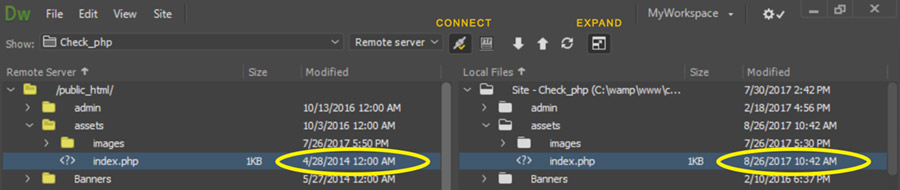
Your local and remote servers are set to different root paths. Dreamweaver cannot possibly upload your files to the correct location. Unfortunately, I don't think you got the hint when Anissa and I asked you to post a shot of the panels. So, a little guess work...
Change the server setup to point to the folder on your server that actually houses your site. Hint: there will be an index.htm(l) page in the root.
Copy link to clipboard
Copied
Hitt the Expand button. See screenshot. Your local and remote site files should be nearly identical.
Copy link to clipboard
Copied

I figured out how to get them side by side! Does this help?
Copy link to clipboard
Copied
I guess I should also mention that I started out with an old website template and files (also under the same remote server name and hosting address) but I needed to change the template so I created a new site in Dreamweaver with a new template, then took off the remote server name and hosting address---and switched it to the new template I created. I think that might have caused issues as well with the syncing.
Copy link to clipboard
Copied
Based on what you're showing us, you're not in the right server folder. Nothing on the left remote site matches what you have in your local site folder.
Copy link to clipboard
Copied
Also my Dreamweaver settings


Find more inspiration, events, and resources on the new Adobe Community
Explore Now
 AdChoices