


Error Message?

Copy link to clipboard
Copied
http://prntscr.com/849623 This is a screenshot of the message I get in Skype. I have no idea what to do about it or if I should do anything. This is on an HP Pavilion 23 All-in-one machine. Any help appreciated.


 13
Replies
13
13
Replies
13


Copy link to clipboard
Copied
Hi,
Skype is not an Adobe program. I see your screen shot (BTW, please post screen shots directly to the forum) shows an Adobe Flash Player error.. Could you elaborate on the issue? Also, if this is indeed a question about Flash Player, this is not the Flash Player forum.
Benjamin
Copy link to clipboard
Copied
I could not find a Flash Player forum. What ever is causing the error message does not seem to affect any functionality. Skype works as it should, other websites that use adobe work as they should. That is why I am not sure if I need to do anything. The only info I have is what is what shows in the screenshot. and it comes up when Skype is running.
As for posting the screenshot directly to the site, I am really not certain how to do that.


Copy link to clipboard
Copied
If you will start at the Forums Index https://forums.adobe.com/welcome
You will be able to select a forum for the specific Adobe product(s) you use
Click the "down arrow" symbol on the right (where it says All communities) to open the drop down list and scroll
Copy link to clipboard
Copied
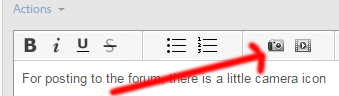
For posting to the forum, there is a little camera icon which allows you to attach an image:
I am going to move this from Forum comments to Using Flash Player, where you will hopefully get better results.
Benjamin
Copy link to clipboard
Copied
I hope this worked. it is suppose to be a screen shot of my issue. Thanks.
Copy link to clipboard
Copied
Sorry, seems it is just a different link to same pic as above.
Copy link to clipboard
Copied
Did you upload a file directly from your computer?
Copy link to clipboard
Copied
no, it is an image of the message I get in my Skype window. Maybe I can copy and paste the text of the message.
Copy link to clipboard
Copied
SecurityError: Error #2060: Security sandbox violation: ExternalInterface caller https://cdn.doubleverify.com/dvdtc.swf cannot access https://static.skypeassets.com/adserver/AdLoader.html?version=1.66.9.
at flash.external::ExternalInterface$/_initJS()
at flash.external::ExternalInterface$/call()
at dvdtc()
this is the text of the message. It also says outside the text area "An ActionScript error has occurred"
Copy link to clipboard
Copied
Okay, great thank you. Hopefully someone with experience in Flashplayer will come along soon.

Copy link to clipboard
Copied
I'm getting the same error, but I don't use skype. I get an Adobe Flash Player message window on startup stating an ActionScript error has occurred and it states "SecurityError: Error #2060: Security sandbox violation: ExternalInterface caller http://cdn.doubleverify.com/dvdtc.swf cannot access...". My computer also just finished installing new windows updates and this is the first time I've ever seen this error.


Copy link to clipboard
Copied
Hi,
If this is on Windows 8.1 Microsoft inadvertently released the content debug version of Flash Player for Internet Explorer (Skype may also use the same ActiveX Control). The debugger is used by content developers to debug their code, which is why you're seeing these errors. Microsoft released the fix afternoon, please see https://support.microsoft.com/en-us/kb/3089023, or run Windows Update to download and install the update.
--
Maria

Copy link to clipboard
Copied
Many computer users complain about Cdn.doubleverify.com pop-ups which appear when they visit certain websites. You can try enable IE Active X filtering, or run Internet Explorer Safety troubleshooter or remove Cdn.doubleverify.com from Local intranet zone to fix the problem. The post (http://guides.uufix.com/how-to-remove-cdn-doubleverify-com-pop-ups-completely/)shares several methods how to deal with it. I'm not sure if they can help fix your issue.
Good luck.

Get ready! An upgraded Adobe Community experience is coming in January.
Learn more
 AdChoices