


- Home
- Flash Player (read-only)
- Discussions
- Re: Flash Player 32 Bit installs in my Windows 7 6...
- Re: Flash Player 32 Bit installs in my Windows 7 6...

Copy link to clipboard
Copied
Running Win 7 64 Bit, Explorer 9 with ActiveXFiltering removed, downloaded & installed latest version Flash Player but when I checked Control panel I found 32 Bit Flash Player installed. Unininstalled then again downloaded & run installation but still installed 32 Bit version. According to website I have Flash Player installed but I cannot run a program (BBC iPlayer DeskTop) that requires 64 Bit Flash player Any ideas?


 1 Correct answer

Installing a different browser is never a "solution". Check with the Task Manager's Processes tab that no instance of iexplore.exe is running in the background. Also any messengers, chat clients, Skype, etc. must be closed when running the installer.

 13
Replies
13
13
Replies
13

Copy link to clipboard
Copied
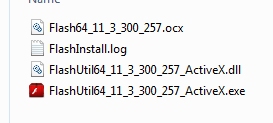
What files do you have in
- C:\WINDOWS\system32\Macromed\Flash ?
- C:\WINDOWS\syswow64\Macromed\Flash ?
Note that the Flash Player Settings Manager in Control Panel is only a 32-bit applet; on both 32-bit and 64-bit systems.
Copy link to clipboard
Copied
Please see attatched.
Regards
Phil
Copy link to clipboard
Copied
There is no attachment. Attachments (images) can only be posted directly in the forum, using the camera icon.
Your topic is http://forums.adobe.com/thread/1033853
Copy link to clipboard
Copied
Hi
Sorry about that please see below
 .
.
Regards
Phil
Copy link to clipboard
Copied
I see that you have both 32-bit and 64-bit Flash Player add-ons for Internet Explorer. Does it work? See http://helpx.adobe.com/flash-player/kb/find-version-flash-player.html
As for your BBC iPlayer DeskTop; if it requires the Flash Player plugin, you haven't installed it yet.
Copy link to clipboard
Copied
Tried all above but had problems re installing Flash player twice, half way thru download installation stopped saying 'Close Internet Explorer' that was already closed. So I gave in and installed Google Chrome to make it main browser then deleted & reinstalled Air/BBC iPlayer Desktop and it is now all working.
Thanks for all your help.
Regards
Phil
Copy link to clipboard
Copied
Installing a different browser is never a "solution". Check with the Task Manager's Processes tab that no instance of iexplore.exe is running in the background. Also any messengers, chat clients, Skype, etc. must be closed when running the installer.
Copy link to clipboard
Copied
Hi Pat
Did check Task Manager & I had stopped Skype but I gave in. I did have issues with Explorer also before so changing browser was not a problem.
Regards
Phil

Copy link to clipboard
Copied
Your reply directed me to the 2 locations as I am seeing strange things with ADOBE. I have had to do multiple installs also. I have Windows 7 Professional 64bit. Latest IE9 32 and 64bit and Firefox 13.0.1. I looked into C:WINDOWS\SYSTEM32\MICROMED\FLASH and all entries are *64(FLASHUTIL64_11_3_300_265_ACTIVEX). C:\WINDOWS\SYSWOW64\MACROMED\FLASH and all entries are *32(FLASHUTIL32_11_3_300_265_ACTIVEX).
This seems backward. YOUTUBE videos do seem to run in both browsers .
Copy link to clipboard
Copied
LVNVUS wrote:
This seems backward.
It seems, but it is not. Some reading: http://en.wikipedia.org/wiki/WoW64
Copy link to clipboard
Copied
Great information at wikipedia. I, and others, are still facing the problem of losing the Flash connection when shutting down for the night. Are there cookies that need to be added to a list so they never get removed? Any other ideas?


Copy link to clipboard
Copied
@LVNVUS - If Flash Player stops working after rebooting your computer, please try the steps oulined in this FAQ:
Copy link to clipboard
Copied
Dibbens wrote:
According to website I have Flash Player installed but I cannot run a program (BBC iPlayer DeskTop) that requires 64 Bit Flash player Any ideas?
Does that program require the Flash Player ActiveX Control, or the plugin? If you only have the ActiveX Control (for Internet Explorer) installed, then you may also need the plugin (for other browsers). Get it from http://get.adobe.com/flashplayer/otherversions/

Get ready! An upgraded Adobe Community experience is coming in January.
Learn more
 AdChoices