


- Home
- Flash Player (read-only)
- Discussions
- Flash Player plugin.exe could not be found
- Flash Player plugin.exe could not be found

Copy link to clipboard
Copied
Hi,
since a few days Flash Player is giving me an error message saying "C:\Users\Username\AppData\Roaming\Adobe\Flash Player\Addons\plugin.exe could not be found.
Please make sure you have typed the name correctly and repeat the process." on every bootup. (error message may not be 100% accurate, I had to translate it from German).
Apart from that, the Flash Player plugin (most current version btw) is working perfectly fine. I have done a complete Flash Player + Flash plugin reinstall but I keep getting the error
every time I start my PC. What's going on here?
Oh and I'm running Win 7 x64 Service Pack 1 btw.


 1 Correct answer

Sounds like your system is compromised. Whatever created that "plugins" folder (hint: it WASN'T Adobe - I have Flash Player on XP, Win 7 and two (2) Win 8 machines and NONE of them have such a folder) is causing the error message(s) because it's most likely enabling spyware via Flash.

 6
Replies
6
6
Replies
6

Copy link to clipboard
Copied
Download and save the uninstaller by right clicking the following link and selecting "save target as" (IE) or "Save Link as" (Firefox).
Download the Adobe Flash Player installer directly by right clicking one (or both) of the following links and selecting "Save target as" (IE) or "save Link as" (Firefox).
Flash Player for ActiveX (Internet Explorer)
Flash Player Plug-in (All other browsers)
Save the file(s) to your downloads folder - DO NOT run anything yet.
Reboot your system.
BEFORE opening anything else, run the UNINSTALLER to remove ALL instances fo Flash Player plugin.
Run the installer(s) next to replace the plugin for IE or Firefox (or both).
Copy link to clipboard
Copied
Hey,
thanks for your answer. I just did a clean reinstall using the installer and uninstaller from the 1st and 3rd link you provided (I'm using Firefox).
I rebooted after every step, however I'm still getting the error message. I checked the mentioned folder and it seems the reason for the error actually IS
the missing plugin.exe - it's obviously supposed to be in the AppData\Roaming\Adobe\Flash Player\Addons folder, but it just isn't there.
Copy link to clipboard
Copied
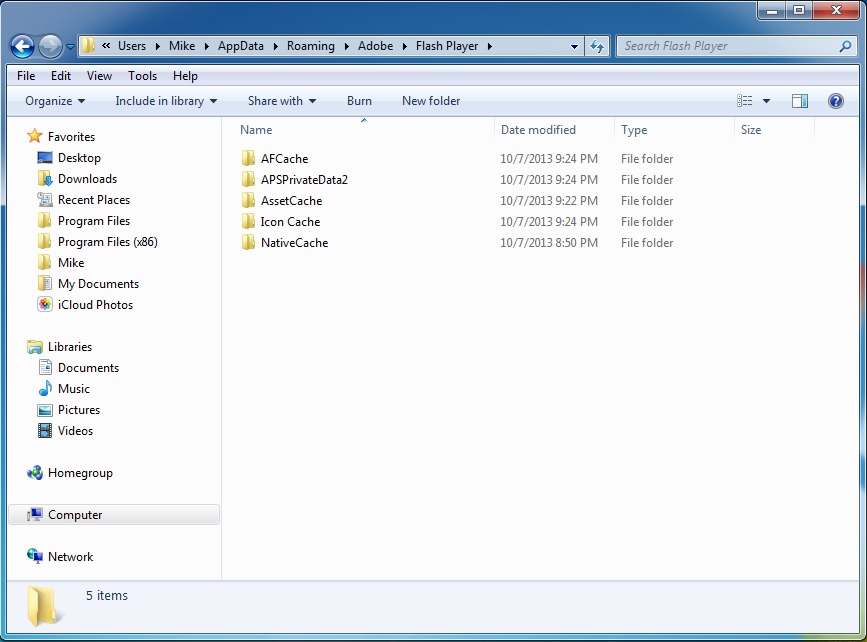
I can't, for the life of me, figure out WHY you even HAVE a "Plugins" folder in AppData/Roaming/Adobe/Flash Player.
Flash Player ISN'T a Plugin FOR Flash Player. It's a Plugin for IE or Firefox.
Me? Id' delete that entire Plugins folder.
Copy link to clipboard
Copied
Now that you mention it, it seems pretty dang suspicious...
I followed your advice and deleted the Addons folder, now instead of a missing "plugin.exe" I get an error message from
Windows Script Host saying "the script file C:\Users\Username\AppData\Roaming\Adobe\Flash Player\Addons\invis.vbs could not be found".
After doing some quick research on the internet, turns out invis.vbs is reported to be a potential trojan and should be deleted. So I recovered the Addons
folder from my recycle bin and had Bitdefender check it for potential threats, but it seems to be clean. This is getting mysterious.
Copy link to clipboard
Copied
Sounds like your system is compromised. Whatever created that "plugins" folder (hint: it WASN'T Adobe - I have Flash Player on XP, Win 7 and two (2) Win 8 machines and NONE of them have such a folder) is causing the error message(s) because it's most likely enabling spyware via Flash.
Copy link to clipboard
Copied
I just ran a full system scan, result: something's fishy with that Addons folder (big surprise), anyways thanks a lot for your help.
Bitdefender doesn't seem to be able to completely solve the problem so I guess that's one for the security experts now.
// Update
Fixed it. Just for the record (or if anyone else is encountering the same problem), deleting the registry key named "Addon"
at HKEY_CURRENT_USER\Software\Microsoft\Windows\CurrentVersion\Run will solve the problem.

Get ready! An upgraded Adobe Community experience is coming in January.
Learn more
 AdChoices