


Flash Player Version Issues

Copy link to clipboard
Copied
I found out on the support forums that i can check the version i have on my computer of which Flash Player i have installed but i have conflicting information. The first information is the Adobe website link which was referred to me through the FAQ:
Q: How do I know that Adobe Flash Player is installed correctly?
A: Adobe Flash Player requires users to restart their browser after installation. To validate that Adobe Flash Player is installed correctly, visit www.adobe.com/software/flash/about/.
So i took a picture of what it told me which is this image:(I dont know if the images are going to work because Adobe said they were going to be disabled so i have a link under each image to my website if you would like to see the image) I have no intention to harm your computer; i wouldn't want you harming mine.

http://cstapleton.com/zero/flash_version.jpg
Then i looked in my Windows 7 programs and features to see which version i had because some of the FAQ said to just uninstall the old versions and reinstall. So i went and took a picture of that also:
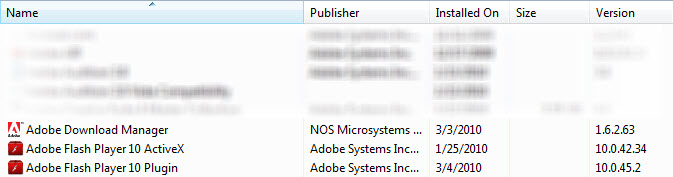
http://cstapleton.com/zero/flash_program.jpg
I dont understand why it has conflicting information for the VERSION.
I read in the FAQ that the ADM would appear and then would be deleted after i restarted so i restarted and it is not there anymore.
I keep having a weird issue with the Flash Player not working especially because its been asking for it all over sites i visit but i install or reinstall like up to 3 times and it keeps saying i dont have the right version. I thought when i bought the Adobe Master Collection CS4 that it would automatically update all that together. Am i not understanding correctly?
If anyone has an information that could help me i would value your comments and suggestions.
Thanks,
Chris


 12
Replies
12
12
Replies
12



Copy link to clipboard
Copied
Hi again, Ok to answer your other thread. There is nothing you need to do until after you have your problems answered and then it is not a requirement. As far as I know it is something you do and the points are given to the person whose answers have either solved your problem or helped. You can disrgard it until at that time.
Now to your issues.It appears from your screenshots that you have at least 3 different versions installed.
Since you have Win7, then IE 8 would be the browser for that. Now what other browser or browsers and versions please,
installed?
Now I need to mention to you I am not familiar with CS4, however I am with Flash Player and in my opinion that is your main problem.
Please post back that info.
Thanks,
eidnolb
Copy link to clipboard
Copied
```
>> 1. Mar 4, 2010 1:11 PM in response to: Chris_Stapleton
Re: Flash Player Version Issues
> Now to your issues.It appears from your screenshots that you have at least 3 different versions installed.
Since you have Win7, then IE 8 would be the browser for that. Now what other browser or browsers and versions please,installed? <
-1. (FF) Firefox Version: 3.5.8
-2. (MIE) Microsoft Internet Explorer Version: 8.0.7600.16385
64/32-bit Edition
-3. (SF) Safari Version 4.0.4 (531.21.10)
> Now I need to mention to you I am not familiar with CS4, however I am with Flash Player and in my opinion that is your main problem.
Please post back that info
Thanks,
eidnolb <<
```
>> 3. Mar 5, 2010 9:36 PM in response to: Chris_Stapleton
Re: Tired of installing Flash Player 10 over and over and over
again!!!!!!
> Hey Chris, I don't understand why you are posting on this person's thread when you have started 2 of your own in the last couple of days.<
-Hello Blondie,
-I am new to Adobe Forums and i find them very confusing. To let you know why i have not responded to your posts is i have been receiving a FLOOD of Adobe Forum responses in my email and i have not been able to keep track of them all.
-I did not understand why i was receiving all of the emails when i clicked the subscribe button next to my post. I dont know if i clicked the wrong subscribe button as if there are more than one subscribe button for either an individual post versus all the posts for Adobe Flash messages that would come at once.
-As it has been several days since writing this post i have realized that i probably selected the subscribe button to the whole Flash forum rather than just the individual post. One thing that contributed to this situation that makes that hard is:
-I have a visual processing disorder. This means i am not able to process written text in massive quantities without the effective use of whitespace and imagery. I have to use a software on my PC called Natural Reader, its a text to speech software. I highlight

the text and listen to a somewhat natural persons voice read the text to me aloud in an audio format to help me get the point accros of what the information is wanting me to know.
```
> Since you have Win7, <
-Q: Where do i find my specs i entered for my profile and why is that not on each post? I noticed that you had noticed that i was using Win 7 but i didn't understand how you could get to the information.
```
-One thing i do like about the forums is that each person has their own bubble or square in their own color which neatly and visually is distinguishable between other posts, but even within the (UI) User Interface: being my deffinition is everything the user can interact and see. Whether that is things they can touch with their mouse, hover over, highlight, click on and visually see with their eyes of content that is appealing to that person in their own context.
-Being visually impared and Adobe being a visually minded organization, (i know because i am an artist myself) and i find it hard to navigate this forum mostly because i cannot see the text very well so i couldn't tell if i was going to receive a notification that you would reply to my email. In the options under my profile it asks:
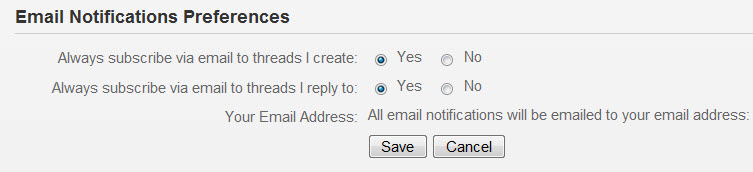
-In other forums on the internet they usually have that option setup in the Control Panel. I found the fact that Adobe Forums has their proprietary forum and it looks a lot different than general forums i have seen on the internet. See image:

-From what i remember and i did not screenshot the subscription button because i didn't realize there would be more than one button to click on. I wasn't really instructed to read anything as in other forums they have sticky topics. And on the Adobe Forums they are on the bottom right hand side of the page that i hadn't seen until my 7th time around. I was looking for more information like FAQ and ediquette but i didn't find that until days later because it was somewhat taxing to resolve the first question i had which was about the point system. I think a section in the Adobe Naviation that says "Forum Help" upfront would be appropriate because how do i drive Adobe's forum? Some people may not know how to do it especially if they are visually impared or have other disabilities and we all have different backgrounds, culture, and experiences how we experience computers when we come to Adobe Forums for help.
```
>> Here is one of your threads, which I responded to in case you haven't read it. And no, I will not respond to you any further on this thread. If you want to reply to my response to you on your own thread then do so. Here is one of your 2 threads:
http://forums.adobe.com/thread/589497?tstart=0 <<
-I was receiving the subscriptions as they were flooding in and being new to the forum it was hard to find the exact email for my specific question. I didn't even realize how to find the discussions section or know to look there until i came back searching for help. The fact that i am able to read with Natural Reader is somewhat taxing and getting all those emails was really overwhelming as i haven't been able to use much of any of Flash player online and its kept me coming back to this message to let you know what is going on. Overall the experience has been very dissatisfying.
-My intention was not to take over their thread. I was only taking the first email that was on the huge stack of other emails and i felt i should help other people that were having similar problems. It was a lack of understanding and i thought if i helped other people more people would respond to help us.
-Other people were having the same issue so i wanted to let them know what i had done so they could have some reassurance that it was not just them because some people had asked for help and there was no response given so i thought i would help out as best as i knew how as it says in the etiquette and best practices:
-In the Sep 17, 2009 2:14 PM adobe-admin: Forum etiquette and best practices it says:
# Respect others
# Assume good faith
# Share what you know
# Be kind to newbies-we were all new once
# Encourage others; recognize and praise good work
# Attract and honor good, knowledgeable people
# Ask for help, and help others in return
# Set a good example
# Add information about yourself to your forum profile
>>You don't get to come on someone else's thread and ask me to answer to YOU regarding what I am inquiring about to another person on HIS OWN THREAD! eidnolb<<
-I dont feel like you were empathising much with me and i reported you for abuse. Anyone can be new to a forum and you may not know who is new and who is not. At this point i couldn't find the FAQ or the ediquette but i dont understand why you think i was making any personal question towards you individually? If it says i cant post on other peoples threads im sorry i could not find the information.
-It would be helpful if there were helpful video tutorials to use the forum because they are not like other forums i have been to. They look totally different.
-I can tell you are trying to help and appreciate your help, i just had a hard time dealing with the overwhelming mound of emails, the inability to navigate the forum well, the lack of information or where to find it, and the stress of wanting to get a question answered but not being able to find the answers. So i felt i should help some people until i received an answer. If i stepped on your territory i appologize.
Thank you for your sincere desire to help out. I was only trying to share what i knew.

Copy link to clipboard
Copied
This is a peer-to-peer forum; the people who are helping others here are just users like you and me, not Adobe staff.
The forum software may be different and more difficult to use than other forums, but basically it works exactly the same as any other forum. If you choose to receive forum notifications, then you will have to deal with these. If they confuse you, then disable notifications.
Now you posted a very long rant here - the longest I have ever seen in this forum. I fail to see the point of it. We forum users have not chosen this forum software, and we also have no control over how you use this forum.
And then you go and report the very person who is trying to help you for Abuse??? Come on - are you for real, or are you just a troll?
Copy link to clipboard
Copied
The reason it was so long was because i compiled some of the other response of other links into one because Blondie was saying to keep them all in one thread. I was trying to explain the situation and what happend and the response was written over a period of a couple days which is why it appeared so long. So i am verbose its ok.
Part of the point was i had seen others on the forum be able to quote other parts of what another person would say so i tried to show all my math in a sense.
How do you quote another user?
Are there more than one buttons to choose to receive notifications? Like on a thread i create versus threads for all of Adobe Forums?
I wasn't trying to blame anyone i just felt like i was being yelled at because i was on someone elses thread and i didn't know it was wrong. I value your comments and im glad you responded so quickly
Copy link to clipboard
Copied
The best for all involved is to keep one question/problem in one topic. If things get spread over multiple topics, it will get difficult for the people who are trying to provide help, and more difficult for people who later search existing topics for help.
Replying by email is an option, but it does not give you any ways of meaningfully format your posts.
Chris_Stapleton wrote:
How do you quote another user?
To quote from the post you are replying to, just use the "quote" button in the forum edit panel (below)

To quote from another topic you have to resort to some trickery (do the quoting in the other topic, then copy the result into the current topic), so it is better just to quote from the current topic.
To just make a quote use the "Insert" button (below)

To insert an image, use the camera button (below), rather than uploading on a 3rd-party website. Such images often appear blurred, as yours in the original post of this topic.

Finally, questions and comments about the forums itself can be made in this forum
Copy link to clipboard
Copied
Thank you for the quick reply.
Originally eidnolb wrote:
Now to your issues.It appears from your screenshots that you have at least 3 different versions installed.
Since you have Win7, then IE 8 would be the browser for that. Now what other browser or browsers and versions please,
installed?
Now I need to mention to you I am not familiar with CS4, however I am with Flash Player and in my opinion that is your main problem.
Please post back that info.
Thanks,
eidnolb
-1. (FF) Firefox Version: 3.5.8
-2. (IE) Microsoft Internet Explorer Version: 8.0.7600.16385 64/32-bit Edition
-3. (SF) Safari Version 4.0.4 (531.21.10)
-4. (CR) Google Chrome 4.0.249.89
Here is the info he/she wanted. Please respond,
Thanks,
Chris
Copy link to clipboard
Copied
-1. (FF) Firefox Version: 3.5.8
-2. (IE) Microsoft Internet Explorer Version: 8.0.7600.16385 64/32-bit Edition
-3. (SF) Safari Version 4.0.4 (531.21.10)
-4. (CR) Google Chrome 4.0.249.89
Sorry for the run around 

Copy link to clipboard
Copied
Hi Chris,
I'm new in here but I was checking similar threads since few days ago.
I had a big big problem with updating my Flash player for Mozilla
Everything was working fine on IE8, but same page would not work in Firefox.
The problem was with Shockwave player.
After checking few things, I have searched for a file containing 'sw' for shockwave.
I have found two with a name of NPSWF32.dll and I have renamed them to XNPSWF32.dll
After that I restarted Mozilla and the version checker was showing I have Flash 10.0.2, not 9.0.16 any more 
Cool, so then I updated Flash downloading it from Adobe website and it worked. Now it shows I have most recent version of Flash.
Hope this helps in your case, too.
@Everyone
Please share this with everybody else who had such problem, as it seems to be a common issue.
Regards,
Wojtek
Edit:
Forgot to tell you that I had problems mainly with video sites like LiveLeak, Dailymotion (but not Youtube).
Copy link to clipboard
Copied
Hi W, There is no problem with Shockwave Player. That was not your problem. You are confusing that with Flash Player and giving advice as such. The 2 are totally different and have no impact on each other.
You had other problems, as I can tell from what you have posted.
Please don't offer whatever you did as a solution. This is misleading and will cause other users that don't understand
the programs and many many other issues to follow this.
Regards,
eidnolb
P.S. Whatever all you did to solve whatever your issues were is fine for you. But that is not a solution since no one
knows what your problems were. Shockwave Player was not one of them.
Copy link to clipboard
Copied
OK I know that as you said (probably) Mozilla is confusing SW with FP, hence I have done as described above. My Mozilla was displaying a version of SW like it was FP, which is incorrect.
I dont want nobody follow false instructions, but still hope that it will solve other people's problem - this is the only reason I shared my case with you all 
@Chris, sorry for misunderstanding, wish your problem is solved soon
Copy link to clipboard
Copied
Hi W, I appreciate your reply. However, Mozilla does not confuse Shockwave Player with Flash Player. I think you did and
was confused between the two. Stapleton's problem as I told him in the very beginning, he had 3, yes 3 different versions
of Flash Player installed. However he chose not to reply to my response to him at that time. To solve a problem, you first
must know what the problem is and after that you offer a solution. Guessing and experimenting is dangerous and that
is why I replied to you. For other users to follow a suggestion, no matter how sincere in your offer to help without knowing
anything about their problem or system set up is not a good thing. Any help is always appreciated on the forum, but it
must be logical and based on facts.
Thanks,
eidnolb
Copy link to clipboard
Copied
I have been following along with user: flashplayerisstupid - on their thread http://forums.adobe.com/message/2650541#2650541 where they are using the 64 bit version also which they were told to use the Beta version to fix this problem.
Im also in the same boat as i am using 64bit Windows 7. I uninstalled the active-x and flash player addon plugins under the Control Panel; restarted to make a fresh clean version; then downloaded the Beta versions from http://labs.adobe.com/downloads/flashplayer10.html which i installed and restarted which works great.
I am now able to watch flash video online with the new beta.
Sorry i have been a pain these last few days.
Thank you for everyone's help.
Chris

Get ready! An upgraded Adobe Community experience is coming in January.
Learn more
 AdChoices