


- Home
- Flash Player (read-only)
- Discussions
- Flash Player White Screen - Installer Not Working
- Flash Player White Screen - Installer Not Working
Flash Player White Screen - Installer Not Working

Copy link to clipboard
Copied
The installer is not working.
-I run WIn 7, use Firefox browser. All up to date.
-Tried to uninstall fp, and reinstall a older version.
-Also tried to delete the temp files, but this failed as well. Still the same problem.
I read somwhere this could have something to do with some adobe IP adresses being banned?
Please check out the screenshot.



 3
Replies
3
3
Replies
3


Copy link to clipboard
Copied
Hi,
What is the name of the file you are using to install an older version? Based on the screenshot, you are using the online installer. The online installer only downloads the latest version. If you are attempting to use an older online installer it won't work, and is possibly the reason you're seeing a blank window.
--
Maria
Copy link to clipboard
Copied
Thank you for your reply Maria.
Yes, I m using the online installer, but I m not trying to install an older version.
I go from flash player "UPDATE NOW" -> Adobe website -> Download -> Run
And then this blank window shows up.
Any thoughts on what may cause this?
Copy link to clipboard
Copied
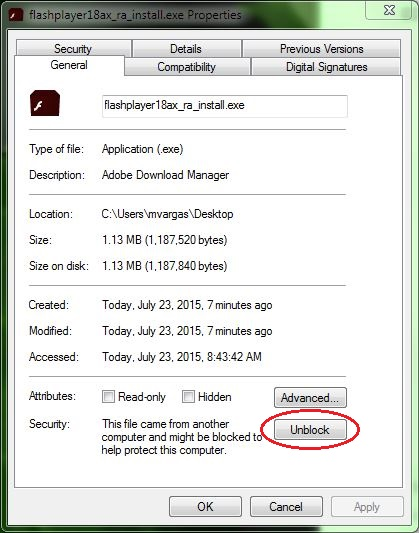
Thank you for clarifying. I assumed you were attempting to install an older version based on the comment "Tried to uninstall fp, and reinstall a older version." Please try the following:
- Right-click on the installer file and select Properties
- In the General tab click the Unblock button
- Click Apply
- Click OK to close the window
- Double-click on the installer file to launch the installer
--
Maria

Get ready! An upgraded Adobe Community experience is coming in January.
Learn more
 AdChoices