


- Home
- Flash Player (read-only)
- Discussions
- How can I help Flash save progress of a game as no...
- How can I help Flash save progress of a game as no...

Copy link to clipboard
Copied
Ubuntu 10.10
Adobe Flash Player - 'You have version 10,1,51,66 installed'
I only discovered Isoball 3 a few days ago but I have had a lot of problems making it, Flash, or whatever does the saving save my progress.
I have tried on www.gimme5games.com, and also Facebook but I do not think any of the Facebook Isoball 3 apps have officially anything to do with the developers, so more recently I have been playing on www.candyflame.com/isoball3/ which does.
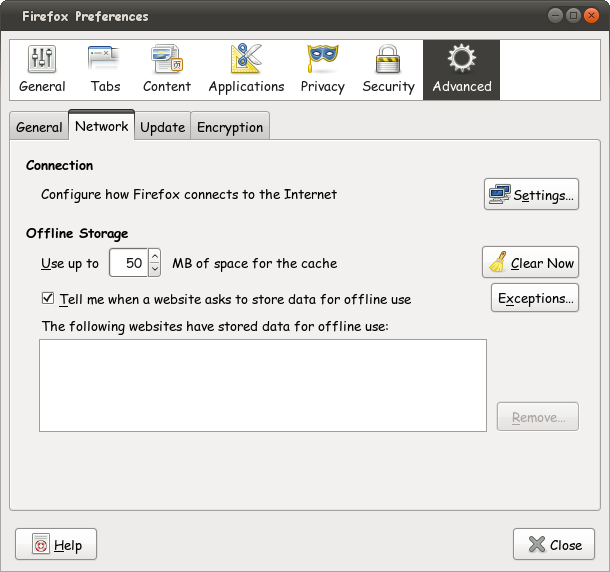
Initially I assumed the problem was my web browser, Firefox 3.6.16 Mozilla/5.0 (X11; U; Linux i686; en-US) as I may have edited some cache settings to improve performance or security, but it seems I have the same problems using Google Chrome.
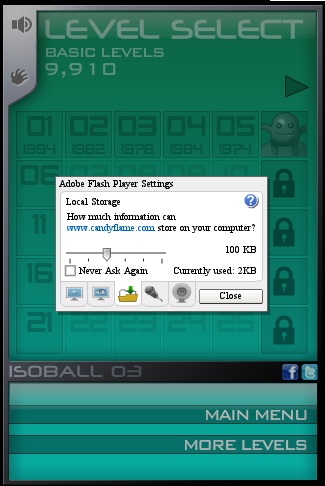
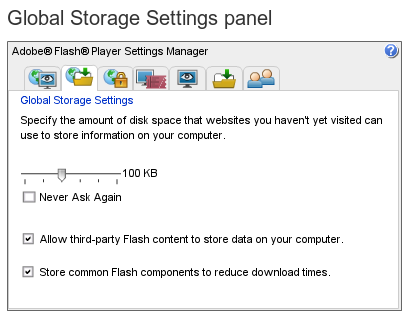
The screenshots included of Firefox's about:config, network offline storage settings, and Flash settings were all taken after completing level 6, and right clicking > settings > storage shows 2kb used of a possible 100kb.
The problem is that even if I play up to level 36 or 46, it will always put me back to level 6 which is where, for some reason, the software believes I have progressed to. Interestingly it is saving my progress somewhat as it maintains my level scores and otherwise it would put me back to level 1.
Please note it is possible, on starting a new game, to skip basic levels, starting at either 06, 11, 16, 21, but not further than that. This is inconsequential to my issue.
I have contacted the developers and they have told me that they are aware of this problem occurring for some linux users, but are at a loss as to why.
If you can help please let me know.




 1 Correct answer

Hi, I don't play any games, etc but I thot you could put certain websites in a "trusted zone" in the Settings Panels. Then increase the Storage. Is the game asking for more storage?
Do you already have the sites entered here?
http://www.macromedia.com/support/documentation/en/flashplayer/help/settings_manager04.html
That would be all I could suggest. Perhaps other users will respond and have a better answer.
Thanks,
eidnolb

 4
Replies
4
4
Replies
4

Copy link to clipboard
Copied
bump.

Copy link to clipboard
Copied
Hi, I don't play any games, etc but I thot you could put certain websites in a "trusted zone" in the Settings Panels. Then increase the Storage. Is the game asking for more storage?
Do you already have the sites entered here?
http://www.macromedia.com/support/documentation/en/flashplayer/help/settings_manager04.html
That would be all I could suggest. Perhaps other users will respond and have a better answer.
Thanks,
eidnolb
Copy link to clipboard
Copied
Thank you very much 
It was adding it to http://www.macromedia.com/support/documentation/en/flashplayer/help/se ttings_manager04.html that did it.
I had thought once it was granted access in website storage settings panels as I had, it would do it. I was confused because it was assigned a limit of 100kb, but only using 2kb.
Anyway, again, many thanks, posted on two other forums looking for a resolution too.
Copy link to clipboard
Copied
Hi, Well, I'm glad that helped sort it out. Those Settings are not the easiest and can be confusing. I know the first time I set them all, I'd be confused and have to read a couple of them 2 or 3 times, LOL
Thanks for marking your thread as answered, appreciate that.
I would have thought the game sites would have had an answer for you. Oh well, now you have one for them
Regards,
eidnolb

Get ready! An upgraded Adobe Community experience is coming in January.
Learn more
 AdChoices