
Inspiring
May 5, 2016
Answered

Windows 10 - Flash content asking Internet Explorer to Install flash player

  • May 5, 2016
  • 2 replies
  • 10984 views

* Windows 10 Pro Version: 10.0.10586

* www.bbc.co.uk/iplayer, Microsoft edge  25.10586.0.0 -The flash content just shows a blank area, so I tried Internet Explorer 11.212.10586.0 same thing happened.

* When I go to test flash, I get the following message :

Sorry flash player is either not installed or not enabled

As you can see, flash player is installed, it comes pre installed with Windows 10,

(which I think is a bad move on Microsoft part, as flash player is slowly being hushed out with HTML5 as the new king of the interactive content world, it's also a bad move on adobes part, as now they have to try and push updates through windows updates, it also scr@ws us users, as now we cant choose to install it, or even fix it! when it gos wrong like today!)

I believe the problem started after the KB3154132 Update, I have tried removing the update then reinstalling it, I have got in contact with the Microsoft help desk, who are as (something I wont say) I am an advanced user, I or they, cant fix this problem!

so I'm here,

The files needed for flash content seem to be in the correct locations, I have tried removing Internet Explorer then reinstalling it, Grr and ive tried what the adobe help page says... to turn ActiveX off and on, also to make sure the plugin is turned on, which it is
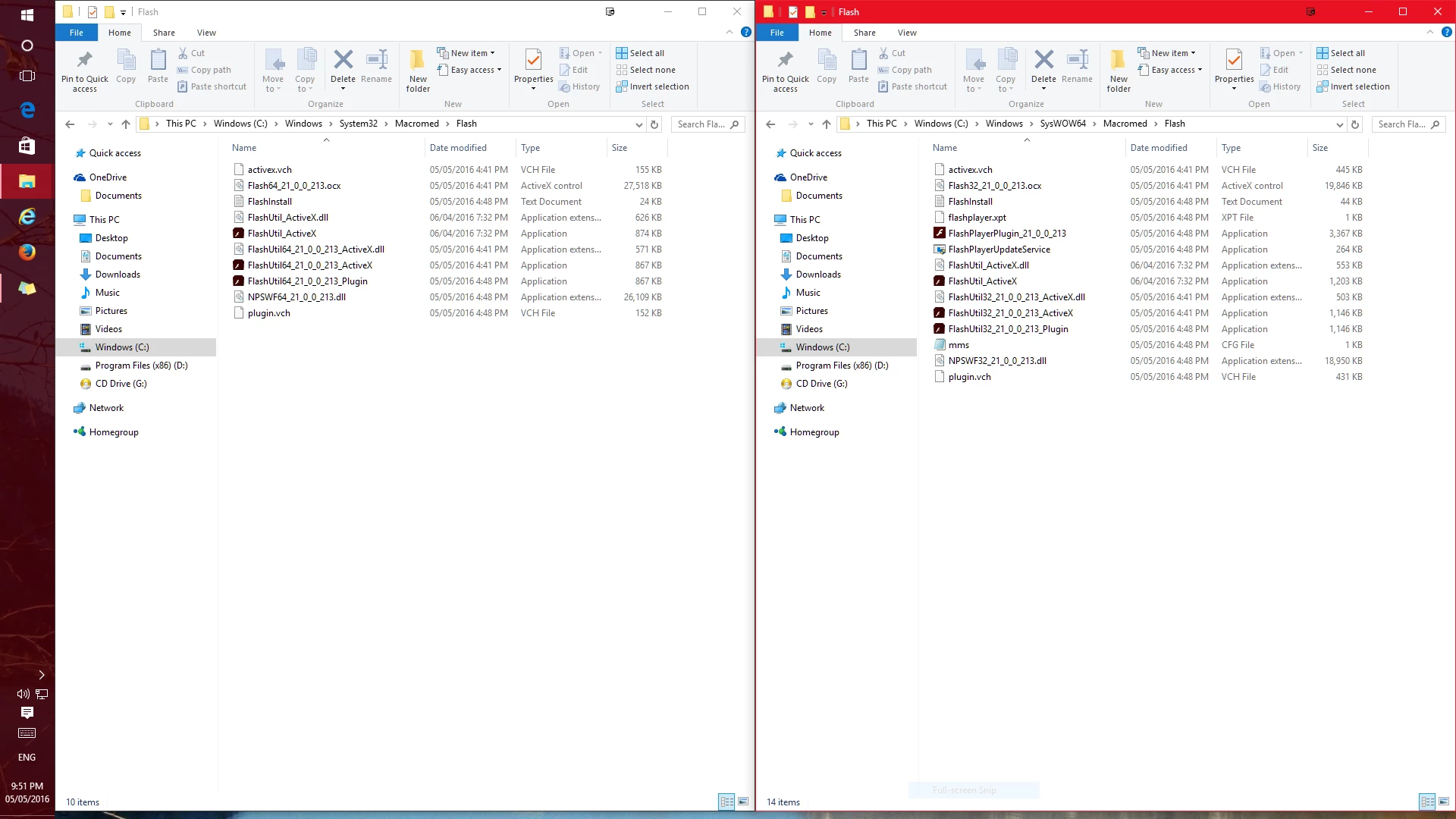
the only other place that I can think of, which have not tried, is the appdata (user program data) which could hold the fix to the problem

other photos

Internet Explorer You aren

This topic has been closed for replies.
Correct answer SignedAdam

Just to add, This could be a registry problem, I have found some entries that are not the same, however I think the entrys have changed, because i installed flash player manually, under windows 8 compatibility mode under windows 10, I did this, because flash player stopped working, as I explained above,

Bodge Solution

download :

https://fpdownload.macromedia.com/pub/labs/flashruntimes/flashplayer/flashplayer_22_ax_debug.exe

or go to :

Download Adobe Flash Player 22 Beta for Desktops - Adobe Labs

choose

Download Flash Player for Internet Explorer - ActiveX

install the setup, under windows 8 compatibility mode under windows 10

then change the following

C:\Windows\SysWOW64\Macromed\Flash\Flash32_21_0_0_213.ocx

C:\Windows\system32\Macromed\Flash\Flash32_21_0_0_213.ocx

need to be changed to :

C:\Windows\system32\Macromed\Flash\Flash.ocx

C:\Windows\SysWOW64\Macromed\Flash\Flash.ocx

you will also need to make the changes in the registry, by opening run, and enterying regedit then press enter,

HKEY_LOCAL_MACHINE/SOFTWARE/Macromedia/FlahPlayerActiveX

click on the PlayerPath and change it to :

C:\Windows\system32\Macromed\Flash\Flash.ocx

HKEY_LOCAL_MACHINE/SOFTWARE/WOW6432Node//Macromedia/FlahPlayerActiveX

click on the PlayerPath and change it to :

C:\Windows\SysWOW64\Macromed\Flash\Flash.ocx

warnning, this is a l@zy fix, a bypass, to force it to work again! follow at your own r!sk,

2 replies

mtlrom
Participant
August 22, 2016

Then it means there is no way to debug actionscript now?.. I'm trying to get simple working solution with ANY adobe tools that could do actionscript debugging and NOTHING can do anything at all. Total failure: flash - how do you debug actionscript that runs in browser - Stack Overflow

_maria_
Community Manager
Community Manager
August 23, 2016

Microsoft embeds Flash Player in IE/Edge on Windows 10 and they decide which control they support.  Thus far they only support the release version, not the content debugger version.

darren_evans
Participant
March 21, 2017

What needs to be done to get the ball rolling on this? To actually get Microsoft to support the debugger version properly in IE.

This is holding us back from a company-wide Windows 10 release.

We've been waiting 18 months and nothing. I and a few other developers have implemented this hack to be able to work in Windows 10.

It has got to the point where we will be writing an automated deployment of this hack/bodge to developers machines and roll out Window 10. A sad state really that our only option is to go with a complete and utter hack!

_maria_
Community Manager
Community Manager
May 5, 2016

Hi,

Thank you for the detailed report.  Is this on a standard user or administrator user account?

We've received reports that administrator user accounts work, but not standard users, however, we've not been able to reproduce and it's been difficult getting additional information from users.  We have also escalated to Microsoft and they've not been able to reproduce it either.  Thank you for mentioning KB3154132.  This is information we've not had before.

--

Maria

Inspiring
May 5, 2016

This is on an account that is in the administrator group, so yes it is an administrator account, the kind of setup you would find on any new windows 10 computer, the 1st account being made, it was not an upgrade but a fresh install of windows 10 pro (clean)

* Please brake off from Microsoft, this is not helping having flash player integrated, this is effecting both you're reputation and Microsoft's, it's also stopping me and other users from repairing the problem manually, you need to get on top of this

* Please make some kind of Windows 10 flash player install/repair setup

SignedAdamAuthorCorrect answer
Inspiring
May 5, 2016

Just to add, This could be a registry problem, I have found some entries that are not the same, however I think the entrys have changed, because i installed flash player manually, under windows 8 compatibility mode under windows 10, I did this, because flash player stopped working, as I explained above,

Bodge Solution

download :

https://fpdownload.macromedia.com/pub/labs/flashruntimes/flashplayer/flashplayer_22_ax_debug.exe

or go to :

Download Adobe Flash Player 22 Beta for Desktops - Adobe Labs

choose

Download Flash Player for Internet Explorer - ActiveX

install the setup, under windows 8 compatibility mode under windows 10

then change the following

C:\Windows\SysWOW64\Macromed\Flash\Flash32_21_0_0_213.ocx

C:\Windows\system32\Macromed\Flash\Flash32_21_0_0_213.ocx

need to be changed to :

C:\Windows\system32\Macromed\Flash\Flash.ocx

C:\Windows\SysWOW64\Macromed\Flash\Flash.ocx

you will also need to make the changes in the registry, by opening run, and enterying regedit then press enter,

HKEY_LOCAL_MACHINE/SOFTWARE/Macromedia/FlahPlayerActiveX

click on the PlayerPath and change it to :

C:\Windows\system32\Macromed\Flash\Flash.ocx

HKEY_LOCAL_MACHINE/SOFTWARE/WOW6432Node//Macromedia/FlahPlayerActiveX

click on the PlayerPath and change it to :

C:\Windows\SysWOW64\Macromed\Flash\Flash.ocx

warnning, this is a l@zy fix, a bypass, to force it to work again! follow at your own r!sk,