


- Home
- Flash Player (read-only)
- Discussions
- VB6 Fusion Chart Not Loading In Flash Player 18
- VB6 Fusion Chart Not Loading In Flash Player 18
VB6 Fusion Chart Not Loading In Flash Player 18

Copy link to clipboard
Copied
Dear Sir,
I am Using Fusion Chart For VB6 Since Last 6 Year In My Project It's Working fine but recently in Flash Player 18 which is automate updating in Windows 8.1
is not loading Fusion Chart For VB6 And Showing Black Spot Please Provide Solution Else my business will collapse in mumbai my software is used by 50+ client
either give me solution to downgrade Flash player to Version 16.00 and stop upgrade in windows 8.1 of give update on it


 27
Replies
27
27
Replies
27


Copy link to clipboard
Copied
Could you give this a try in tomorrows (7/14) release and let us know if it resolves the problem for you?
Thanks,
Chris
Copy link to clipboard
Copied
Tried Version of today (14/7) Flash.ocx 18.0.209
No other reaction. Same black flash-container if we load Flash-file second time
Copy link to clipboard
Copied
Dear Joerg,
are you checked is it showing version 18.0.0.203 or 18.0.0.209 because in my pc after installing 18.0.0.209 its showing me 18.0.0.203
flash.ocx is not replacing might its only replace with windows 8.1 flash update please check and let me inform
so it clear that this problem is not solved in there 18.0.0.209 version
Copy link to clipboard
Copied
today I Tried to Install today Version Flash.ocx 18.0.209 on my windows 8.1 system
but after installing also my Windows System32 not updating Flash.ocx 18.0.209
It's showing same old Flash.ocx 18.0.203
so tell me what to do
Copy link to clipboard
Copied
dear cris,
from today morning my two person are just giving reply to customer (almost 250+ call) that right know its not supporting in flash player current version but wait for there new update might they give it in that.
they are using fusion chart graph for there day to day activity its very urgent please look into it it we don't get solution on it's
its very big loss for us and we have to change whole charting work and you know that in vb6 there is no any other best control then fusion chart available
please try to understand our situation.
Best Regard's
Ramesh Jain

Copy link to clipboard
Copied
Hi,
Could you please share proper steps to reproduce the issue, so that we can look into the problem.
If you could share any link of your application with all the steps you followed, that would be helpful in reproducing the issue.
Thanks
Copy link to clipboard
Copied
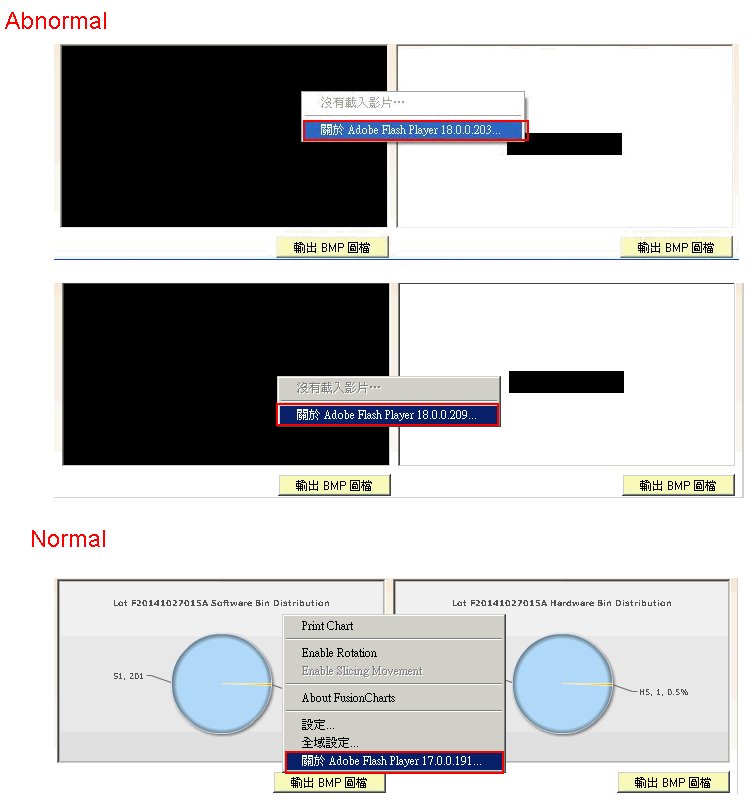
We got the same problem after version 18.
I show to some pictures
Copy link to clipboard
Copied
Our Probleme is the same but we don´t display an chart. We load an swf-file.
www.rothballer.de/download/FlashTest.zip
We have an application which has two buttons to load different swf files.
If we load once there is no problem. If we switch the file to load we only get an black box.
This FlashTest.exe works great on system with Flash<18 but not with Flash 18 any more
Thanks for your help
Joerg
Copy link to clipboard
Copied
dear joerg
when i am downloading your zip file it's my browser warn me that this is virus infected file and it's blocking this file
best Regard's
Ramesh jain
Copy link to clipboard
Copied
Dear Ramesh,
no...... no Virus
If you not able to download
www.rothballer.de/download/FlashTest.zip
use
www.rothballer.de/download/FlashTest.zap and rename .zap => .zip
OK, it looks like an virus (Zip with including exe) but NO Virus.
Yesterday we removed Windows Update KB3065823 and it works on Win8.1 again. Problem: Yesterday evening new Windows Update and not working again.
We checked: We have on all NOT working computers Flash 18.0.209
Kratika Agarwal Do you need more Info about the Problem? Or is enought to understand the Problem.
Thanks Joerg
PS. Windows Update to Remove on Win 8.1 is KB 3079777. After removing it works in our case
Copy link to clipboard
Copied
Please help to solve the 18 version issue ASAP, for us it's a big trouble.
Copy link to clipboard
Copied
Dear Kratika,
As mikec shown in above slide same happen with me when i am loading Fusion chart .swf file in flash player
if you need i can share you fusion chart sample project but that in vb6.
I personally request you that please look into it seriously as soon as possible. as of now we are getting lot of firing
from our customer and they are not ready to listening our problem they fill this mistake is from our side.
if this mistake immediately not solvable then please give us way to replace flash player to older version in windows 8.1
Best Regard's
Ramesh Jain
Copy link to clipboard
Copied
Dear Kratika,
this is not solution because when ever we get auto update from Microsoft on windows 8.1 again problem is there because in windows 8.1
your flash player is automatic updating with there routine update so every time we can't in position to tell customer that remove this update or
that update please look seriously and give solution as soon possible
Best Regard's
Ramesh Jain
Copy link to clipboard
Copied
Dear kratika,
after removing windows 8.1 update KB3079777, KB3065823 it works fine
but strange that is application it shows flash player version 11.8.800.175 but when same I am checking on adobe site its showing
Version 18.0.209 and in system32 flash.ocx is also of new version (18.0.209) what's problem I can't understand also
in auto update again flash player automatic installing in windows 8.1 what to do
Best Regard's
Ramesh Jain
Copy link to clipboard
Copied
Dear Chris,
almost one week gone no any proper solution get on this matter we are in serious trouble please help us
Brest Regard's
Ramesh Jain
Copy link to clipboard
Copied
Dear Chris,
please help us
Brest Regard's
Mike Chiu
Copy link to clipboard
Copied
This should be fixed in our next beta release that we hope to make available this week. I'll post in the announcement forum as soon as it's available.
Copy link to clipboard
Copied
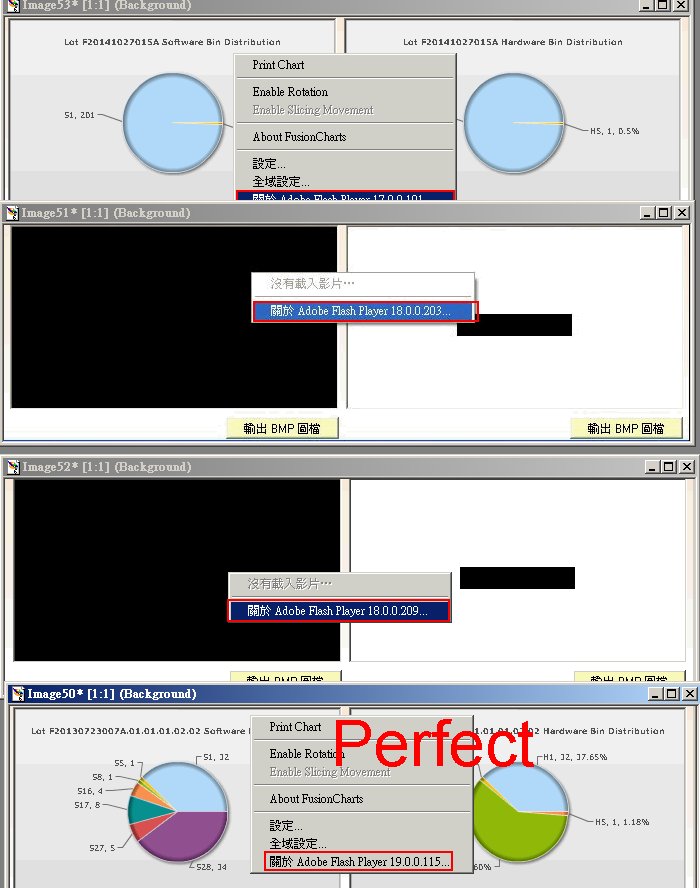
Hi Chris:
It works.
Thanks.
Copy link to clipboard
Copied
thank you chris,
god bless you you saved our lot of time
Best Regard's
Ramesh Jain
Copy link to clipboard
Copied
Hi,
we have the same problem. We have more than 2000 Users of our software an we have used the flash.ocx in our VB6 Application.
With FlashPlayer 18 I can load the flash-file only one time. If I load in the Flash-Container same ore new flash file then I only get an black box.
If I unload and load new my form with the flash I can load flashfile one time. If I change again the flash-file => black box.
I tried allready:
flash.movie = " "
flash.bgcolor = -1
No result. Once solution is reload form and display only one time.
Copy link to clipboard
Copied
i have this problem still now please any help
what can i do for fixed it
i'm uninstall flash player 18.0.0.209 and reinstall it
and install flash player 19.0.0.115 when right click on chart give me in last about adobe flash player 18.0.0.209 also
and i want to fixed it please any help
Copy link to clipboard
Copied
Our Problem is also solved. Problem was: It was not possible to load in VB6 in an Falsh-OCX container two time an SWF-File. If we did this we get an black container.
Problem is solved in beta 19. Durring installation it was necessary to remove Version 18 and install Version 19 which we load from labs.adobe.com
Thanks all for your help
Copy link to clipboard
Copied
thanks joerg3004
iwhen i try to setup flash player 19 give me this massage 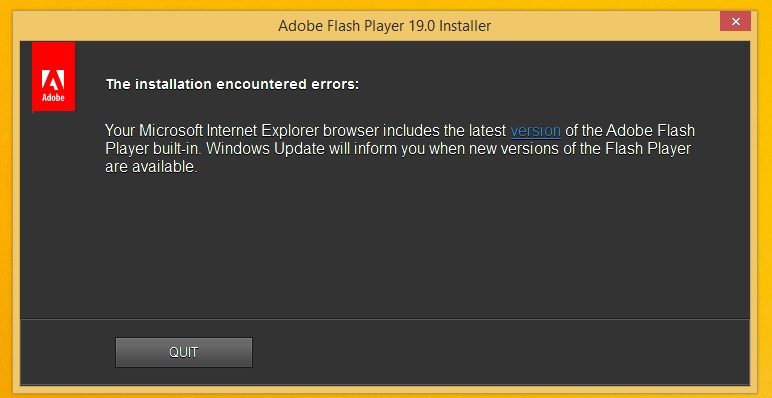
Copy link to clipboard
Copied
It looks like you're running Windows 8.x (or maybe Windows 10?) In which case you unfortunately can't install the beta for Internet Explorer.
We expect to push this fix live on 8/11 (for all platforms). This will be an silent auto update release, so customers will receive the update within 24 hours after it goes live. Windows 8.x and 10 users will receive the update through the normal Microsoft patch Tuesday update mechanism.

-
- 1
- 2
Get ready! An upgraded Adobe Community experience is coming in January.
Learn more
 AdChoices