


- Home
- Flex (read-only)
- Discussions
- Checkbox in List (Source code included)
- Checkbox in List (Source code included)
Checkbox in List (Source code included)

Copy link to clipboard
Copied
Hi,
Code below displays a checkbox control in Spark lists:
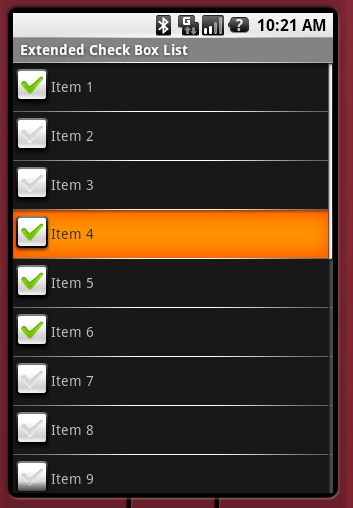
Instructions for use:
- Create a Spark list and add the ChecBoxIconItemRenderer as itemRenderer.
- Use the checkBoxField or checkBoxFunction properties to select/unselect checkboxes from list data.
- Capture the checkBoxIconItemRendererChanged event to be notified when users click on a checkbox.
Example of use:
===============================================
<s:List width="100%" height="100%" id="my_list">
<s:itemRenderer>
<fx:Component>
<controls:CheckBoxIconItemRenderer
labelField="<...>"
checkBoxField="selected"
checkBoxIconItemRendererChanged="onCheckBoxIconItemRendererChangedHandler(event)">
<fx:Script>
<![CDATA[
protected function onCheckBoxIconItemRendererChangedHandler(event:Event):void
{
data.selected=CheckBoxIconItemRenderer(event.target).checkBox.selected;
}
]]>
</fx:Script>
</controls:CheckBoxIconItemRenderer>
</fx:Component>
</s:itemRenderer>
</s:List>
===============================================
Source code:
CheckBoxIconItemRenderer.mxml
===============================================
<?xml version="1.0" encoding="utf-8"?>
<s:IconItemRenderer xmlns:fx="http://ns.adobe.com/mxml/2009"
xmlns:s="library://ns.adobe.com/flex/spark">
<fx:Metadata>
[Event(name="checkBoxIconItemRendererChanged", type="flash.events.Event")]
</fx:Metadata>
<fx:Script>
<![CDATA[
import spark.components.CheckBox;
public var checkBox:CheckBox;
private var checkBoxChanged:Boolean;
private var _checkBoxField:String;
private var _checkBoxFunction:Function;
public function get checkBoxFunction():Function{
return _checkBoxFunction;
}
public function get checkBoxField():String{
return _checkBoxField;
}
public function set checkBoxFunction(value:Function):void{
if(_checkBoxFunction==value){
return;
}
_checkBoxFunction=value;
checkBoxChanged=true;
invalidateProperties();
}
public function set checkBoxField(value:String):void{
if(_checkBoxField==value){
return;
}
checkBoxChanged=true;
_checkBoxField=value;
invalidateProperties();
}
override public function set data(value:Object):void
{
checkBoxChanged=true;
super.data = value; //->invalidateProperties();
}
override protected function createChildren():void
{
super.createChildren();
checkBox = new CheckBox();
checkBox.width=32;
checkBox.height=32;
checkBox.scaleY=.5;
checkBox.scaleX=.5;
addChild(checkBox);
checkBox.addEventListener(MouseEvent.CLICK, function(event:MouseEvent):void{
dispatchEvent(new Event("checkBoxIconItemRendererChanged"));
});
}
override protected function measure():void
{
super.measure();
measuredWidth+=getStyle("horizontalGap")+checkBox.width*checkBox.scaleY;
measuredHeight=Math.max(measuredHeight, checkBox.height*checkBox.scaleY);
}
override protected function layoutContents(unscaledWidth:Number, unscaledHeight:Number):void
{
var paddingLeft:Number = getStyle("paddingLeft");
var paddingRight:Number = getStyle("paddingRight");
var paddingTop:Number = getStyle("paddingTop");
var paddingBottom:Number = getStyle("paddingBottom");
var horizontalGap:Number = getStyle("horizontalGap");
var verticalAlign:String = getStyle("verticalAlign");
setStyle("paddingLeft",paddingLeft+checkBox.width*checkBox.scaleX+horizontalGap);
super.layoutContents(unscaledWidth, unscaledHeight);
setStyle("paddingLeft",paddingLeft);
var vAlign:Number;
if (verticalAlign == "top")
vAlign = 0;
else if (verticalAlign == "bottom")
vAlign = 1;
else // if (verticalAlign == "middle")
vAlign = 0.5;
var viewHeight:Number = unscaledHeight - paddingTop - paddingBottom;
var checkBoxDisplayY:Number = Math.round(vAlign * (viewHeight - checkBox.height*checkBox.scaleY)) + paddingTop;
checkBox.x=paddingLeft;
checkBox.y=checkBoxDisplayY;
}
override protected function commitProperties():void
{
super.commitProperties();
if(checkBoxChanged){
checkBoxChanged=false;
if (checkBoxFunction != null)
{
checkBox.selected=checkBoxFunction(data);
}
else if (checkBoxField)
{
try
{
if (checkBoxField in data && data[checkBoxField] != null)
checkBox.selected=data[checkBoxField];
}
catch(e:Error)
{
trace(e.message);
}
}
}
}
]]>
</fx:Script>
</s:IconItemRenderer>
===============================================
Hope it helps.
Pablo.


 10
Replies
10
10
Replies
10


Copy link to clipboard
Copied
Hi,
I've added a new checBoxAlignment property to place the checkbox at the left or right (default is left).

New source code 0.1 version: CheckBoxIconItemRenderer.mxlm
=============================================
<?xml version="1.0" encoding="utf-8"?>
<s:IconItemRenderer xmlns:fx="http://ns.adobe.com/mxml/2009"
xmlns:s="library://ns.adobe.com/flex/spark">
<fx:Metadata>
[Event(name="checkBoxIconItemRendererChanged", type="flash.events.Event")]
</fx:Metadata>
<fx:Script>
<![CDATA[
import spark.components.CheckBox;
public var checkBox:CheckBox;
private var checkBoxChanged:Boolean;
private var _checkBoxField:String;
private var _checkBoxFunction:Function;
private var _checkBoxAlignment:String;
[Inspectable(category="General", enumeration="left,right", defaultValue="left")]
public function set checkBoxAlignment(value:String):void{
if(_checkBoxAlignment==value){
return;
}
_checkBoxAlignment=value;
checkBoxChanged;
invalidateProperties();
}
public function get checkBoxAlignment():String{
return _checkBoxAlignment;
}
public function get checkBoxFunction():Function{
return _checkBoxFunction;
}
public function get checkBoxField():String{
return _checkBoxField;
}
public function set checkBoxFunction(value:Function):void{
if(_checkBoxFunction==value){
return;
}
_checkBoxFunction=value;
checkBoxChanged=true;
invalidateProperties();
}
public function set checkBoxField(value:String):void{
if(_checkBoxField==value){
return;
}
checkBoxChanged=true;
_checkBoxField=value;
invalidateProperties();
}
override public function set data(value:Object):void
{
checkBoxChanged=true;
super.data = value; //->invalidateProperties();
}
override protected function createChildren():void
{
super.createChildren();
checkBox = new CheckBox();
checkBox.width=32;
checkBox.height=32;
checkBox.scaleY=.5;
checkBox.scaleX=.5;
addChild(checkBox);
checkBox.addEventListener(MouseEvent.CLICK, function(event:MouseEvent):void{
dispatchEvent(new Event("checkBoxIconItemRendererChanged"));
});
}
override protected function measure():void
{
super.measure();
measuredWidth+=getStyle("horizontalGap")+checkBox.width*checkBox.scaleY;
measuredHeight=Math.max(measuredHeight, checkBox.height*checkBox.scaleY);
}
override protected function layoutContents(unscaledWidth:Number, unscaledHeight:Number):void
{
var paddingLeft:Number = getStyle("paddingLeft");
var paddingRight:Number = getStyle("paddingRight");
var paddingTop:Number = getStyle("paddingTop");
var paddingBottom:Number = getStyle("paddingBottom");
var horizontalGap:Number = getStyle("horizontalGap");
var verticalAlign:String = getStyle("verticalAlign");
switch(_checkBoxAlignment){
case "right":
var myWidth:Number=paddingRight+checkBox.width*checkBox.scaleX
super.layoutContents(unscaledWidth-myWidth, unscaledHeight);
checkBox.x=unscaledWidth-myWidth;
break;
default :
setStyle("paddingLeft",paddingLeft+checkBox.width*checkBox.scaleX+horizontalGap);
super.layoutContents(unscaledWidth, unscaledHeight);
setStyle("paddingLeft",paddingLeft);
checkBox.x=paddingLeft;
break;
}
var vAlign:Number;
if (verticalAlign == "top")
vAlign = 0;
else if (verticalAlign == "bottom")
vAlign = 1;
else // if (verticalAlign == "middle")
vAlign = 0.5;
var viewHeight:Number = unscaledHeight - paddingTop - paddingBottom;
var checkBoxDisplayY:Number = Math.round(vAlign * (viewHeight - checkBox.height*checkBox.scaleY)) + paddingTop;
checkBox.y=checkBoxDisplayY;
}
override protected function commitProperties():void
{
super.commitProperties();
if(checkBoxChanged){
checkBoxChanged=false;
if (checkBoxFunction != null)
{
checkBox.selected=checkBoxFunction(data);
}
else if (checkBoxField)
{
try
{
if (checkBoxField in data && data[checkBoxField] != null)
checkBox.selected=data[checkBoxField];
}
catch(e:Error)
{
trace(e.message);
}
}
}
invalidateSize();
invalidateDisplayList();
}
]]>
</fx:Script>
<fx:Declarations>
<!-- Place non-visual elements (e.g., services, value objects) here -->
</fx:Declarations>
</s:IconItemRenderer>
=============================================

Copy link to clipboard
Copied
very useful indeed , thx for sharing with us!!
Copy link to clipboard
Copied
A small but useful improvement:
I've added a call to the stopInmediatePorpagation() method when the CheckBox control receives a MouseEvent.CLIK event. Thus, the IconItemRenderer parent control doesn't receives click events when the checkbox control is selected/unselected (you have to listen for checkBoxIconItemRendererChanged events instead).
CheckBoxIconItemRenderer.mxml v.0.1.1:
===================================
<?xml version="1.0" encoding="utf-8"?>
<s:IconItemRenderer xmlns:fx="http://ns.adobe.com/mxml/2009"
xmlns:s="library://ns.adobe.com/flex/spark">
<fx:Metadata>
[Event(name="checkBoxIconItemRendererChanged", type="flash.events.Event")]
</fx:Metadata>
<fx:Script>
<![CDATA[
import spark.components.CheckBox;
public var checkBox:CheckBox;
private var checkBoxChanged:Boolean;
private var _checkBoxField:String;
private var _checkBoxFunction:Function;
private var _checkBoxAlignment:String;
[Inspectable(category="General", enumeration="left,right", defaultValue="left")]
public function set checkBoxAlignment(value:String):void{
if(_checkBoxAlignment==value){
return;
}
_checkBoxAlignment=value;
checkBoxChanged;
invalidateProperties();
}
public function get checkBoxAlignment():String{
return _checkBoxAlignment;
}
public function get checkBoxFunction():Function{
return _checkBoxFunction;
}
public function get checkBoxField():String{
return _checkBoxField;
}
public function set checkBoxFunction(value:Function):void{
if(_checkBoxFunction==value){
return;
}
_checkBoxFunction=value;
checkBoxChanged=true;
invalidateProperties();
}
public function set checkBoxField(value:String):void{
if(_checkBoxField==value){
return;
}
checkBoxChanged=true;
_checkBoxField=value;
invalidateProperties();
}
override public function set data(value:Object):void
{
checkBoxChanged=true;
super.data = value; //->invalidateProperties();
}
override protected function createChildren():void
{
super.createChildren();
checkBox = new CheckBox();
checkBox.width=32;
checkBox.height=32;
checkBox.scaleY=.5;
checkBox.scaleX=.5;
addChild(checkBox);
checkBox.addEventListener(MouseEvent.CLICK, function(event:MouseEvent):void{
event.stopImmediatePropagation();
dispatchEvent(new Event("checkBoxIconItemRendererChanged"));
});
}
override protected function measure():void
{
super.measure();
measuredWidth+=getStyle("horizontalGap")+checkBox.width*checkBox.scaleY;
measuredHeight=Math.max(measuredHeight, checkBox.height*checkBox.scaleY);
}
override protected function layoutContents(unscaledWidth:Number, unscaledHeight:Number):void
{
var paddingLeft:Number = getStyle("paddingLeft");
var paddingRight:Number = getStyle("paddingRight");
var paddingTop:Number = getStyle("paddingTop");
var paddingBottom:Number = getStyle("paddingBottom");
var horizontalGap:Number = getStyle("horizontalGap");
var verticalAlign:String = getStyle("verticalAlign");
switch(_checkBoxAlignment){
case "right":
var myWidth:Number=paddingRight+checkBox.width*checkBox.scaleX
super.layoutContents(unscaledWidth-myWidth, unscaledHeight);
checkBox.x=unscaledWidth-myWidth;
break;
default :
setStyle("paddingLeft",paddingLeft+checkBox.width*checkBox.scaleX+horizontalGap);
super.layoutContents(unscaledWidth, unscaledHeight);
setStyle("paddingLeft",paddingLeft);
checkBox.x=paddingLeft;
break;
}
var vAlign:Number;
if (verticalAlign == "top")
vAlign = 0;
else if (verticalAlign == "bottom")
vAlign = 1;
else // if (verticalAlign == "middle")
vAlign = 0.5;
var viewHeight:Number = unscaledHeight - paddingTop - paddingBottom;
var checkBoxDisplayY:Number = Math.round(vAlign * (viewHeight - checkBox.height*checkBox.scaleY)) + paddingTop;
checkBox.y=checkBoxDisplayY;
}
override protected function commitProperties():void
{
super.commitProperties();
if(checkBoxChanged){
checkBoxChanged=false;
if (checkBoxFunction != null)
{
checkBox.selected=checkBoxFunction(data);
}
else if (checkBoxField)
{
try
{
if (checkBoxField in data && data[checkBoxField] != null)
checkBox.selected=data[checkBoxField];
}
catch(e:Error)
{
trace(e.message);
}
}
}
invalidateSize();
invalidateDisplayList();
}
]]>
</fx:Script>
<fx:Declarations>
<!-- Place non-visual elements (e.g., services, value objects) here -->
</fx:Declarations>
</s:IconItemRenderer>
===================================
I think above is the most frequent use case.
Copy link to clipboard
Copied
A new improvement: checkbox can be hidden depending on data value.
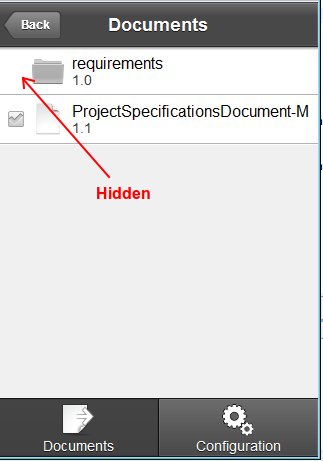
Two new properties added:
- checkBoxIncludeInLayoutFunction
- checkBoxVisibleFunction
Required functions receive data object and must return a Boolean value. Example:
function isFile(item:Object):Boolean{
return item.type=="file";
}
You also have to pass the function as parameter value:
checkBoxVisibleFunction="isFile"
Usually, you might want to include it in layout when checkBox is left aligned and not when it's right aligned.
Source code for version 0.2:
==================================
<?xml version="1.0" encoding="utf-8"?>
<s:IconItemRenderer xmlns:fx="http://ns.adobe.com/mxml/2009"
xmlns:s="library://ns.adobe.com/flex/spark">
<fx:Metadata>
[Event(name="checkBoxIconItemRendererChanged", type="flash.events.Event")]
</fx:Metadata>
<fx:Script>
<![CDATA[
import spark.components.CheckBox;
public var checkBox:CheckBox;
private var checkBoxChanged:Boolean;
private var _checkBoxField:String;
private var _checkBoxFunction:Function;
private var _checkBoxIncludeInLayoutFunction:Function;
private var _checkBoxVisibleFunction:Function;
private var _checkBoxAlignment:String;
[Inspectable(category="General", enumeration="left,right", defaultValue="left")]
public function set checkBoxAlignment(value:String):void{
if(_checkBoxAlignment==value){
return;
}
_checkBoxAlignment=value;
checkBoxChanged;
invalidateProperties();
}
public function get checkBoxAlignment():String{
return _checkBoxAlignment;
}
public function get checkBoxFunction():Function{
return _checkBoxFunction;
}
public function get checkBoxField():String{
return _checkBoxField;
}
public function set checkBoxFunction(value:Function):void{
if(_checkBoxFunction==value){
return;
}
_checkBoxFunction=value;
checkBoxChanged=true;
invalidateProperties();
}
public function set checkBoxIncludeInLayoutFunction(value:Function):void{
if(_checkBoxIncludeInLayoutFunction==value){
return;
}
_checkBoxIncludeInLayoutFunction=value;
checkBoxChanged=true;
invalidateProperties();
}
public function get checkBoxIncludeInLayoutFunction():Function{
return _checkBoxIncludeInLayoutFunction;
}
public function set checkBoxVisibleFunction(value:Function):void{
if(_checkBoxVisibleFunction==value){
return;
}
checkBoxChanged=true;
_checkBoxVisibleFunction=value;
invalidateProperties();
}
public function get checkBoxVisibleFunction():Function{
return _checkBoxVisibleFunction;
}
public function set checkBoxField(value:String):void{
if(_checkBoxField==value){
return;
}
checkBoxChanged=true;
_checkBoxField=value;
invalidateProperties();
}
override public function set data(value:Object):void
{
checkBoxChanged=true;
super.data = value; //->invalidateProperties();
}
override protected function createChildren():void
{
super.createChildren();
checkBox = new CheckBox();
checkBox.width=32;
checkBox.height=32;
checkBox.scaleY=.5;
checkBox.scaleX=.5;
addChild(checkBox);
checkBox.addEventListener(MouseEvent.CLICK, function(event:MouseEvent):void{
event.stopImmediatePropagation();
dispatchEvent(new Event("checkBoxIconItemRendererChanged"));
});
}
override protected function measure():void
{
super.measure();
if(checkBox.includeInLayout){
measuredWidth+=getStyle("horizontalGap")+checkBox.width*checkBox.scaleY;
measuredHeight=Math.max(measuredHeight, checkBox.height*checkBox.scaleY);
}
}
override protected function layoutContents(unscaledWidth:Number, unscaledHeight:Number):void
{
if(!checkBox.includeInLayout){
super.layoutContents(unscaledWidth, unscaledHeight);
return;
}
var paddingLeft:Number = getStyle("paddingLeft");
var paddingRight:Number = getStyle("paddingRight");
var paddingTop:Number = getStyle("paddingTop");
var paddingBottom:Number = getStyle("paddingBottom");
var horizontalGap:Number = getStyle("horizontalGap");
var verticalAlign:String = getStyle("verticalAlign");
switch(_checkBoxAlignment){
case "right":
var myWidth:Number=paddingRight+checkBox.width*checkBox.scaleX
super.layoutContents(unscaledWidth-myWidth, unscaledHeight);
checkBox.x=unscaledWidth-myWidth;
break;
default :
setStyle("paddingLeft",paddingLeft+checkBox.width*checkBox.scaleX+horizontalGap);
super.layoutContents(unscaledWidth, unscaledHeight);
setStyle("paddingLeft",paddingLeft);
checkBox.x=paddingLeft;
break;
}
var vAlign:Number;
if (verticalAlign == "top")
vAlign = 0;
else if (verticalAlign == "bottom")
vAlign = 1;
else // if (verticalAlign == "middle")
vAlign = 0.5;
var viewHeight:Number = unscaledHeight - paddingTop - paddingBottom;
var checkBoxDisplayY:Number = Math.round(vAlign * (viewHeight - checkBox.height*checkBox.scaleY)) + paddingTop;
checkBox.y=checkBoxDisplayY;
}
override protected function commitProperties():void
{
super.commitProperties();
if(checkBoxChanged){
checkBoxChanged=false;
if(checkBoxIncludeInLayoutFunction!=null){
checkBox.includeInLayout = checkBoxIncludeInLayoutFunction(data);
}
if(checkBoxVisibleFunction!=null){
checkBox.visible=checkBoxVisibleFunction(data);
}
if(checkBox.includeInLayout){
if (checkBoxFunction != null)
{
checkBox.selected=checkBoxFunction(data);
}
else if (checkBoxField)
{
try
{
if (checkBoxField in data && data[checkBoxField] != null)
checkBox.selected=data[checkBoxField];
}
catch(e:Error)
{
trace(e.message);
}
}
}
}
invalidateSize();
invalidateDisplayList();
}
]]>
</fx:Script>
<fx:Declarations>
<!-- Place non-visual elements (e.g., services, value objects) here -->
</fx:Declarations>
</s:IconItemRenderer>
==================================

Copy link to clipboard
Copied
Thanks for the code. Do you know how to add persistence to each checkbox as i am trying to use in a multi view app. I have tried some code but its not working.
override protected function createChildren():void
{
super.createChildren();
checkBox = new CheckBox();
checkBox.width=45;
checkBox.height=45;
checkBox.scaleY=1.0;
checkBox.scaleX=1.0;
addChild(checkBox);
checkBox.addEventListener(MouseEvent.CLICK, function(event:MouseEvent):void{
var saveManager:PersistenceManager = new PersistenceManager();
saveManager.setProperty("selected", checkBox.selected);
event.stopImmediatePropagation();
dispatchEvent(new Event("checkBoxIconItemRendererChanged"));
});
}
protected function addHandler(event:FlexEvent):void
{
var loadManager:PersistenceManager = new PersistenceManager();
if (loadManager.load())
{
var savedData:Object = loadManager.getProperty("selected");
if(savedData)
checkBox.selected = savedData.valueOf();
}
}
It works on all checkboxes as a whole, but not individually
Copy link to clipboard
Copied
It's much easier than that. The checked/unchecked state works like the rest of Flex controls, it means it's data based. No source code modifications are needed to get it.
The "checkBoxIconItemRendererChanged" have to be captured in order to persist the state.
Look at this part of the code:
=============================================
checkBox.addEventListener(MouseEvent.CLICK, function(event:MouseEvent):void{
event.stopImmediatePropagation();
dispatchEvent(new Event("checkBoxIconItemRendererChanged"));
});
=============================================
When the internal checkbox control state changes, the event is captured and the control fires a new "checkBoxIconItemRendererChanged" event. As the event is dispatched by the CheckBoxIconItemRenderer control, you can get the internal checbox control (public variable) to get the selected value:
Your code
===================
addEventListener("checkBoxIconItemRendererChanged", function(event:Event):void{
var myControl:CheckBoxIconItemRenderer=CheckBoxIconItemRenderer(event.currentTarget);
myControl.selectedItem.<the property name used to check/unckeck>=myControl.checkBox.selected;
});
===================
For example, if you are displaying Person objects:
class Person{
public var firstName:String;
public var lastName:String;
public var sex:String; //"Man" or "Female"
}
then you have to declare a fuction to indicate the checkbox state:
function isMale(item:Object):Boolean{
return (Person(item).sex=="Male"); //Check boxes will be selected for males only.
}
.....
myControl.checkBoxFunction="isMale"
....
addEventListener("checkBoxIconItemRendererChanged", function(event:Event):void{
var myControl:CheckBoxIconItemRenderer=CheckBoxIconItemRenderer(event.currentTarget);
var selectedtPerson=Person(myControl.selectedItem);
//The following will persints the sate:
if(myControl.checkBox.selected){
selectedPerson.sex="Male";
}else{
selectedPerson.sex="Female";
}
});
Hope this helps.
Pablo
Copy link to clipboard
Copied
Thanks for your help but i am new to flex and dont know how to apply this to my situation. I have used the exact setup in your first post but under itemRenderer I have a dataprovider. I want each checkbox to be selectable and correspond to each object. So if a user selects the checkbox next to "1" it will stay selected. Is this possible?
</s:itemRenderer>
<s:dataProvider>
<s:ArrayList>
<fx:Object id="1" label="1"...
<fx:Object id="2" label="2"...
<fx:Object id="3" label="3"...
<fx:Object id="4" label="4"...
<fx:Object id="5" label="5"...
<fx:Object id="6" label="6"...
...
</s:ArrayList>
</s:dataProvider>
</s:List>
Copy link to clipboard
Copied
Please can anyone help, im really stuck.

Copy link to clipboard
Copied
Hello,
Thank you for your example codes. It’s really handy. But there is a problem. When I mark an item in the list and then scroll down the screen, some other items automatically marked although I do not want to.
How can I fix this?
Kind Regards,
Copy link to clipboard
Copied
I added an event listener for the dataChange:
this.addEventListener(FlexEvent.DATA_CHANGE, onDataChange);
The issue has been resolved.

Get ready! An upgraded Adobe Community experience is coming in January.
Learn more
 AdChoices