
Copy link to clipboard
Copied
Hello,
When exporting to XML "File-Save as XML"
FM does not export all the information. Below is the the Structure view:
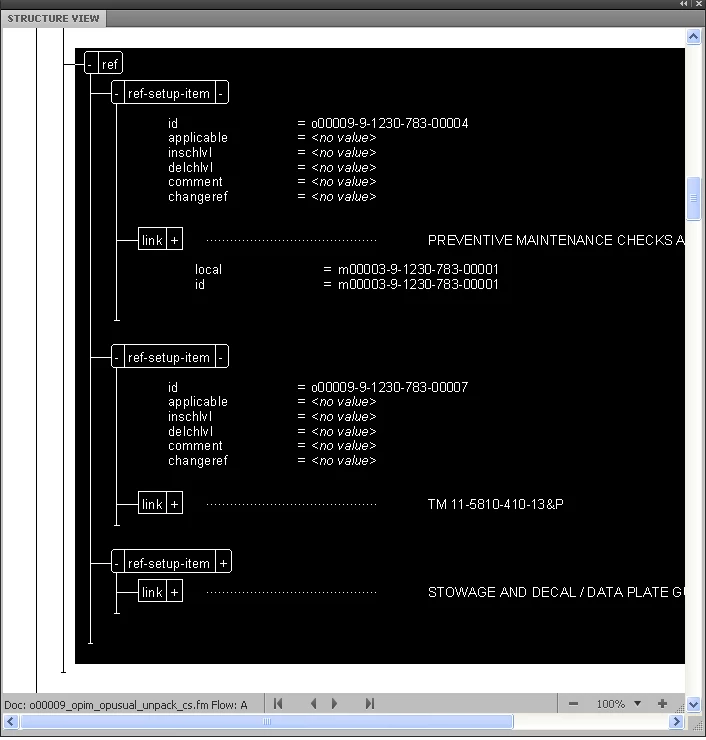
The XML output from this is:
<ref>
<ref-setup-item id = "o00009-9-1230-783-00004">
<link local = "m00003-9-1230-783-00001" id = "m00003-9-1230-783-00001"></ref-setup-item>
<ref-setup-item id = "o00009-9-1230-783-00007">
<link local = "s00001-9-1230-783-00050" id = "s00001-9-1230-783-00050"></ref-setup-item>
<ref-setup-item id = "o00009-9-1230-783-00010">
<link local = "o00031-9-1230-783-00001" id = "o00031-9-1230-783-00001"></ref-setup-item></ref>
As you see the "link" element text is missing and is not closed...any thoughts?
Yes of course - this would be my answer. You do not need to force it to a Frame link structure - it can be treated just like any other XML structure assuming that you have code that knows how to convert the original XML structure into a link in HTML. Make it a containter and get rid of the R/W rules and it should come out just like the original DTD spec.
Jim
Copy link to clipboard
Copied
Hi,
Is link-element a Framemaker cross-reference element?. If so, the element content is left empty during xml export. If not, check the r/w rules associates to structured application used for link element.
Hope this helps,
Martti
(back after a long time..)
Copy link to clipboard
Copied
I changed the type to container, and removed the R/W rules but I am still getting the error "Expected end of tag 'link' "
And it is still not exporting all the information and not closing the tag...very strange.
Copy link to clipboard
Copied
Hi mj,
I seems you have to share more of your setup. If you select Save As XML multiple things come into play:
a) R/W rules
b) optional structure client
c) optional post-processing XSL
d) external DTD
All those things have to fit to successfully create XML output. You might want to make sure b) and c) are not active, by checking the Structured Application definition. BTW, it is not possible to simply change the element type in the EDD, you also have to import them into the document, and possibly create a new external DTD. Containers have a rounded-rectangle appearance in Structure View and I see the <link> elements as normal rectangles.
- Michael
Copy link to clipboard
Copied
Here is the issue.
I am trying to export XML from framemaker. The link tag defined here in the DTD (which I cannot change) is here:
<!ELEMENT link (title?, (pretext?, (symbol | ref.generate | prompt),
posttext?)?, (returnlink | interaction)?)>
<!ATTLIST link
xmlns:xlink CDATA #FIXED "http://www.w3.org/1999/xlink"
application (page | frame | both) "frame"
local IDREF #IMPLIED
localrange IDREF #IMPLIED
xlink:href CDATA #IMPLIED
xlink:type (simple | complex) #FIXED "simple"
linkobject (%notation.class;) #IMPLIED
linktype (goto | return | undefined) "goto"
linkaction (prompt | immediate) "prompt"
xreftype (%referencetype;) #IMPLIED
popup %no_att;
parameter CDATA #IMPLIED
alt CDATA #IMPLIED
%applidatt;
>
When exporting the XML framemaker does not close the link element properly. This is what I am getting:
<link local = "m00003-9-1230-783-00001" id = "m00003-9-1230-783-00001">
When this is what is expected
<link local = "m00003-9-1230-783-00001" id = "m00003-9-1230-783-00001"><title>My Title</title></link>
In FM EDD link is of Cross Reference type.
In the readwrite rules I have this:
element "link" {
is fm cross reference element;
}
Michael Müller-Hillebrand wrote:
Hi mj,
I seems you have to share more of your setup. If you select Save As XML multiple things come into play:
a) R/W rules
b) optional structure client
c) optional post-processing XSL
d) external DTD
All those things have to fit to successfully create XML output. You might want to make sure b) and c) are not active, by checking the Structured Application definition. BTW, it is not possible to simply change the element type in the EDD, you also have to import them into the document, and possibly create a new external DTD. Containers have a rounded-rectangle appearance in Structure View and I see the <link> elements as normal rectangles.
- Michael
Michael, thank you for that post. This is what is in my Structured App file
Application name: production
DOCTYPE: production
DTD: production.dtd
Read/write rules: production_read_write.fm
Template: production_template.fm
Defaults
Default API client: FmTranslator
SGML character encoding: ISO Latin1
XML character encoding: UTF-8
Namespace: Disable
CSS2 Preferences:
Generate CSS2: Disable
Add Fm CSS Attribute To XML: Disable
Retain Stylesheet Information: Enable
Entity locations
Entity search paths
$HOME
This XML is used to generate HTML using a 3rd party xml parser. Hope this makes more sense. Thank you everyone for your responses so far.
-Michael
Copy link to clipboard
Copied
Hi Michael (D),
I received your files and took a look. You didn't send the DTD so I couldn't experiment, but I do have some ideas at areas you might want to look at.
Your EDD setup for the link element doesn't look unusual, so I don't have any comments there.
Your expectation of the final XML heirarchy, however, is flawed. You said you were expecting this:
<link local = "m00003-9-1230-783-00001" id = "m00003-9-1230-783-00001"><title>My Title</title></link>
...but that is invalid for a cross-reference element and is also inconsistent with the structure from the original structured FM file. And besides, it is generally illogical in the broad sense of how markup-based links should work. What you should expect is your <title> element wherever it naturally resides, for example:
<warnsum>
<title id="id_of_the_title">Here is a title</title>
. . .
</warnsum>
...then, you should expect the <link> element to likewise fall in its normal hierarchy, with the link between the two being made between the id and idref attributes, for example:
. . .
<para>Here is an xref: <link local="id_of_the_title" /></para>
. . .
Any post-processing application, then, should be able to resolve these attribute-based links and do whatever you require, such as making hyperlinks in HTML.
With that said, your r/w rule experiment of the following does not make sense either, hence the error:
element "link" {
is fm cross reference element;
element "title" is fm element;
}
Perhaps you have some unusual requirements that make your original expectations more logical. However, even if so, you will not get this from Framemaker without some fancy programming. With normal behavior, cross-references must be empty and must have an idref attribute that references the target.
With that, I see two potential problems with your DTD. One is the content model for the link element:
<!ELEMENT link (title?, (pretext?, (symbol | ref.generate | prompt),
posttext?)?, (returnlink | interaction)?)>
You are allowing content in the element here, which may be screwing up the export. Sometimes, Frame looks at stuff in the DTD/schema and makes assumptions about it that can override other things, such as r/w rules. For example, maybe FM is looking at this declaration and deciding maybe you didn't really want a single, empty closed tag after all, and thus omits the /. I don't know this for sure but I've seen goofy stuff like this happen where two competing assumptions result in a hybrid output that makes no sense for either.
The other thing I notice is that you define two IDREF attributes in the DTD. I don't know if this is valid. If it is not, it could also cause quirky behavior.
So, in summary, I think you need to revise your assumptions and take another look at the DTD. You said that you can't change it, but you might have to. I have personally seen situations where an incorrect DTD/schema setup caused output errors and there was no recourse other than to edit it.
Russ
Copy link to clipboard
Copied
...and, if I didn't make it clear, you positively cannot use r/w rules to make changes to the structural hierarchy when exporting to XML, such
as sticking the <title> element into the <link>. There are a few modest, specialized exceptions, such as CALS table
handling, but nothing general like you want in this case. If you must do this, your options are:
- Run an XSLT stylesheet as part of the export process that does this work for you
- Write a custom import/export API client that does it.
Russ
Copy link to clipboard
Copied
Before you changed the element type of link to container, what was it?
If it was of type marker, then you can use the read/write rules to export the markers content either as an attribute or as content (ie, text contained in the element). You will probably have to use other r/w rules to specify what happens with FrameMaker properties.
I have never worked with hyperlinks, if that is what your link element is supposed to do, so can offer little information, other than to look through the structured application reference guides.
Copy link to clipboard
Copied
Still guessing.. (as Michael said, w/o application files it's difficult to say),
Did you import the new edd to document?. Error message indicates that frame outputs link as empty element (no end tag) and thus the content is lost and DTD is expecting non-empty element.
BR, Martti
Copy link to clipboard
Copied
Along with what Michael was saying, do you know what structured application you are using? Is it your own, or are you just doing a Save As and FrameMaker is simply picking one? If it is the latter, then it is selecting a structured app based on your highest-level element tag and who knows what that app is set up to do. Maybe you already know all this, but if not, open up your structapps.fm file (Structure Tools > Edit Application Definitions) and check the "DocType" settings... this is how structured apps are automatically chosen.
Russ
Copy link to clipboard
Copied
I use my own structured app file....
Copy link to clipboard
Copied
Yes i did import the changes to the EDD...
Copy link to clipboard
Copied
Is there some way I can upload the files that I am using...i do not see that option anymore.
Michael
Copy link to clipboard
Copied
I don't see it either. Maybe a host can weigh in.
Copy link to clipboard
Copied
Any experts out there have an email address I can use to send these files too...i have been staring at the same problem for 2 days now...
Copy link to clipboard
Copied
Michael,
There are plenty of folks with more expertise than me, but I'd be willing to take a look. russ@weststreetconsulting.com.
Russ
Copy link to clipboard
Copied
Ok. I think I know what the problem is.
The problem is in the Read/Write rules. The "title" element is part of the cross-reference structure, but is not being exported.
The read/write rules currently being used for the "link" element is:
element "link" {
is fm cross reference element;
}
What do i need to do to force FM to add the title element
I tried
element "link" {
is fm cross reference element;
element "title" is fm element;
}
but this generated an error...any thoughts?
Michael
Copy link to clipboard
Copied
Hi Michael,
Looks pretty weird.., Framemaker cross reference - type elements cannot have content, their counterpart in XML must be an empty element. R/W-rules cannot create element structures, so you cannot create the title-element from thin air.
What is your DTD definition for the cross-refrence structure?. What should the title-element contain?
BR, Martti
Copy link to clipboard
Copied
Am 18.08.2010 um 16:26 schrieb mjdeslon:
Ok. I think I know what the problem is.
but this generated an error...any thoughts?
Michael,
It would be easier for us to help if you would explain to us what you you want to achieve. Just passing along small snippets of things which are broken does not help us understand what you want/need to achieve. In quite a few cases the problem is broader than the detail you are looking at. I have mentioned the building blocks of a structured application above and it is useful to look at all of them.
Best regards, - Michael
Copy link to clipboard
Copied
I cannot change the DTD it is provided for me by the government and it cannot be manipulated.
Copy link to clipboard
Copied
I do not need frame to create a reference...i just need it to create something i can translate to html later...I hope that makes sense.
Copy link to clipboard
Copied
Michael (D),
Got your DTD. I'm wondering, are you suggesting that the government would be intractable in its demands for something, even if that something makes little sense and is of no use to anyone? Surely you jest.
Anyway, there needs to be some kind of link, and normally it is based on a match between the ID and IDREF attributes. Then, if you are building something that publishes to HTML, it resolves them to do whatever you require. For example, a web-based publisher might encounter a <link> element, recognize it as a hyperlink, and create an <a> hyperlink for the HTML using the content in its IDREF attribute. You would probably want to go one step further and seek out the target element in order to extract the text for the hyperlink, much like Frame does when you update a cross-reference.
Is this the kind of thing you are talking about?
I might need until the morning to experiment again with your files.
Russ
Copy link to clipboard
Copied
I wish I was joking ![]()
That is exactly what i am looking for.
Thanks Russ
Michael Deslongchamps
Copy link to clipboard
Copied
Miachael and Russ,
I am sure this is NOT the elegant way Russ would do it, but this might be a possible kludge.
The goal is to create a hyperlink in the HTML, such as:
<A href="path/document#ID">The Content of the Target</A>
Assuming you are allowed to fudge the EDD, define an element in the EDD that contains two cross-reference elements, xref1 and xref 2. Both xref1 and xref2 are defined in the EDD as elements of type cross-reference, and each has an attribute of type idref. The containing element can be named Link. So an instance of link in your document might be:
<Link><xref1 idref="AAAA"/><xref2 idref="AAAA"/></Link>
Notice that both xref1 and xref2 point to the SAME target element, whose ID value is AAAAA.
Now when you export this element to XML, you export xref1 as one would normally do a cross-reference element, BUT your r/w rule for xref2 is to unwrap it. Unwrapping a cross-reference element translates it to text. I did not text this, but I am assuming the resulting text is the displayed content of the target. So, if the target element is <title ID="AAAA">This Is the Title Content</title>, then the resulting XML is:
<Link><xref1 idref="AAAA"/>This Is the Title Content</Link>
The next step is as Russ suggests: apply an XSLT to transform this structure into the one you want. Note that this XSLT can be specified in your structure application, so that it is applied after the above intermediate result. Your XSLT template creates a link element, copies the idref attribute from the xref1 element, puts a Title element inside the link element, and copies the content of the Linkelement into the Title element. The result is:
<link idref="AAAA"><Title>This Is the Title Content</Title></link>
The trick is the double cross-reference in the Frame document BOTH pointing to the same target with the r/w rules treating them differently.
If the cross-references in FrameMaker are to an external file, then they are output to XML as <xref1 srcfile="path/document#ID"/>. So, your XSLT will have to handle to two possible forms of the xref elements.
I am sure Russ's solution will be more elegant, but this might work. NOTE: it is untested.
Good luck,
Van
Copy link to clipboard
Copied
Van,
I'm glad that you regard me as a paragon of elegance. I'll add that to my resume. I must say, though, that your solution seems a clever way to get that text into the file, where a stylesheet can get to it. I can't really comment on what is the most elegant or appropriate way, because I'm not clear on the ultimate goal. My thought is that an XML publishing system (homemade, DITA OT, whatever) should be able to take the files in their natural forms and resolve any links, however you want them to do it. I have one such system that works with my Frame-generated XML files and creates hyperlinks by opening the target and retrieving the text directly, much as Frame does when it resolves/updates an xref. But I'm not clear that this type of thing is what we are talking about here.
Michael (D),
Regrettably, I overestimated my ability to run actual tests. This DTD/EDD is mind-boggling in its size and complexity... I'm not even sure where to start with generating a test document. If you hadn't mentioned the government earlier, I would be asking you just who in the #@$! could actually use this thing. But now I know that the answer is probably no one, actually, but therein lies a possible wild digression that I should reluctantly shove aside.
Anyway, there is an enormous amount of stuff going here and it would take me far too much time just to figure out the logic of the structure model alone. I can say this, though, for sure... The definitions of the <link> element in the EDD versus the DTD are fundamentally incompatible. In the DTD, the cross-reference element must have an empty content model, which your DTD does not. I'm reasonably confident that the root of your problem lies in this somewhere, although there might be many other layers that I'm not aware of.
Let me ask you this... did you build this EDD or did it come with the DTD? If you built the EDD, my thought is maybe you have misinterpreted the intent of this element, that perhaps it is not a standalone cross-reference at all. If it came with the DTD, well, then, there is a piece to this puzzle that has been kept from you and I don't know what it is. Maybe it is some fancy programming related to import/export, or maybe FrameMaker was not the original authoring tool at all. Maybe there is some other XML app and related setup to make all this work. Any further commentary would be sheer guessing, so I'll just leave it at that.
I wish that I could help you more. Perhaps if I had some experience with this DTD, I could offer more expertise. As it stands, though, I think that's the best I can do.
Russ
Get ready! An upgraded Adobe Community experience is coming in January.
Learn more