


- Inicio
- Illustrator
- Hilos de conversación
- Re: This is when I first enter into blending optio...
- Re: This is when I first enter into blending optio...

Copiar vínculo al Portapapeles
Copiado
My blender tool isnt working at all. Every time I make 2 lines, select them, then click on the blender options and try to select my options, the preview button is greyed out and no extra lines come out. I was trying to follow this tutorial (https://youtu.be/NMerkeTJ0nY?t=54) but I can't do anything if the lines don't even show up. I've reinstalled the program and reset all my preferences to no avail



 2 respuestas correctas

You don't do this↓
4. Object> Blend> Make


As stated already in this thread: blend only works on point text.

Examinar y buscar tutoriales y artículos relacionados
 22
réplicas
22
22
réplicas
22

Copiar vínculo al Portapapeles
Copiado
Hello, asdf15
The preview button can be checked when applying options to a blend object that has already been created.
First, create a blend. After that, when you open the options, you should be able to press the preview button.
Copiar vínculo al Portapapeles
Copiado
Hi! My main issue isn't that the preview button isnt working, but that I can't create a blend at all. No matter how much I click the create blend button after selecting my two lines, nothing shows up~
Copiar vínculo al Portapapeles
Copiado
Ah, right. I'm sorry.
I can't figure out the matter from what you wrote.
I will write the procedure
1. Draw a single path
2. Draw the second path
3. Select two paths
4. Object> Blend> Make
(After this, you should be able to press the preview button in Object> Blend> Blend Options.)
But is the preview button grayed out?
really sorry. I can't find a solution.
Copiar vínculo al Portapapeles
Copiado
Please show a screenshot of the problem. Please include the layers panel (it should be open with the objects visible).
And maybe the youtube video just doesn't show the procedure correctly: https://helpx.adobe.com/illustrator/using/blending-objects.html
Copiar vínculo al Portapapeles
Copiado
This is when I first enter into blending options
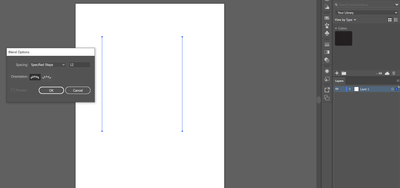
and this is after I hit ok
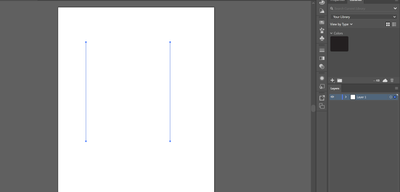
Copiar vínculo al Portapapeles
Copiado
You don't do this↓
4. Object> Blend> Make
Copiar vínculo al Portapapeles
Copiado
It worked! Thanks so much!

Copiar vínculo al Portapapeles
Copiado
Wait, I'm a bit confused. I selected 2 shapes and the Blend Option previewed is still grayed out for me. I did as you said
Copiar vínculo al Portapapeles
Copiado
Hello, Oldbonniegamer5DEF.
The Blend Options Preview button is grayed out unless an object that has already been blended is selected.
My guess is that you are selecting an object that has not yet been blended.
You can press the preview button by first making the blend and then selecting the blend option.

Copiar vínculo al Portapapeles
Copiado
Hi, I'm sorry but I am having this issue too and I tried following these steps but nothing is working. I have two separate layers of text that I am trying to blend and the "make" button is greyed out. I can't get it to work, please help?
Copiar vínculo al Portapapeles
Copiado
Are both text objects point text?

Copiar vínculo al Portapapeles
Copiado
Yes, I have the same issue. I did as it was said, but still cant create blend between two texts.
Copiar vínculo al Portapapeles
Copiado
Please show screenshots of your issue. We need to see the base objects you are trying to blend.


Copiar vínculo al Portapapeles
Copiado
Hi @Yasir5CBE @Darin244929752bjz,
Sorry to hear about the trouble you are facing. I have attached a short demo video demonstrating when the "make" blend option is unavailable and when it is available while joining two separate text layers.
I hope it helps!
Regards,
Anshul Saini

Copiar vínculo al Portapapeles
Copiado
Mine is still not working, idk why.. can anybody help?
Copiar vínculo al Portapapeles
Copiado
We are sorry to hear about this. Would you mind sharing a screenshot or a small recording of the issue? It would be really helpful for us.
Also, please confirm the OS & version of Illustrator.
We are here to help. We just need more info.
Thanks & Regards,
Anshul Saini

Copiar vínculo al Portapapeles
Copiado
Im encountering the same, insane it drive me nuts! simple command yet illustrator cant fix their! THE 'MAKE' OPTION IS GREYED OUT EVEN AFTER YOU BLEND IT! most of the i encountered in illustrator is basic task like this! takes my work longer! (Abusive remarks removed by moderator)
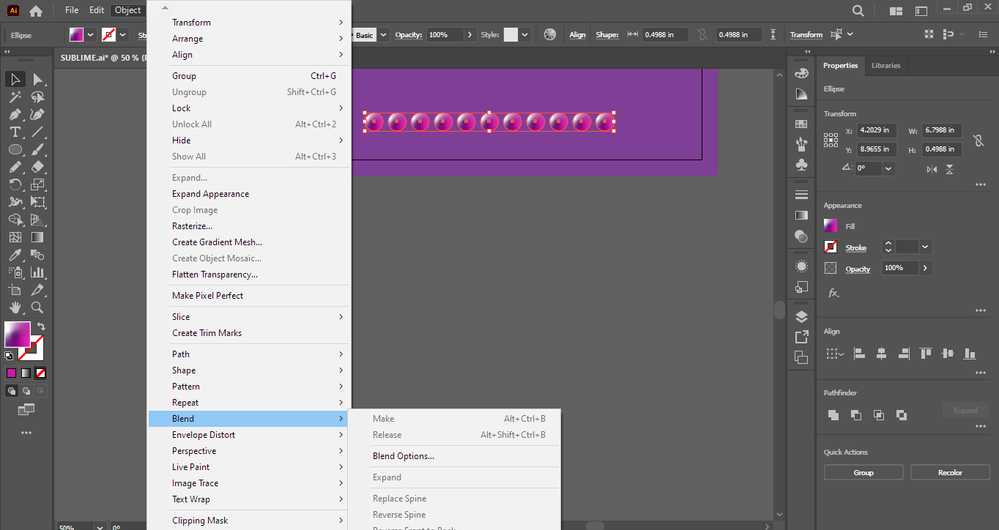
Copiar vínculo al Portapapeles
Copiado
Your object has a freeform gradient. Those cannot be blended.
Copiar vínculo al Portapapeles
Copiado
why does youtube tutorials able to do it? https://www.youtube.com/watch?v=riEE6EQnSx0
Copiar vínculo al Portapapeles
Copiado
They are using a linear gradient. Not a freeform gradient.
Copiar vínculo al Portapapeles
Copiado
i figured that out already, I AM CURRENTLY LOSING BRAINCELLS FROM ILLUSTRATOR another problem occured, blend doesnt work again for text

Copiar vínculo al Portapapeles
Copiado
As stated already in this thread: blend only works on point text.


Encuentra más inspiración, eventos y recursos en la nueva comunidad de Adobe
Explorar ahora
 AdChoices