Exit
  • Global community
    • Language:
      • Deutsch
      • English
      • Español
      • Français
      • Português
  • 日本語コミュニティ
  • 한국 커뮤니티
0

Converting brush work done in Photoshop into a vector in Illustrator

Community Beginner ,
Mar 26, 2018 Mar 26, 2018

Is it possible to take brushwork done in Photoshop, drop it into Illustrator, and then convert it into a vector?  I've tried doing just this, but the vector I created still had blurry edges.

Thank you in advance!

3.8K
Translate
Report
Community guidelines
Be kind and respectful, give credit to the original source of content, and search for duplicates before posting. Learn more
community guidelines

correct answers 1 Correct answer

Enthusiast , Mar 26, 2018 Mar 26, 2018

Hello,

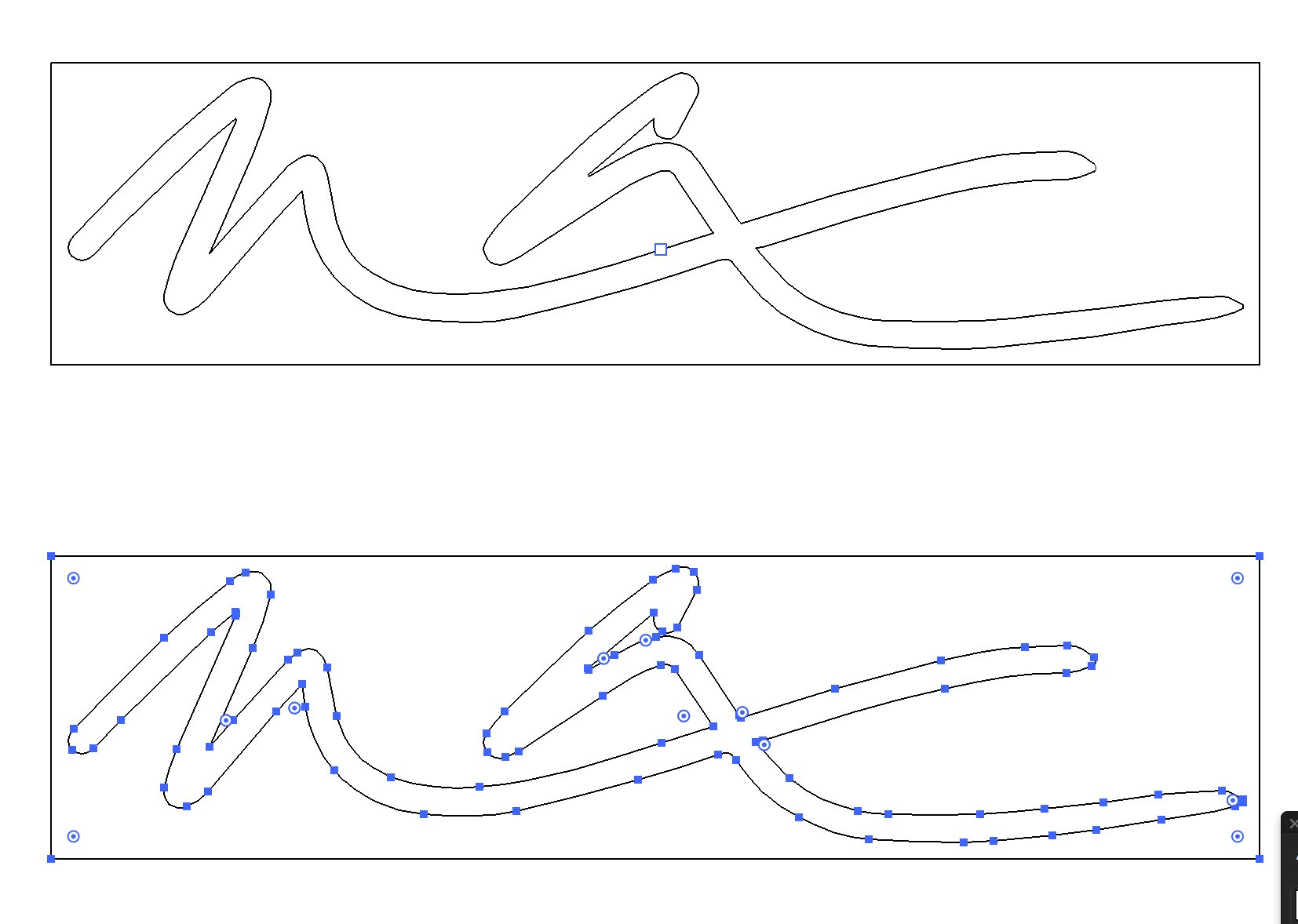
I brought your file into Illustrator and did a standard Live Trace and then Expanded the results.
See attached and see if this works for you? I just used the standard default settings and it looked good.
Screen Shot 2018-03-26 at 7.00.42 PM.png

Screen Shot 2018-03-26 at 7.03.45 PM.png

Best,

Babs

Translate
Adobe
Community Expert ,
Mar 26, 2018 Mar 26, 2018

Please show the artwork.

Translate
Report
Community guidelines
Be kind and respectful, give credit to the original source of content, and search for duplicates before posting. Learn more
community guidelines
Community Beginner ,
Mar 26, 2018 Mar 26, 2018

signature.jpg

Translate
Report
Community guidelines
Be kind and respectful, give credit to the original source of content, and search for duplicates before posting. Learn more
community guidelines
Community Expert ,
Mar 26, 2018 Mar 26, 2018

You could trace them in black and white.

Translate
Report
Community guidelines
Be kind and respectful, give credit to the original source of content, and search for duplicates before posting. Learn more
community guidelines
Enthusiast ,
Mar 26, 2018 Mar 26, 2018

Hello,

I brought your file into Illustrator and did a standard Live Trace and then Expanded the results.
See attached and see if this works for you? I just used the standard default settings and it looked good.
Screen Shot 2018-03-26 at 7.00.42 PM.png

Screen Shot 2018-03-26 at 7.03.45 PM.png

Best,

Babs

Translate
Report
Community guidelines
Be kind and respectful, give credit to the original source of content, and search for duplicates before posting. Learn more
community guidelines
Community Beginner ,
Mar 27, 2018 Mar 27, 2018

Babs,

Thank you so much for going out of your to help me with this!!!  Now I can finally get my new business cards printed with confidence.

Translate
Report
Community guidelines
Be kind and respectful, give credit to the original source of content, and search for duplicates before posting. Learn more
community guidelines
Enthusiast ,
Mar 27, 2018 Mar 27, 2018

Hi!

So glad I could be of help.

I get a lot of help here on the forums, nice to give back when I can
Best,
Babs

Translate
Report
Community guidelines
Be kind and respectful, give credit to the original source of content, and search for duplicates before posting. Learn more
community guidelines
Community Expert ,
Mar 27, 2018 Mar 27, 2018
LATEST

You can also copy a brush strok and paste it as a smart object and than creat a brush !

So many ways to work with pixel and make it into vector!

https://spark.adobe.com/page/d4XhyajktTb0h/

Translate
Report
Community guidelines
Be kind and respectful, give credit to the original source of content, and search for duplicates before posting. Learn more
community guidelines