Exit
  • Global community
    • Language:
      • Deutsch
      • English
      • Español
      • Français
      • Português
  • 日本語コミュニティ
  • 한국 커뮤니티
0

Dead pixels

New Here ,
Sep 14, 2022 Sep 14, 2022

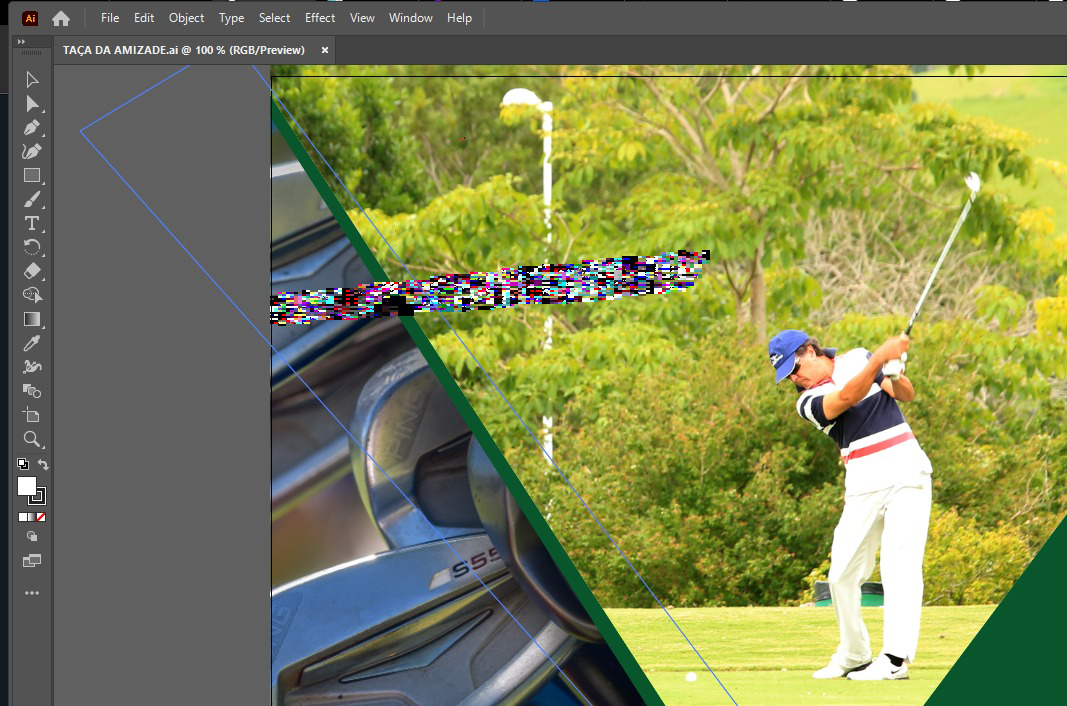
Im having a issue because of this thing, i dont know what to call, i guess its dead pixels, they move around, they vanish and then appear again

TOPICS
Bug
332
Translate
Report
Community guidelines
Be kind and respectful, give credit to the original source of content, and search for duplicates before posting. Learn more
community guidelines

correct answers 1 Correct answer

Community Expert , Sep 14, 2022 Sep 14, 2022

Ctrl E to switch to CPU Preview? Or check for updates for your video card?

Translate
Adobe
Community Expert ,
Sep 14, 2022 Sep 14, 2022

Ctrl E to switch to CPU Preview? Or check for updates for your video card?

Translate
Report
Community guidelines
Be kind and respectful, give credit to the original source of content, and search for duplicates before posting. Learn more
community guidelines
New Here ,
Sep 14, 2022 Sep 14, 2022

CTRL+E worked, thanks man

Translate
Report
Community guidelines
Be kind and respectful, give credit to the original source of content, and search for duplicates before posting. Learn more
community guidelines
Community Expert ,
Sep 14, 2022 Sep 14, 2022
LATEST

Good to hear that worked, I would also check the video card driver. Illustrator is slower in CPU Preview.

Translate
Report
Community guidelines
Be kind and respectful, give credit to the original source of content, and search for duplicates before posting. Learn more
community guidelines