Exit
  • Global community
    • Language:
      • Deutsch
      • English
      • Español
      • Français
      • Português
  • 日本語コミュニティ
  • 한국 커뮤니티
0

End points misaligned with paths

New Here ,
Oct 25, 2022 Oct 25, 2022

Hi,

I'm having an issue with the latest version of Illustrator whereby the anchor points aren't aligning with the ends of the path, if that makes sense. 

TOPICS
Bug , Draw and design , Tools
1.1K
Translate
Report
Community guidelines
Be kind and respectful, give credit to the original source of content, and search for duplicates before posting. Learn more
community guidelines

correct answers 1 Correct answer

Community Expert , Oct 25, 2022 Oct 25, 2022

Thanks, that worked.

Looks like a Preview problem to me. It shows correct in CPU preview.

GPU preview is fast but not very precise. CPU shows what you get when printed or exported.
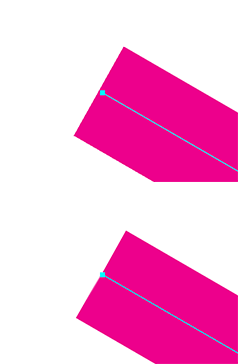
gpu-vs-cpu.gif

Translate
Adobe
Community Expert ,
Oct 25, 2022 Oct 25, 2022

How much are you zoomed in? Does it disappear when you switch to CPU Preview (Cmd or Ctrl E)?

Translate
Report
Community guidelines
Be kind and respectful, give credit to the original source of content, and search for duplicates before posting. Learn more
community guidelines
Community Expert ,
Oct 25, 2022 Oct 25, 2022

What is your platform and system?

I'm not seeing the same thing here (v27.0), whether my GPU is on or not (which isn't a sure determination anyway since all cards are different),

Can you upload your file?

Translate
Report
Community guidelines
Be kind and respectful, give credit to the original source of content, and search for duplicates before posting. Learn more
community guidelines
New Here ,
Oct 25, 2022 Oct 25, 2022
Hi,

I’m using v27.0 also, on a Mac.
I’ve just reinstalled Illustrator but it’s still happening.
It makes things really difficult when I’m trying to snap paths to a guide.
Translate
Report
Community guidelines
Be kind and respectful, give credit to the original source of content, and search for duplicates before posting. Learn more
community guidelines
Community Expert ,
Oct 25, 2022 Oct 25, 2022

Did it change if you turned off GPU as Ton suggested? 

What is your Mac and system (Intel? M1? Monterey? etc)


Translate
Report
Community guidelines
Be kind and respectful, give credit to the original source of content, and search for duplicates before posting. Learn more
community guidelines
New Here ,
Oct 25, 2022 Oct 25, 2022

It's slightly less misaligned if I turn off GPU.

I'm using Monterey on an Intel Mac.

Translate
Report
Community guidelines
Be kind and respectful, give credit to the original source of content, and search for duplicates before posting. Learn more
community guidelines
Community Expert ,
Oct 25, 2022 Oct 25, 2022

Okay, I see the effect, but yes it's only when using GPU. That being said, I also see the effect in CC2020 (v24) so it's not unique to v27.

Rather than being a bug, I suspect you've gone far past the precision level possible in the program, and certainly the GPU, since it only shows at 64000%!!!!!

but with THAT being said, your physical ouput is based on what the CPU generates, so your lines will be the size you expect.

Translate
Report
Community guidelines
Be kind and respectful, give credit to the original source of content, and search for duplicates before posting. Learn more
community guidelines
New Here ,
Oct 26, 2022 Oct 26, 2022

Ah okay, thank you, I probably am aiming for an unnecessary level of precision.

Appreciate the help!


Translate
Report
Community guidelines
Be kind and respectful, give credit to the original source of content, and search for duplicates before posting. Learn more
community guidelines
Community Expert ,
Oct 25, 2022 Oct 25, 2022

How much are you zoomed in? Are you using a Large Canvas document?

Translate
Report
Community guidelines
Be kind and respectful, give credit to the original source of content, and search for duplicates before posting. Learn more
community guidelines
New Here ,
Oct 25, 2022 Oct 25, 2022
I’m zoomed in 64000% to make sure I’m accurately snapping to my guides, and it’s an A3 sized document.

Sent from Yahoo Mail for iPhone
Translate
Report
Community guidelines
Be kind and respectful, give credit to the original source of content, and search for duplicates before posting. Learn more
community guidelines
Community Expert ,
Oct 25, 2022 Oct 25, 2022

It would help if you shared an example .ai file.

CC file sharing, Dropbox, Google, WeTransfer...

Translate
Report
Community guidelines
Be kind and respectful, give credit to the original source of content, and search for duplicates before posting. Learn more
community guidelines
New Here ,
Oct 25, 2022 Oct 25, 2022

https://assets.adobe.com/id/urn:aaid:sc:EU:d2d5c767-1eaa-4e6a-8dc1-3c0e46281e72?view=difile


This is the file I've been using, it has a guide layer, and when I create paths the end point is misaligned with the paths. Perhaps I am zoomed in too much?


Translate
Report
Community guidelines
Be kind and respectful, give credit to the original source of content, and search for duplicates before posting. Learn more
community guidelines
Community Expert ,
Oct 25, 2022 Oct 25, 2022

Can you share it downloadable?

Translate
Report
Community guidelines
Be kind and respectful, give credit to the original source of content, and search for duplicates before posting. Learn more
community guidelines
New Here ,
Oct 25, 2022 Oct 25, 2022

https://assets.adobe.com/id/urn:aaid:sc:EU:d2d5c767-1eaa-4e6a-8dc1-3c0e46281e72?view=difile


I'm not 100% sure how to do that, but I have changed the link so that you can save a copy, if that works.

Translate
Report
Community guidelines
Be kind and respectful, give credit to the original source of content, and search for duplicates before posting. Learn more
community guidelines
Community Expert ,
Oct 25, 2022 Oct 25, 2022

Thanks, that worked.

Looks like a Preview problem to me. It shows correct in CPU preview.

GPU preview is fast but not very precise. CPU shows what you get when printed or exported.

gpu-vs-cpu.gif

Translate
Report
Community guidelines
Be kind and respectful, give credit to the original source of content, and search for duplicates before posting. Learn more
community guidelines
New Here ,
Oct 26, 2022 Oct 26, 2022
LATEST

Okay that makes sense now, I've always been a little confused around GPU and CPU previews.

Thanks for the help!

Translate
Report
Community guidelines
Be kind and respectful, give credit to the original source of content, and search for duplicates before posting. Learn more
community guidelines