Exit
  • Global community
    • Language:
      • Deutsch
      • English
      • Español
      • Français
      • Português
  • 日本語コミュニティ
  • 한국 커뮤니티
0

gaussian blur in Illustrator

Community Beginner ,
Aug 03, 2017 Aug 03, 2017

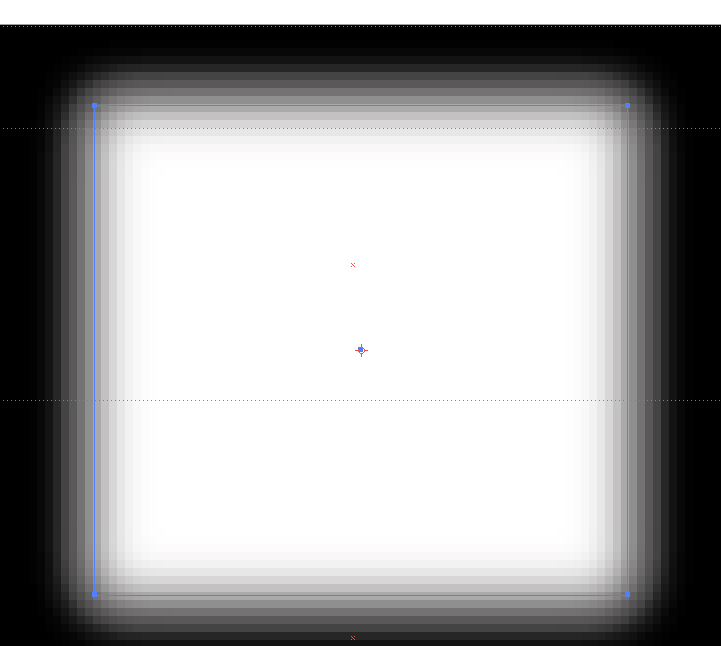
Hi all - can I ask about gaussian blur?  I have a vector shape in illustrator that I want a blurred edge to.  However it shows as VERY blocky and not smooth (see photo below) is there something I can do to make it look smoother?

I am sure years ago I had this and my colleague showed me a setting I could change - but my colleague is not here to ask!

Many thanks
MJ

blur temp.jpg

6.6K
Translate
Report
Community guidelines
Be kind and respectful, give credit to the original source of content, and search for duplicates before posting. Learn more
community guidelines

correct answers 1 Correct answer

Community Expert , Aug 03, 2017 Aug 03, 2017

To what number is the Document Raster Effect of the current file set? It looks like it is set to 72.

Translate
Adobe
Community Expert ,
Aug 03, 2017 Aug 03, 2017

To what number is the Document Raster Effect of the current file set? It looks like it is set to 72.

Translate
Report
Community guidelines
Be kind and respectful, give credit to the original source of content, and search for duplicates before posting. Learn more
community guidelines
Community Beginner ,
Aug 03, 2017 Aug 03, 2017

I haven't rasterized it.  So where is it that I set the Document Raster Effect?

Translate
Report
Community guidelines
Be kind and respectful, give credit to the original source of content, and search for duplicates before posting. Learn more
community guidelines
Community Expert ,
Aug 03, 2017 Aug 03, 2017

gaussian blur is a raster effect. it is always rasterised.

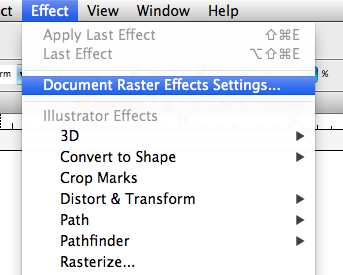
set the document raster effects resolution in Effect > Document Raster Effects.

Translate
Report
Community guidelines
Be kind and respectful, give credit to the original source of content, and search for duplicates before posting. Learn more
community guidelines
Community Beginner ,
Aug 03, 2017 Aug 03, 2017

Thank you!  I have now found it!  Thank you all!

MJ

Translate
Report
Community guidelines
Be kind and respectful, give credit to the original source of content, and search for duplicates before posting. Learn more
community guidelines
Community Expert ,
Aug 03, 2017 Aug 03, 2017

Gaussian Blur is a raster effect.

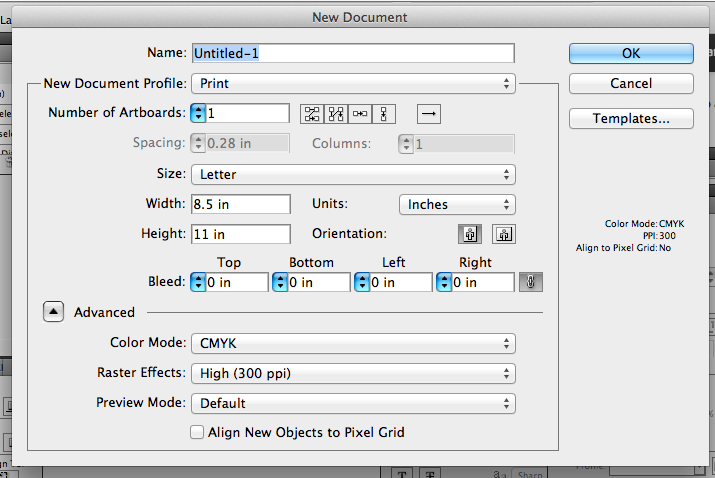
There are several places. for a new document use the Advanced settings

Screen Shot 2017-08-03 at 7.20.16 AM.png

For a current file use the Effects menu

Screen Shot 2017-08-03 at 7.21.15 AM.png

Translate
Report
Community guidelines
Be kind and respectful, give credit to the original source of content, and search for duplicates before posting. Learn more
community guidelines
New Here ,
Oct 29, 2017 Oct 29, 2017
LATEST

Thanks!very useful!

Translate
Report
Community guidelines
Be kind and respectful, give credit to the original source of content, and search for duplicates before posting. Learn more
community guidelines