Known Participant
November 25, 2024
Answered

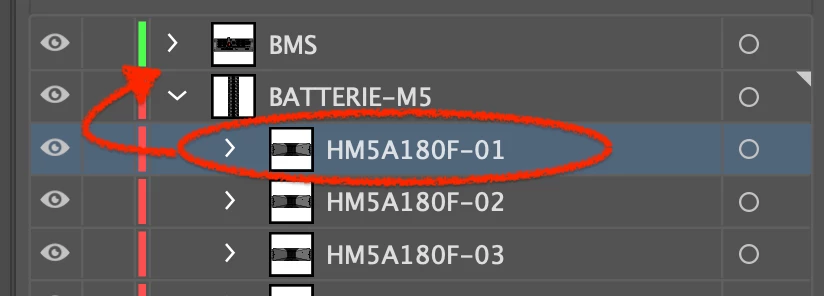
How do I raise a level to a higher one?

  • November 25, 2024
  • 3 replies
  • 580 views

How do I raise a level to a higher one?
strangely not able with with drag and drop ....
 

This topic has been closed for replies.
Correct answer Monika Gause

Those are probably groups or some other container objects. In Illustrator nothing can exist outside of a layer. First make a layer, then move it into the layer.

3 replies

Known Participant
November 25, 2024
Monika Gause
Community Expert
Monika GauseCommunity ExpertCorrect answer
Community Expert
November 25, 2024

Those are probably groups or some other container objects. In Illustrator nothing can exist outside of a layer. First make a layer, then move it into the layer.

Monika Gause
Community Expert
Community Expert
November 29, 2024

yes in fact with the command "release to levels" I solved the problem.

but how was I supposed to understand that what I thought was a level was actually not?


If you click on the target symbol of an item in the layers panel (the circle), then Illustrator will display what it is in the control panel to the very left.

Anubhav M
Community Manager
Community Manager
November 25, 2024

Hello @Milko37656671vnte,

Thanks for reaching out. Would you mind dragging the layer on top of the other one until the blue placeholder line appears to see if it helps?

Looking forward to hearing from you.


Anubhav

Known Participant
November 25, 2024

when i try to move the level to the upper location, outside the parent level, the mouse pointer change to a pointer with a no entry sign. no levels are bloacked

Ka-Tja
Community Expert
Community Expert
November 25, 2024

Have you tried grabbing it where the text is? Moving it closer to the text area might help.
