
Exit
  • Global community
    • Language:
      • Deutsch
      • English
      • Español
      • Français
      • Português
  • 日本語コミュニティ
  • 한국 커뮤니티
0

Illustrator Pattern Creation Help

New Here ,
May 12, 2017 May 12, 2017

Hey folks, first post so please go easy on me!

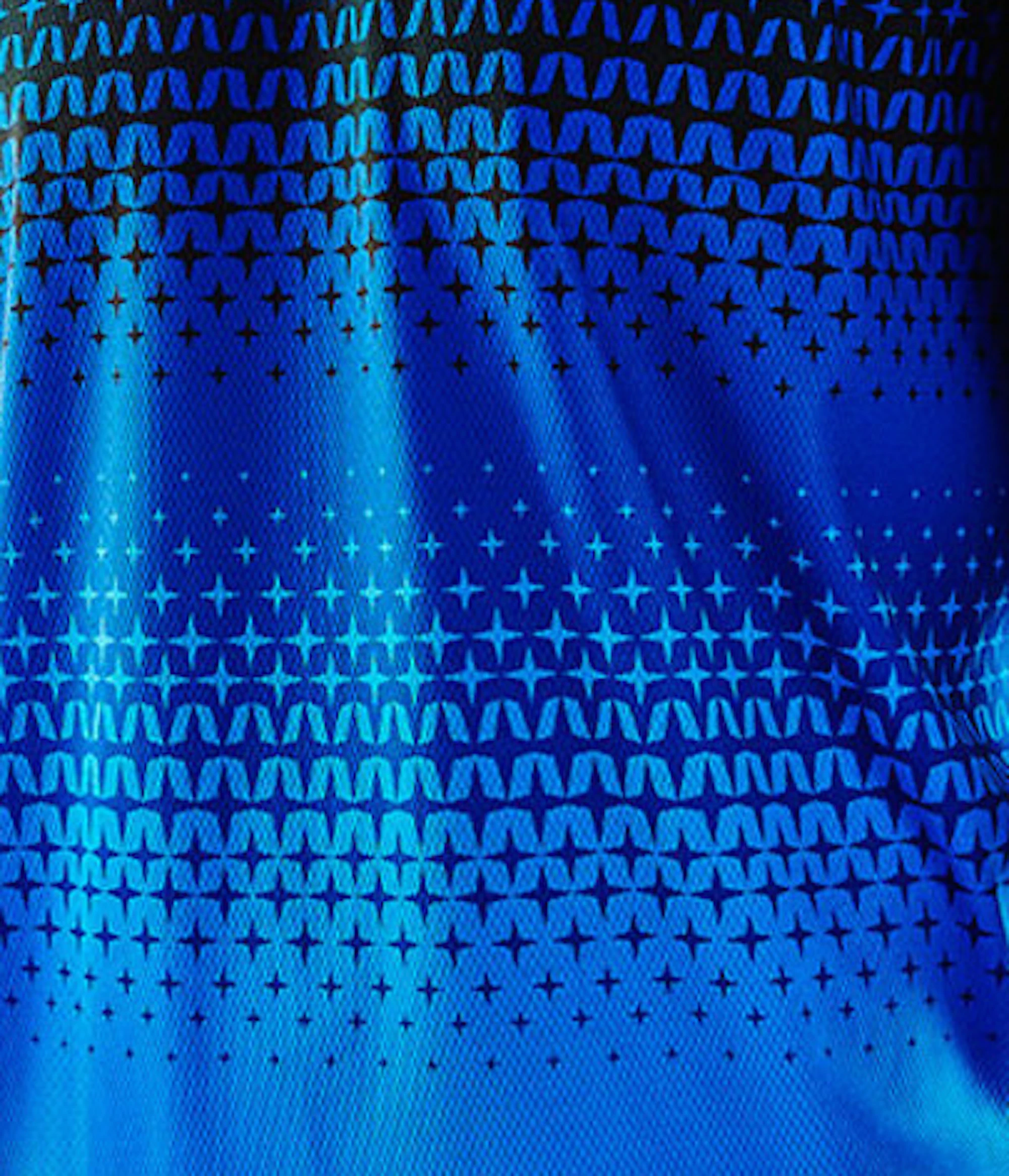
I've been trying to replicate a blend?morph pattern in Illustrator for some time now and have had no luck.

Could someone please give some advice on how I need to do it? Better yet, if someone could replicate it and provide the AI or EPS file I'd be willing to pay for it using paypal.
TLD_Starburst_Example.jpg

795
Translate
Report
Community guidelines
Be kind and respectful, give credit to the original source of content, and search for duplicates before posting. Learn more
community guidelines
Adobe
Guide ,
May 12, 2017 May 12, 2017

Always hard to tell exactly how I would do something like this, but what I see as the repeated patterns are the stars that are reduced in size... the background colours can always be added separately so I'd start by focussing on the stars pattern.

E.g. start by drawing one star (using the Polygon tool), and duplicate that across the page, to have the ability to adjust the distance, size etc, use the Appearance panel:

  1. Select the shape.
  2. Click the fx button at the bottom of the Appearance panel and select Distort & Transform > Transform.
  3. In the Transform Effect panel, set the Horizontal Move setting and the number of copies you want.
    pattern1.png

  4. You can copy this shape, and move it below the previously added row and reduce the size a little by Shift-dragging one of the corner handles of the bounding box for the shape. Then click on 'Transform' in the Appearance panel again, to adjust the Transform Effect settings for the second row and set it back to the same amount you used for the first row.
    pattern2.png
  5. Repeat these steps till you get the first lot of stars to build the pattern. You can then use that block and duplicate it to build the other half of the pattern.
    pattern3.png
Translate
Report
Community guidelines
Be kind and respectful, give credit to the original source of content, and search for duplicates before posting. Learn more
community guidelines
New Here ,
May 12, 2017 May 12, 2017

Hey, I'd already been able to get that far, although I do appreciate the info... the portion that is stumping me is that the point  at which the tho different colors of sunbursts meet, in the middle. I cant decide if  it was made using the blending tool or some morphing.

Translate
Report
Community guidelines
Be kind and respectful, give credit to the original source of content, and search for duplicates before posting. Learn more
community guidelines
Guide ,
May 12, 2017 May 12, 2017

Once you've got all the star patterns done:

  • Apply black, light blue and dark blue colour to the star blocks (top to bottom),
  • then add dark blue background and light blue background.

That won't give you the exact pattern yet, you'd need to add one final lot of repetitive shapes (I've added ellipse here by way of example), and ensure these overlap the light blue background (and have the dark blue stars above that).

You'd get something like this:

pattern4.png

Translate
Report
Community guidelines
Be kind and respectful, give credit to the original source of content, and search for duplicates before posting. Learn more
community guidelines
New Here ,
May 17, 2017 May 17, 2017

Hey Cari, thanks for the help and tips... I knew i could manually build it but was hoping there'd be a was i could use the blend tool or patter making ability to do it. TLD uses it in some applications that suggest to me that they have indeed turned it into a pattern. Im on my phone right now or Id post a new photo.

Translate
Report
Community guidelines
Be kind and respectful, give credit to the original source of content, and search for duplicates before posting. Learn more
community guidelines
New Here ,
May 17, 2017 May 17, 2017

p5pb14625013.jpg

Translate
Report
Community guidelines
Be kind and respectful, give credit to the original source of content, and search for duplicates before posting. Learn more
community guidelines
New Here ,
May 17, 2017 May 17, 2017

This handlebar for example... The pattern is radiating out in 4 directions, almost like they applied it as a Fill.

Translate
Report
Community guidelines
Be kind and respectful, give credit to the original source of content, and search for duplicates before posting. Learn more
community guidelines
Community Expert ,
May 17, 2017 May 17, 2017

You need either plugins (Phantasm) or a separate app (Vectoraster or the like) to do this.

Translate
Report
Community guidelines
Be kind and respectful, give credit to the original source of content, and search for duplicates before posting. Learn more
community guidelines
New Here ,
May 17, 2017 May 17, 2017

Interesting, I've never heard of those. Thanks, ill look into them.

Translate
Report
Community guidelines
Be kind and respectful, give credit to the original source of content, and search for duplicates before posting. Learn more
community guidelines
New Here ,
May 17, 2017 May 17, 2017
LATEST

Do you know of anyone who would be interested in recreating the pattern in question for a fee?

Translate
Report
Community guidelines
Be kind and respectful, give credit to the original source of content, and search for duplicates before posting. Learn more
community guidelines