


- Home
- Illustrator
- Discussions
- Re: Keyboard shortcut for line break in Illustrato...
- Re: Keyboard shortcut for line break in Illustrato...

Copy link to clipboard
Copied
I've been trying to make a keyboard shortcut for a line break. I've been trying to make it Command-Return (as I have it in inDesign) or Shift-Return (in other programs), but all I get is a message that the key pressed cannot be used as a shortcut
I'd like to get one of those working; this shortcut worked for me in CS5 (which I recently stopped using) and would like to get it back. Any advice?


 1 Correct answer


Mike, the reason why InDesign may use Cmd-Return to make a line break is because – unlike Illustrator – it can be set to that key combo if you want it. For whatever reason.
InDesign is much more flexible when it comes to define keyboard shortcuts. In Illustrator one (too often) just get a message that you cannot do this or that shortcut without using a special modifier.
Anyway, in this case it just seems to be a hardware issue that has to be solved with a warranty claim.


Explore related tutorials & articles
 11
Replies
11
11
Replies
11

Copy link to clipboard
Copied
Shift-Return is the default shortcut to make a line break.
Doesn't it work for you? If not, what happens instead?
Copy link to clipboard
Copied
I get a return, not a line break.
Copy link to clipboard
Copied
Does that mean that you get a new paragraph?
That wouldn't be normal behaviour.
Copy link to clipboard
Copied
That's right, I get a new paragraph. So how would I get the normal behavior back?
Copy link to clipboard
Copied
Frankly speaking, I don't know.
Guess you have already checked if the Shift key is defect-free on your keyboard?
Sometimes participants on this forum recommend to trash the Illustrator Preferences file to cure abnormal behaviours, but I'm not sure if that will help in your case.
Copy link to clipboard
Copied
I think it is the keyboard. I purchased a new Macally keyboard along with CC. Shortcuts involving shift have been working so far. Plugged in my old Macally keyboard, and shift-return works. I'll have to try contacting Macally to see if there's a fix.
Is there any reason why I ca't just make a keyboard shortcut of Command-Return for a line break, the same as in InDesign? I just get a warning message when I try to set it up.
Copy link to clipboard
Copied
Probably because Adobe once decided to not allow certain keys when you want to define custom keyboard shortcuts in Illustrator.

Copy link to clipboard
Copied
DHStudio schrieb
That's right, I get a new paragraph. So how would I get the normal behavior back?
Sometimes other apps (or their plugins) steal keypresses from Illustrator.
Browser plugins are known to cause this. What else is running at the moment on your system?
Also: do you use a system wide etension to enhace your keyboard? Like some sort of shortcut utility?
Copy link to clipboard
Copied
See above response to Kurt Gold — I think I tracked it down to the keyboard and Shift-Return not working properly.
If that's the case, would you know why I get an error message when I try to change the line-break command to Cmd-Return, as it is in InDesign?

Copy link to clipboard
Copied
InDesign uses shift return for a forced line break (AKA soft return)
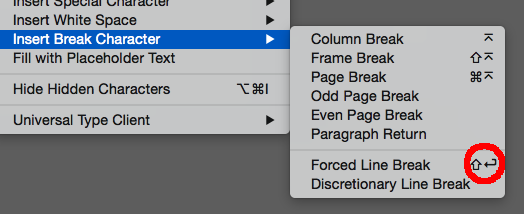
Not sure why your InDesign uses Command return for a line break.

I get quick apply on CC2017 InDesign, when doing a command return

Shift return has been a soft return (AKA forced line break) for as long as I can remember in both programs. My recommendation is to stay with the defaults, so when you go work on another computer or they release an update you wont have to continually edit the keyboard shortcuts.
Copy link to clipboard
Copied
Mike, the reason why InDesign may use Cmd-Return to make a line break is because – unlike Illustrator – it can be set to that key combo if you want it. For whatever reason.
InDesign is much more flexible when it comes to define keyboard shortcuts. In Illustrator one (too often) just get a message that you cannot do this or that shortcut without using a special modifier.
Anyway, in this case it just seems to be a hardware issue that has to be solved with a warranty claim.


Find more inspiration, events, and resources on the new Adobe Community
Explore Now
 AdChoices