Exit
  • Global community
    • Language:
      • Deutsch
      • English
      • Español
      • Français
      • Português
  • 日本語コミュニティ
  • 한국 커뮤니티
0

Spot colours disappear from document when exported

Community Beginner ,
Mar 05, 2023 Mar 05, 2023

I can't seem to export spot colours with my document, everything just seems to turn to CMYK when I check it in Acrobats output preview. I've done this in the past but am having trouble this time around.

Thanks for any responses

TOPICS
Import and export
1.9K
Translate
Report
Community guidelines
Be kind and respectful, give credit to the original source of content, and search for duplicates before posting. Learn more
community guidelines

correct answers 1 Correct answer

Community Expert , Mar 05, 2023 Mar 05, 2023

The .ai file is in the PDF.

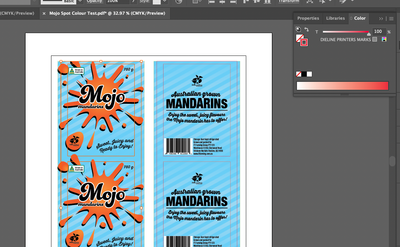
What your screendump shows (the DIELINE PRINTERS MARKS) color is a global CMYK  color. Just double click the swatch in the Swatches panel to change it to Spot instead of Process.

Translate
Adobe
Community Expert ,
Mar 05, 2023 Mar 05, 2023

Which Illustrator version do you use and what are your PDF settings?

Can you share a simple example PDF (with Illustrator editing enabled)?

Translate
Report
Community guidelines
Be kind and respectful, give credit to the original source of content, and search for duplicates before posting. Learn more
community guidelines
Community Beginner ,
Mar 05, 2023 Mar 05, 2023

Here is an example PDF, I use AI 27.3.1


Thanks for your quick response.

Translate
Report
Community guidelines
Be kind and respectful, give credit to the original source of content, and search for duplicates before posting. Learn more
community guidelines
Community Expert ,
Mar 05, 2023 Mar 05, 2023

Thanks, but there are no spot colors used in your Illustrator file.

I only see some global CMYK colors.

Translate
Report
Community guidelines
Be kind and respectful, give credit to the original source of content, and search for duplicates before posting. Learn more
community guidelines
Community Beginner ,
Mar 05, 2023 Mar 05, 2023

That's odd, can I send you the AI file to have a look?

Translate
Report
Community guidelines
Be kind and respectful, give credit to the original source of content, and search for duplicates before posting. Learn more
community guidelines
Community Beginner ,
Mar 05, 2023 Mar 05, 2023

Screen Shot 2023-03-06 at 10.02.11 am.png


Translate
Report
Community guidelines
Be kind and respectful, give credit to the original source of content, and search for duplicates before posting. Learn more
community guidelines
Community Expert ,
Mar 05, 2023 Mar 05, 2023

The .ai file is in the PDF.

What your screendump shows (the DIELINE PRINTERS MARKS) color is a global CMYK  color. Just double click the swatch in the Swatches panel to change it to Spot instead of Process.

Translate
Report
Community guidelines
Be kind and respectful, give credit to the original source of content, and search for duplicates before posting. Learn more
community guidelines
Community Beginner ,
Mar 05, 2023 Mar 05, 2023

Well, that was silly, thanks for your help!

Translate
Report
Community guidelines
Be kind and respectful, give credit to the original source of content, and search for duplicates before posting. Learn more
community guidelines
Community Expert ,
Mar 05, 2023 Mar 05, 2023
LATEST

Good to hear that helped.

Translate
Report
Community guidelines
Be kind and respectful, give credit to the original source of content, and search for duplicates before posting. Learn more
community guidelines