


- Inicio
- Illustrator
- Hilos de conversación
- Re: Unsupported video driver error
- Re: Unsupported video driver error

Copiar vínculo al Portapapeles
Copiado
All of my drivers are up to date, but I still get the folowing error when starting Adobe Illustrator/ Premiere/ AE/ etc.


When I click fix, I'm advised to update my drivers, but like I said all of my drivers are updated to the latest version:

Please help
PS I also have Gforce 1050 graphics card, which also runs the latest drivers.


 1 respuesta correcta

Hi there,
Thank you for reaching out.
If you're getting this error with Nvidia graphics card. Please check out the latest version of the driver on https://www.nvidia.com/Download/index.aspx?lang=en-us & see if you have any new version available.
If you do not see any update released within a year, then NVIDIA probably has discontinued releasing updates to your driver which is a bit old and either you can update the card or switch off this reporting via preferences.
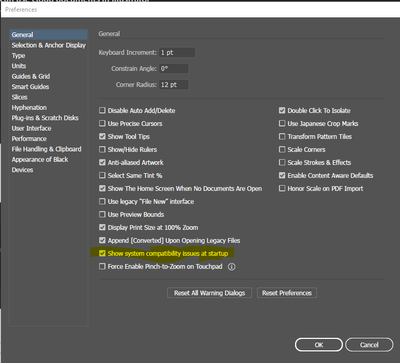
Edit > preferences > General >


Examinar y buscar tutoriales y artículos relacionados
 238
réplicas
238
238
réplicas
238



Copiar vínculo al Portapapeles
Copiado
Hi @Susan5C87 ,
You cannot upgrade the onboard graphics card, though you can buy add-on graphic card from NVIDIA, AMD etc.
Sanjay.

Copiar vínculo al Portapapeles
Copiado
Copiar vínculo al Portapapeles
Copiado
Hi @razizm73948767 ,
Your NVIDIA Quadro 4000 card is a bit old and if you can't upgrade the card, you can suspend the warning from the preferences.
Sanjay.
Copiar vínculo al Portapapeles
Copiado
Thanks Sanjay.

Copiar vínculo al Portapapeles
Copiado
Copiar vínculo al Portapapeles
Copiado
Hi @yuzhub67742131 ,
Your latest driver for NVIDIA GeForce GTX 1060 is at https://www.nvidia.com/Download/driverResults.aspx/170886/en-us
Sanjay.
Copiar vínculo al Portapapeles
Copiado
Thanks Sanjaykr.

Copiar vínculo al Portapapeles
Copiado
Hi,
I have got the same problem here. I have Windows 10 and my drivers are updated. I have Intel (R) UHD 360 and my computer has the driver updated to its latest version. Any help is highly appreciated.
Best regards,
Raya
Copiar vínculo al Portapapeles
Copiado
Hi @Raya5E2E ,
Can you please attach the "System Compatibility Report" file. You can generate it by clicking the "Export Report..." button on the dialog.
Sanjay.
Copiar vínculo al Portapapeles
Copiado
Hi @sanjaykr ,
Thank you for your reply. I have attached the report to this reply. Hope this works.
Best regards,
Raya
Copiar vínculo al Portapapeles
Copiado
Hi @Raya5E2E ,
You have "Intel(R) UHD Graphics 620" card which is a bit old and hence Ai is detecting it as incompatible. If you are not able to upgrade the card, then you can suppress this warning via preferences. click the "continue with known issues..." Text and then unchecking General > "show system compatibility issues at startup" in the preferences.
Sanjay.

Copiar vínculo al Portapapeles
Copiado
Opened AI today and received the following error message:
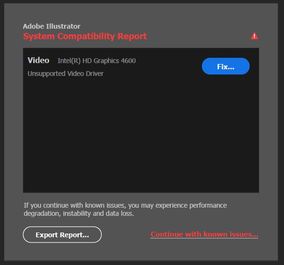
Following the instructions provided via Illustrator support, I updated my Intel 4600 drivers to the latest version:
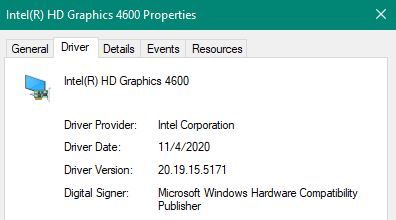
And yet the problem persists. I have attached the System Compatibility report to this post.
Could anyone help me figure out how to work around this issue?

Copiar vínculo al Portapapeles
Copiado
I'm getting the same problem that has only started today. I've followed the instructions from Adobe as well but the problem is still here. It would be great if anyone has any advice for us both.
Copiar vínculo al Portapapeles
Copiado
Hi there,
Sorry to hear about this. We have introduced this feature with the latest release of Adobe Illustrator 2021(v25.2). Let me check the details about this report coming up again after the GPU update. I'll get back to you on this.
If you wish to stop seeing this compatibility report, you may turn this off by unchecking "Show system compatibility issues at startup" under Preferences > General.
I am also attaching a screenshot for your reference:
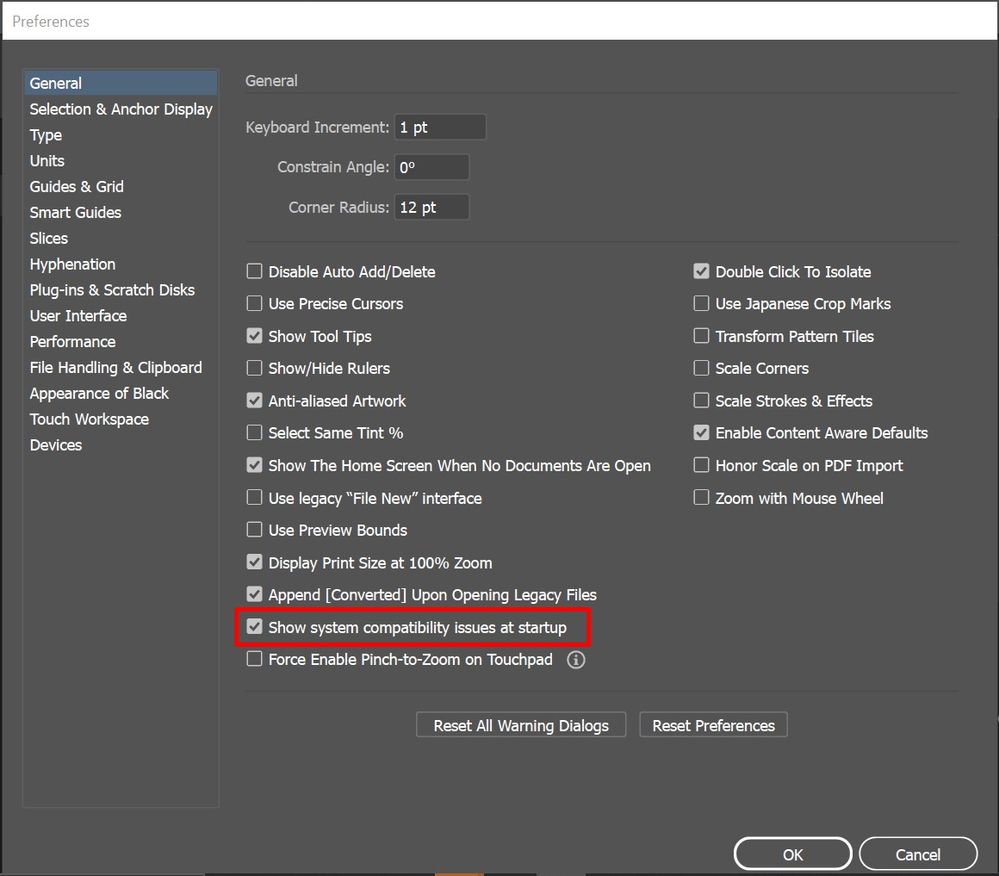
Hope it helps.
Regards,
Ashutosh
Copiar vínculo al Portapapeles
Copiado
Hi! Thanks for your quick response.
I think there is something wrong internally because I am getting an error message saying I do not have enough RAM to support the work I am trying to do in Illustrator.
One of the possible problems is the graphics card, so I am inclined to think that the issue with my graphics card is the cause of this.
Perhaps this can help with your investigation.

Copiar vínculo al Portapapeles
Copiado
This can't be done, since once the compatabilty report comes on, you can't continue using Illustrator. It crashes the computer as soon as you want to proceed.
Enoch

Copiar vínculo al Portapapeles
Copiado
I'm getting this too, on my laptop. But with Nvidia GeForce GT540M
Copiar vínculo al Portapapeles
Copiado
I downloaded NVIDIA Geforce GT620M and I'm still getting it. When I open my illustrator it's saying there is a problem with Inter(R) HD Graphics 4000 and NVIDIA Geforce GT620M. Is it making your illustrator crash?

Copiar vínculo al Portapapeles
Copiado
The article was in 2019 but may have some info that will help:
Copiar vínculo al Portapapeles
Copiado
Thanks for trying to help. I've read the tips and followed the advice about changing the settings on NVIDIA Control panel but it still it's not worked.
Copiar vínculo al Portapapeles
Copiado
I tried the same, but it unfortunately did not solve the issue.
Copiar vínculo al Portapapeles
Copiado
Hi All,
Many users have reported the similar concern. We'd request you to upvote & add your comment on this UserVoice post(https://illustrator.uservoice.com/forums/601447-illustrator-desktop-bugs/suggestions/42662191-system...) to stay tuned for the updates.
Regards,
Ashutosh
Copiar vínculo al Portapapeles
Copiado
Please explain to me why?
There are lots of replies here, but only 1 in that link.
Just to make sense out of it.
Thank you 🙂

Copiar vínculo al Portapapeles
Copiado
Ha! So, not a fix at all. You just tell Illustrator to shut up about it.
Reminds me of my old Land Rover. Gearbox making a funny noise? Turn the radio up.

Copiar vínculo al Portapapeles
Copiado
Hi, I'm also wxperiencing issues with the 25.2 relase of illustrator on Windows 10. I also get the System Compatibility Issue with Intel Iris 45200 in Illustrator, however acording to the hardware specification published by Adobe, Intel Iris 5000 series is supported hardware, and I have the latest driver published on the intel website. The driver suggested in the System Compatibility Report window doesn't even exist!
I'm also experiencing instability with 5 crashes so far today
[2021-02-17_15-10-40][11624][Error] [general] Uncaught JS Exception:
[2021-02-17_15-10-40][8976][Error] [general] Uncaught JS Exception:
[2021-02-17_15-10-40][23396][Default] [console] i am called
[2021-02-17_15-10-40][23396][Error] [general] Uncaught JS Exception:
[2021-02-17_15-10-40][20136][Error] [general] Uncaught JS Exception:
-------------------------------------------------------------------------------------------
[2021-02-17_15-03-56][3396][Error] [general] Uncaught JS Exception:
[2021-02-17_15-03-56][9904][Error] [general] Uncaught JS Exception:
[2021-02-17_15-03-56][19028][Default] [console] i am called
[2021-02-17_15-03-56][23884][Error] [general] Uncaught JS Exception:
[2021-02-17_15-03-56][19028][Error] [general] Uncaught JS Exception:
---------------------------------------------------------------------------------------------
[2021-02-17_12-46-38][7964][Error] [general] Uncaught JS Exception:
[2021-02-17_12-46-38][17880][Error] [general] Uncaught JS Exception:
[2021-02-17_12-46-38][21300][Default] [console] i am called
[2021-02-17_12-46-38][24144][Error] [general] Uncaught JS Exception:
[2021-02-17_12-46-39][21300][Error] [general] Uncaught JS Exception:
And on it goes...
Always the same issue when working with text boxes...


Encuentra más inspiración, eventos y recursos en la nueva comunidad de Adobe
Explorar ahora
 AdChoices