 Adobe Community

- Home
- Illustrator
- Discussions
- Why can't apply Character Style to Text Object in ...
- Why can't apply Character Style to Text Object in ...

Copy link to clipboard
Copied
I attach sample data: Font2.ai
https://drive.google.com/file/d/1EZyR4TARjRAb9n7myCI9s2Oy8VD-wiCj/view?usp=sharing
Character style using a Composite Font.
This is my code:
var doc=app.documents[0];
var style=doc.characterStyles[1];
var oText=doc.textFrames[0];
style.applyTo(oText.textRange);
In Illustrator 2020: it apply ok,
But with Illustrator 2021,2023 thi occur error: an Illustrator error occurred: 285 ('')
Why can't apply Character Style to Text Object in Illustrator 2021, 2023?


 1 Correct answer


Hi @MrTran, I tried your code on your sample .ai document and I got the exact same results as you did. I don't think I'll be much help but here are two things I noticed:
1. The script actually worked (it applied the character style to the text), so if you put in a try/catch it won't show the error:
var doc = app.documents[0];
var style = doc.characterStyles[1];
var oText = doc.textFrames[0];
try {
    style.applyTo(oText.textRange);
} catch (error) { }
2. What is going on with that character s
...
Explore related tutorials & articles
 9
Replies
9
9
Replies
9

Copy link to clipboard
Copied
Hi @MrTran, I tried your code on your sample .ai document and I got the exact same results as you did. I don't think I'll be much help but here are two things I noticed:
1. The script actually worked (it applied the character style to the text), so if you put in a try/catch it won't show the error:
var doc = app.documents[0];
var style = doc.characterStyles[1];
var oText = doc.textFrames[0];
try {
    style.applyTo(oText.textRange);
} catch (error) { }
2. What is going on with that character style? The font family is "test2" which might not be right.
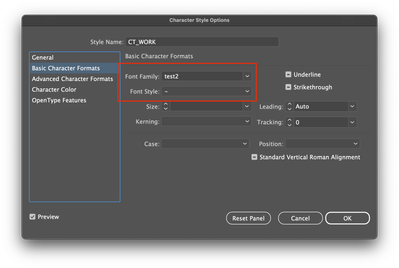
If I change "test2" to another font on my system, the script does not throw the error.
- Mark
Copy link to clipboard
Copied
Thank you.
1. I had try try catch, but it still can't apply to text object:
try {
style.applyTo(oText.textRange);
} catch (error) { }
2. Character style using a Composite Font, it is a font type of Japanese,
To create it refer: https://www.globalizationpartners.com/2016/03/09/illustrator-working-with-composite-font-for-japanes...
Copy link to clipboard
Copied
Sorry, i had try again with try catch, it is ok.
Thank you, it can apply.
Copy link to clipboard
Copied
Thank you for the link. You have taught me something today.
- Mark

Copy link to clipboard
Copied
I took too long to reply loll
anyway, it seems there might be something wrong with test2.
applying characterStyles[0] or [2] works fine
Copy link to clipboard
Copied
[test2] is a composite font.
I think, this is a bug of Adobe. Because with CC2020 can apply OK.
Copy link to clipboard
Copied
Yes it seems to be a bug. If you like you could lodge a bug. You can link the bug report to this thread, too.
- Mark
Copy link to clipboard
Copied
have you tried applying other composite fonts?
I get the same 285 error but using a try/catch bypasses the error and it seems to apply the Character Style succesfully.
var doc=app.documents[0];
var style=doc.characterStyles[1];
var oText=doc.textFrames[0];
try {
    style.applyTo(oText.textRange);
}
catch(e) {/*$.writeln(e)*/}Copy link to clipboard
Copied
Thank you.
Yes, It only occur error with composite font.


 AdChoices