


White background

Copier le lien dans le Presse-papiers
Copié
I'm seeing these white backgrounds when I'm trying to create an image within an 18X18 artboard. I exported one file where I was able to see the drawing within the 18X18. From the picture attached, you can see how it has the full white background as opposed to the drawing being within the 18x18 container. When I open the file in the app, the drawing looks fine but when I save it and it takes me back to the homepage, it looks like this. Anyone know how to correct that?



 8
Réponses
8
8
Réponses
8



Copier le lien dans le Presse-papiers
Copié
If you're exporting from Illustrator and want to preserve
the transparency. File>Export as a PNG format
Copier le lien dans le Presse-papiers
Copié
Thanks for the reply. It exports fine, it's when I save the file and I'm viewing it on the Home Screen. I'd like to view it in the page format that I set as opposed to having to view it as if it's on an 8.5X11 artboard.


Copier le lien dans le Presse-papiers
Copié
Did you check the use Artboards option?
Copier le lien dans le Presse-papiers
Copié
Where can I find that in the app?
Copier le lien dans le Presse-papiers
Copié
When you export, it is in the dialog where you give a name for the file.
Copier le lien dans le Presse-papiers
Copié
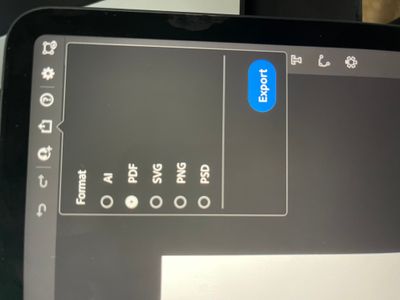
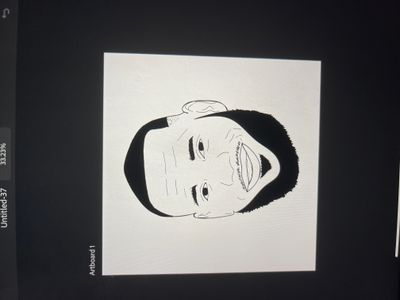

I'm not sure if my question is making sense to everyone so I'm attaching more pictures. The first picture is how I want it to look when I save it and close out of the project. There isn't an art board option in the iPad app for the art board. Do you know how to get my work once I save it to look like it does when I'm in the file? In the third picture, you can see the extra white space that I'm referring to.

Copier le lien dans le Presse-papiers
Copié
Are there perhaps paths or single anchor points in that space?
Even if invisible?
Also: the preview in the file overview might look wrong, but it really doesn't matter.
Copier le lien dans le Presse-papiers
Copié
Not that I know of. I have one drawing that does display correctly and the artboards are the same so I'm not sure why there's an inconsistenty. On the desktop it's not an issue, just the iPad app.


Préparez-vous ! Une expérience Adobe Community améliorée arrive en janvier.
En savoir plus
 AdChoices