- Home
- Illustrator on the iPad
- Discussions
- Can't open Illustrator Cloud documents created on ...
- Can't open Illustrator Cloud documents created on ...

Copy link to clipboard
Copied
Hi there
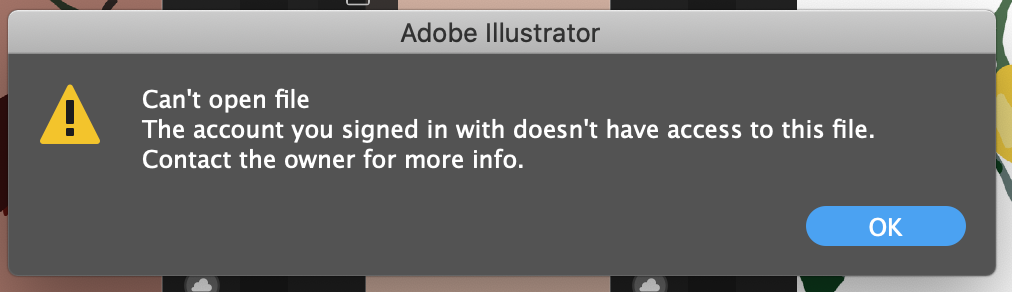
To get straight to the point. I have created an Illustrator file on my iPad using the Illustrator app. It is saved inside the Cloud Documents. Now I wanted to open said file on my Macbook. However this error message keeps popping up:
"Can't open file. The account you signed in with doesn't have access to this file. Contact the owner for more information"
Well I am the owner of the file and I have no clue. So asking myself won't solve this problem. And YES I am signed into my own account on both devices (I only have one account). So I am very confused as to why I don't have access to my own files that are saved inside my own account??
Any help is much appreciated!


 1 Correct answer

I was having the same error and I'm sure that I was logged in with the same account on both devices. I have found a workaround for this problem:
1. Tap on the share document icon inside the file on the iPad
2. Tap on the settings icon and toggle on people with the link can "Save a copy"
3. Tap on "Send Link" and copy the link
4. Paste the link on your macbook
5. Click on the three dots at the top right corner and you will find "Download"
For some reason "Open in Illustrator" button will give you the
...
 4
Replies
4
4
Replies
4


Copy link to clipboard
Copied
You need to confirm that you are signed in with the same Adobe ID and PW on both Illustrator for iPad and for Desktop.
First sign out:
- iPad: click your avatar in the upper right to open App Settings, then choose Account > Sign Out
- Desktop: Launch the CC app > Click the gear in the upper right, then choose Preferences > Sign Out
Then sign back in with your Adobe ID and PW.
~ Jane

Copy link to clipboard
Copied
I have the same issue. I just followed all recommendations, and I am still getting a message that I should contact the owner: me!
Any help is appreciated.
J

Copy link to clipboard
Copied
Are you logged in with the same account?
Can you access the files on the web in your CC account?
Copy link to clipboard
Copied
I was having the same error and I'm sure that I was logged in with the same account on both devices. I have found a workaround for this problem:
1. Tap on the share document icon inside the file on the iPad
2. Tap on the settings icon and toggle on people with the link can "Save a copy"
3. Tap on "Send Link" and copy the link
4. Paste the link on your macbook
5. Click on the three dots at the top right corner and you will find "Download"
For some reason "Open in Illustrator" button will give you the same error so downloading the content will solve this problem. It might not be the optimal way because if you made the changes on your macbook they won't appear on the iPad, but I guess it's better than nothing until Adobe fixes the issue.


Find more inspiration, events, and resources on the new Adobe Community
Explore Now
 AdChoices