
Participant
March 31, 2017
Question

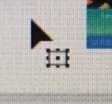
Only a few objects selectable, small box next to pointer

  • March 31, 2017
  • 1 reply
  • 1677 views

I searched for this and didn't find anything, but apologies if this question has been answered elsewhere.

I use AI every day, and this is a new one to me.

I can only select a few objects on the artboard. The cursor has a little box next to it, but I'm not sure what it means. Any ideas for how to get around this? This is AI cc.
Thanks for your help!

    This topic has been closed for replies.

    1 reply

    Mike_Gondek10189183
    Community Expert
    Community Expert
    March 31, 2017

    What Illustrator cc version and OS are you on?

    Guessing 2017 as can see that icon  when you are in the transform tool in CC 2017 and not the pointer tool. Can you try switching to the selection tool and lets us know what happens

    boblee84Author
    Participant
    March 31, 2017

    Yes, it's AI 2017 and El Capitan 10.11.6.

    I'm not sure what it was, but there was something weird about a few of the images I was using. I deleted them, started over, and now everything's fine. For now. Thank you for your response!

    Mike_Gondek10189183
    Community Expert
    Community Expert
    March 31, 2017

    HI Boblee,

    Glad to hear this is working for you. Would you have by any chance been working with the transparency palette and the make mask button?

    Please come back anytime should this come back or anything else we can assist with.