




Copy link to clipboard
Copied
Hi InDesign Friends:
I'm missing something fundamental here, but not sure what it is...
- I have a character style called No Break.
- It does not have a Font Style assigned.
- When I assign it via Find/Change to Regular text, it works as expected. But if I assign it to content that already has a character style assigned (specifically Small Caps or Italics)...
- It removes the character style on the match and changes that last letter to Regular.

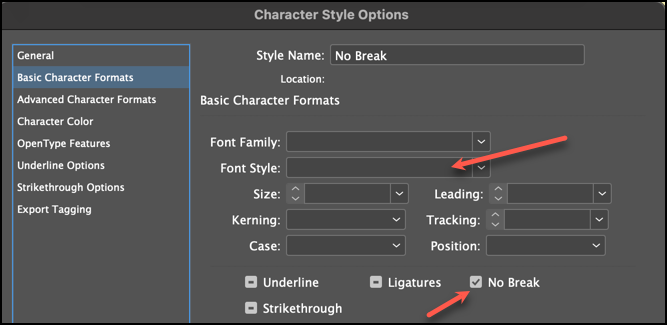
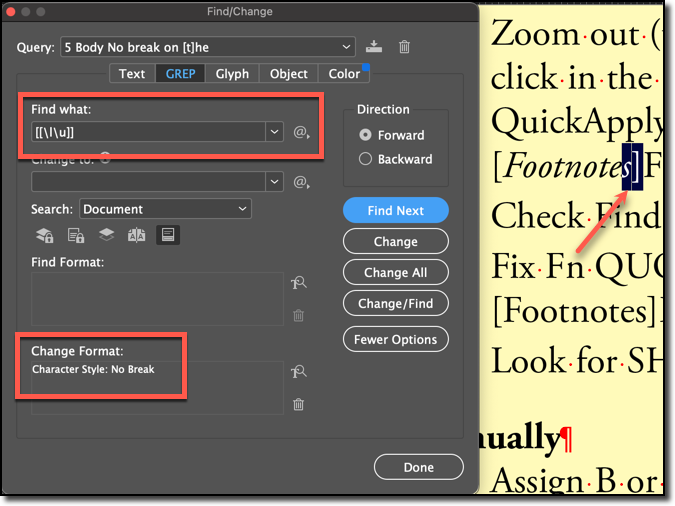
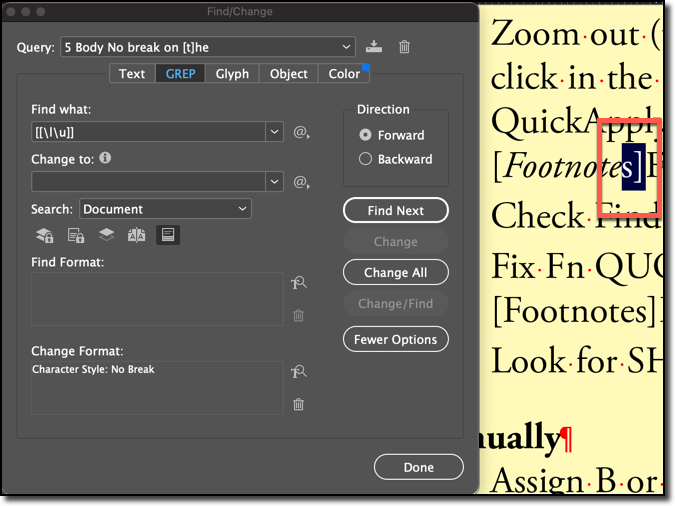
Why? And yes, I can make three passes in my FindChangeByList script: 1 for regular, 1 for small caps and 1 for italics but I'm missing the logic here. Why is the Font Style changing if it is not specified?
~Barb


 4 Correct answers

- When I assign it via Find/Change to Regular text, it works as expected. But if I assign it to content that already has a character style assigned (specifically Small Caps or Italics)...
Maybe I'm missing something obvious in your description, but isn't it as simple as the fact that you can only apply a single Character Style to any given bit of text? That is, your Paragraph Style denotes Minion Pro Regular, then you apply italics with a Character Style "Italics" that only has "[None] + Min
...

This. ID character styles do not stack or layer. It's a bit annoying, IMO. If you want an italicized word in the middle of a bolded sentence, you have to create a specific bold-italic style instead of simply layering Italic over Bold.
I suspect this behavior approaches bare-metal code and is not likely to be changed, so Occam's Razor (about unnecessarily multiplying entities) goes out the window. 🙂

Hey Barb, what happens if you approach that as a GREP style in the specific Body paragraph style? That is, passively?
I suspect this behavior approaches bare-metal code and is not likely to be changed
Every time I come off of a project where I'm working in CSS and come back to InDesign, I think of this, and shed a little tear.
Barb is so knowledgable that I expect a response any minute now, specifying that e.g. Italics is applied via GREP Style or something like that. Because those styles (GREP Styles, Nested Styles, and Line Styles) do stack, if they don't use Bold or Italic or whatever. You can apply e.
... 7
Replies
7
7
Replies
7

Copy link to clipboard
Copied
- When I assign it via Find/Change to Regular text, it works as expected. But if I assign it to content that already has a character style assigned (specifically Small Caps or Italics)...
Maybe I'm missing something obvious in your description, but isn't it as simple as the fact that you can only apply a single Character Style to any given bit of text? That is, your Paragraph Style denotes Minion Pro Regular, then you apply italics with a Character Style "Italics" that only has "[None] + Minion Pro Italic". Then you run your GREP, which is finding some text and applying your no-break Character Style to it. Doing so removes all previously applied Character Styles, right?
Copy link to clipboard
Copied
This. ID character styles do not stack or layer. It's a bit annoying, IMO. If you want an italicized word in the middle of a bolded sentence, you have to create a specific bold-italic style instead of simply layering Italic over Bold.
I suspect this behavior approaches bare-metal code and is not likely to be changed, so Occam's Razor (about unnecessarily multiplying entities) goes out the window. 🙂
Copy link to clipboard
Copied
I suspect this behavior approaches bare-metal code and is not likely to be changed
Every time I come off of a project where I'm working in CSS and come back to InDesign, I think of this, and shed a little tear.
Barb is so knowledgable that I expect a response any minute now, specifying that e.g. Italics is applied via GREP Style or something like that. Because those styles (GREP Styles, Nested Styles, and Line Styles) do stack, if they don't use Bold or Italic or whatever. You can apply e.g. a color with a GREP Style and tracking with a Nested Style and then manually apply your Character Style with Bold, but if any one of those GREP or Nested Styles applies Italic, you'll run into Barb's problem. I think. I have not tested it thorougly, but it looks like Character Styles applied by the user (whether by clicking on the Style in the panel, or by using Find/Change) override both GREP and Nested Styles.
Copy link to clipboard
Copied
OMG. This is what I needed, Joel. 🤯
I already had it defined in my GREP style and then at some point I added it to my FindChangeByList script. And that's what derailed it. Thank you, thank you, thank you. I did it so long ago I had completely forgotten.
~Barb
Copy link to clipboard
Copied
Hey Barb, what happens if you approach that as a GREP style in the specific Body paragraph style? That is, passively?
Copy link to clipboard
Copied
@Joel Cherney. It's just that simple: applying a second character style removes the first one.
And @Mike Witherell, it's the same if I apply it through F/C or just click to assign it. I can manually assign No Break but I can't do it with a style without removing the first one. (Edit: It's been a long day, Mike. I misread your post. Yes, a GREP style was the actual solution.)
All of you were right. 🤣 Thanks Joel, James and Mike!
~Barb

Copy link to clipboard
Copied
I use, when possible, overlapping character styles. Manually is only 1 character style possible, but it is often possible to use GREP and nested Styles via Paragraph Style. Above them I can apply another character style without deleting the properties of these character styles.
In other cases I have to create further character styles with more properties.
Therefore it seems to me very important to create correct paragraph styles and whenever it is possible to include GREP and nested Styles which helps to work correct.


Find more inspiration, events, and resources on the new Adobe Community
Explore Now
 AdChoices