
Exit
  • Global community
    • Language:
      • Deutsch
      • English
      • Español
      • Français
      • Português
  • 日本語コミュニティ
  • 한국 커뮤니티
6

Help with a script

Community Beginner ,
Aug 21, 2023 Aug 21, 2023

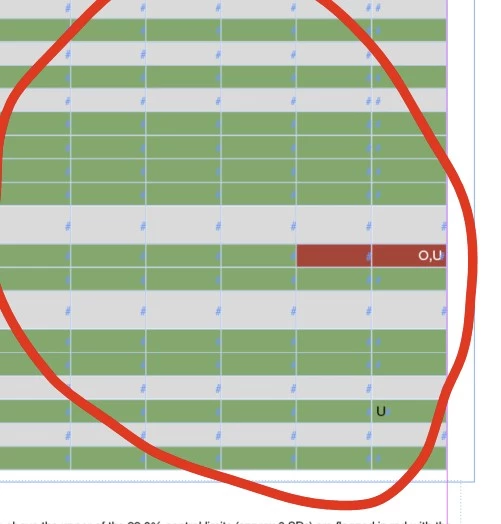
Hi, can you please help me? I need a script that can detect when the cells in a table have content, if they have content the font inside the cell should be changed to white bold and the colour to red (specific tint that I can add later). If the cell doesn't have any content it should be coloured green (again on a specific tint I have).
NJR5F92_1-1692630740352.png


TOPICS
Scripting
693
Translate
Report
Community guidelines
Be kind and respectful, give credit to the original source of content, and search for duplicates before posting. Learn more
community guidelines
LEGEND ,
Aug 21, 2023 Aug 21, 2023

If you work on a PC - you don't need a dedicated script, you could use free version of my ID-Tasker and with few simple Rules build a Task that will do it for you. Then you can easily modify those Rules to get a different result.


In fact, you would need only one Rule:

RobertTkaczyk_0-1692634654495.png


There are also different rules if you want to process only specific Range of Cells, Rows or Columns. 


Translate
Report
Community guidelines
Be kind and respectful, give credit to the original source of content, and search for duplicates before posting. Learn more
community guidelines
LEGEND ,
Aug 21, 2023 Aug 21, 2023

Fresh of the press - and still free:


RobertTkaczyk_0-1692638896962.png

First Rule is to let ID-Tasker know which Table should be processed - it checks what is selected and is pretty flexible.

Of course you can select "empty" Style on the list - if Cells should't be styled / modified.


Translate
Report
Community guidelines
Be kind and respectful, give credit to the original source of content, and search for duplicates before posting. Learn more
community guidelines
Community Expert ,
Aug 21, 2023 Aug 21, 2023

I'm not a great scripter - but I am trying

I can get so far and just giving up now

This creates the tint swatch - but duplicates the black swatch for me - and I can't fix it

And I can't get the white text - no matter if I try white, paper or [paper]


var doc = app.activeDocument;

var table = doc.selection[0];


var redColor = doc.colors.add({space: ColorSpace.RGB, colorValue: [255, 0, 0]});
var greenColor = doc.colors.add({space: ColorSpace.RGB, colorValue: [0, 255, 0]});
var whiteColor = doc.swatches.item("[Paper]"); // Use the [Paper] swatch for white


var boldCharacterStyle = doc.characterStyles.item("BoldStyle");
if (!boldCharacterStyle.isValid) {
    boldCharacterStyle = doc.characterStyles.add({name: "BoldStyle"});
    boldCharacterStyle.fontStyle = "Bold"; // Set the style to Bold
}


for (var r = 0; r < table.rows.length; r++) {
    var row = table.rows[r];
    

    for (var c = 0; c < row.cells.length; c++) {
        var cell = row.cells[c];
        var cellTexts = cell.texts; // Get all Text objects in the cell
        
        if (cellTexts.length > 0) {
            var cellText = cellTexts[0].contents;
            

            if (cellText !== "") {
                cell.fillColor = redColor;
                cellTexts[0].fillColor = [paper]Color;
                

                cellTexts[0].applyCharacterStyle(boldCharacterStyle);
            } else {
                cell.fillColor = greenColor;
            }
        } else {

            cell.fillColor = greenColor;
        }
    }
}
Translate
Report
Community guidelines
Be kind and respectful, give credit to the original source of content, and search for duplicates before posting. Learn more
community guidelines
Community Expert ,
Aug 21, 2023 Aug 21, 2023

Hi @Eugene Tyson,

I did not understand the duplicate issue that you mentioned. The only thing I could reproduce is that if you execute the script while the Black color is selected in the swatches panel then the color that the script creates is named Back Copy etc, is this what you are referring to? If so then it can be resolved by setting the name of the created colors explicitly


var redColor = doc.colors.add({space: ColorSpace.RGB, colorValue: [255, 0, 0], name:"Red"});
var greenColor = doc.colors.add({space: ColorSpace.RGB, colorValue: [0, 255, 0], name:"Green"});


For the While color you should use the method itemByName and the color name would be Paper. Try the following


var whiteColor = doc.swatches.itemByName("Paper"); // Use the [Paper] swatch for white


The other issue in the code is the following


cellTexts[0].fillColor = [paper]Color;
It should be
cellTexts[0].fillColor = whiteColor;


Also, do note that its a good practice to check for the existence of the color before creating it else the script would crash if you try to create the same color again. So this script would crash on color creation if you run it twice on the same document,

Let me know if this resolves all the issues.

-Manan


Translate
Report
Community guidelines
Be kind and respectful, give credit to the original source of content, and search for duplicates before posting. Learn more
community guidelines
Community Expert ,
Aug 21, 2023 Aug 21, 2023

Thank you for the pointers


I've made edits - and it might be the best written script - it seems to work


var doc = app.activeDocument;
var table = doc.selection[0];

// Check for "Red" swatch
var redColor = doc.colors.itemByName("Red");
if (!redColor.isValid) {
    redColor = doc.colors.add({space: ColorSpace.RGB, colorValue: [255, 0, 0], name: "Red"});
}

// Check for "Green" swatch
var greenColor = doc.colors.itemByName("Green");
if (!greenColor.isValid) {
    greenColor = doc.colors.add({space: ColorSpace.RGB, colorValue: [0, 255, 0], name: "Green"});
}

// Paper swatch exists
var whiteColor = doc.swatches.itemByName("Paper");
if (!whiteColor.isValid) {
    whiteColor = doc.swatches.add({name: "Paper"});
}

var boldCharacterStyle = doc.characterStyles.item("BoldStyle");
if (!boldCharacterStyle.isValid) {
    boldCharacterStyle = doc.characterStyles.add({name: "BoldStyle"});
    boldCharacterStyle.fontStyle = "Bold"; // Set the style to Bold
}

for (var r = 0; r < table.rows.length; r++) {
    var row = table.rows[r];

    for (var c = 0; c < row.cells.length; c++) {
        var cell = row.cells[c];
        var cellTexts = cell.texts; // Get all Text objects in the cell

        if (cellTexts.length > 0) {
            var cellText = cellTexts[0].contents;

            if (cellText !== "") {
                cell.fillColor = redColor;
                cellTexts[0].fillColor = whiteColor;

                cellTexts[0].applyCharacterStyle(boldCharacterStyle);
            } else {
                cell.fillColor = greenColor;
            }
        } else {
            cell.fillColor = greenColor;
        }
    }
}
Translate
Report
Community guidelines
Be kind and respectful, give credit to the original source of content, and search for duplicates before posting. Learn more
community guidelines
LEGEND ,
Aug 22, 2023 Aug 22, 2023

Nice work. 


But if I may suggest few things:

- instead of duplicating the same code - create a function that you can call that will return new color swatch - your code will look better and you can quickly use it in your other scripts, 

- "Paper" color is ALWAYS present in the document, at the beginning of the collection, so you don't have to check for it - you can just refer to it by its index - I think in JS it will be "2" / third, where "0" / first is "[None]", then "[Registration]" - "1" / second.

And the correct name is "[Paper]". 


Just my 2 cents. 


Translate
Report
Community guidelines
Be kind and respectful, give credit to the original source of content, and search for duplicates before posting. Learn more
community guidelines
Community Expert ,
Aug 22, 2023 Aug 22, 2023

Yeh I thought about that one - and thought what if they wanted another colour for the text instead of paper - so I just included it - but you're right it's probably not necessary. 

Translate
Report
Community guidelines
Be kind and respectful, give credit to the original source of content, and search for duplicates before posting. Learn more
community guidelines
Community Expert ,
Aug 22, 2023 Aug 22, 2023

And another tip for you, @Eugene Tyson -- you can grab all the table's cells in one go, no need to go through the rows:


var doc = app.activeDocument;
var cells = doc.selection[0].cells.everyItem().getElements();


Note the use of everyItem().getElements(). When you iterate over "doc.selection[0].cells", you refer to a collection of the cells and recreate the collection in each iteration. When you use "doc.selection[0].everyItem().getElements()" you create an array of cells, which is a one-off.


You should almost always avoid processing a collection, and convert the collection into an array. In a big table the difference can be quite dramatic.

Translate
Report
Community guidelines
Be kind and respectful, give credit to the original source of content, and search for duplicates before posting. Learn more
community guidelines
LEGEND ,
Aug 22, 2023 Aug 22, 2023

And as an additional benefit - this will return ONLY selected Cells - not the whole table.


Translate
Report
Community guidelines
Be kind and respectful, give credit to the original source of content, and search for duplicates before posting. Learn more
community guidelines
Community Expert ,
Aug 22, 2023 Aug 22, 2023

Thank you very much. I was wondering if there a quicker way - seemed quite slow on my basic sample I created for myself.


Translate
Report
Community guidelines
Be kind and respectful, give credit to the original source of content, and search for duplicates before posting. Learn more
community guidelines
Community Beginner ,
Aug 22, 2023 Aug 22, 2023

Thank you all for your help. Eugene what should the final code look like now?

Translate
Report
Community guidelines
Be kind and respectful, give credit to the original source of content, and search for duplicates before posting. Learn more
community guidelines
Community Beginner ,
Aug 22, 2023 Aug 22, 2023

Code needs to work with selected cells in a table, not on the whole table as there is different info that shouldn't be modified!

Translate
Report
Community guidelines
Be kind and respectful, give credit to the original source of content, and search for duplicates before posting. Learn more
community guidelines
Community Expert ,
Aug 22, 2023 Aug 22, 2023

Oh right - that might take me longer to figure out. Some good scripters here hopefully they can lend a hand.

Translate
Report
Community guidelines
Be kind and respectful, give credit to the original source of content, and search for duplicates before posting. Learn more
community guidelines
Community Expert ,
Aug 22, 2023 Aug 22, 2023
LATEST

As @Robert at ID-Tasker mentioned earlier, the sample code returns only the selected cells. So you'd get something like this:


var doc = app.activeDocument;

// Check swatches and styles

var cell;
var cells = doc.selection[0].cells.everyItem().getElements();

for (i = 0; i < cells.length; i++) {
  cell = cells[i];
  // The rest is the same
}


Translate
Report
Community guidelines
Be kind and respectful, give credit to the original source of content, and search for duplicates before posting. Learn more
community guidelines