Copy link to clipboard
Copied
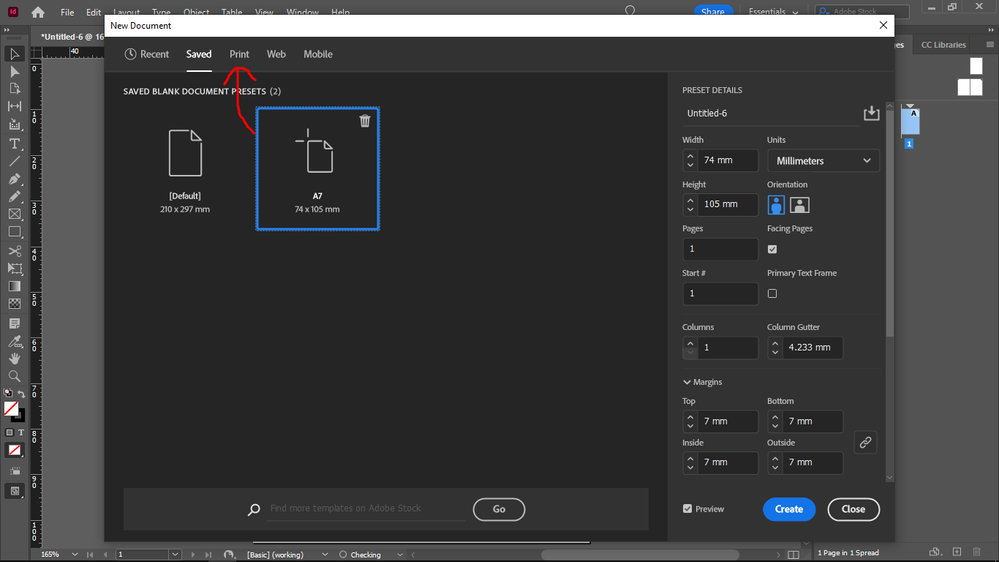
I created a new A7 document preset, but it's listed at "Saved", not at "Print".
Print presets store print specific data, so my preset must be a print preset, not a "Saved" preset.
Views
Translate
Report
I believe the presets in the Print, Web and Mobile categories are built-in. They cannot be edited or added to.
You'll just have to create a Saved Preset.
Votes
If you think it's important to your workflow to be able to add additional presets specific to the Print (or Web or Mobile) workflows, you could make a fearture request in the InDesign User Voice website:
https://indesign.uservoice.com/forums/601021-adobe-indesign-feature-requests?category_id=208333
InDesign product managers and engineers are more likely to read requests there. Others can vote in favor of a request.
never-displayed




 2
Replies
2
Replies


 AdChoices