


- Home
- InDesign
- Discussions
- Re: InDesign CC2020 Presentation Mode causing scre...
- Re: InDesign CC2020 Presentation Mode causing scre...
InDesign CC2020 Presentation Mode causing screen glitch on macOS Catalina

Copy link to clipboard
Copied
I just got a new laptop and updated all my Adobe apps to 2020 versions - my computer is updated to macOS catalina, and everything seems to be working flawlessly, except that when I try and view a document in preview mode in InDesign, my screen glitches. If I click around or take a screen shot, eventually it will go back to normal and show me the preview, but it does this about 3/4 times that I try and view a page in presentation mode.

{Renamed by MOD}


 18
Replies
18
18
Replies
18



Copy link to clipboard
Copied
Hi,
I'll be happy to help.
We have reported this issue to our Product Team and it is being worked upon.
In the meantime, as a workaround, I'd recommend you to turn off GPU Performance from the preferences. I have also attached a screenshot below:
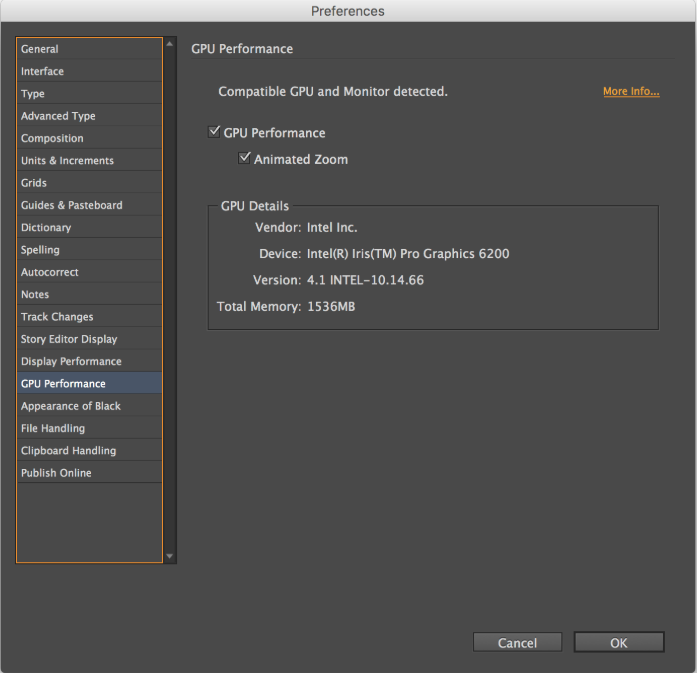
Hope this helps!
Regards,
Ashutosh

Copy link to clipboard
Copied
So this bug remains unsquashed! Any updates coming soon?


Copy link to clipboard
Copied

Copy link to clipboard
Copied
Thank you @AshutoshRox!
I had the same problem: InDesign CC2020, Catalina Version 10.15.2 (19C57) causing a pixelated screen on presentation mode. I turned off the GPU Performance from the preferences and it seems to be working fine now. Let's cross fingers...
Best regards,
– Karla

Copy link to clipboard
Copied
Hello,
I can see these comments were added here last year ( 2019 ) in November and now it's 2020 almost February and I just came upon this issue while working on inDesign 2020 on my new Mac with Catalina OS and it's still glitching on GPU preview performance. I just wanted to ask if the issue has been solved and I can fix it somehow, or it's still working progress?
Thanks a lot in advance!
Copy link to clipboard
Copied
In fairness to the Adobe engineers, if this was an easy fix, it would have been done long ago.
Copy link to clipboard
Copied
Ah ok, thank you! It's just when I put it on CPU performance just drop significantly for me...
Copy link to clipboard
Copied
Same issue here. Very annoying bug! Fixed soon I hope.
Copy link to clipboard
Copied
I actually think I've figure it our how to solve it, or at least it does not glitch for me anymore.
I went to Energy saver preferences and I've unticked the automatic graphic card switching, so the laptop is always running on high-end graphic card and after that, I've not seen any glitches, so maybe you should try to do that and others too, so we can see if it's really helpful, or it's just me.
Let me know, how does it work for you guys.

Copy link to clipboard
Copied
Thanks pertermihok!
I had the same problem (macbook pro 2016, indesign CS 2020) since monthes – very ennoying – and I just tried your tricks with the energy saver: it works for me too!
Copy link to clipboard
Copied
Hey, I'm glad that it helped! The only thing about it that it worked for me for some days, but now it's back on and it's glitching again, so I was forced to use CPU performance again, to avoid glitching...I hope they will fix it soon, but once again I'm glad that it somehow worked for you and I hope it will last too.

Copy link to clipboard
Copied
This will sound totally random, but copy/paste this line in Terminal and reboot your Mac:
defaults write -g NSRequiresAquaSystemAppearance -bool Yes
Then try to re-enable GPU option and let me know if it works. It did for me and I'm back to GPU smoothness like on Mojave.
Good luck!
Copy link to clipboard
Copied
Hi!
Thanks for your message I really appreciate your concern. I've tried to paste that line to my terminal and reboot the mac, but after swapping to GPU in InDesign it glitched again, so it did not work for me, unfortunately.
Thanks though!
Copy link to clipboard
Copied
Sorry to read that, I'm guessing this hack works only on specific video cards then...
Copy link to clipboard
Copied
Well, I did some research of what exactly does this code you've sent to me and it apparently just changes the light/dark mode, but with leaving the top bar with opposite mode, for example, if you have dark mode it will swap to light mode, but leave the top bar dark.
Copy link to clipboard
Copied
Yes I posted about it in another discussion here :
I know this is really out of left field, but for me it fixes my problem with GPU issues. How weird is that?
Copy link to clipboard
Copied
Oh ok, I see.
It is a bit weird indeed, but most important is that it works for you. I will have to wait for another solution, or adobe update, which will fix it.

Copy link to clipboard
Copied
I just got the same glitch problem, and unticked the box. Looks like it works! Thank you.


Find more inspiration, events, and resources on the new Adobe Community
Explore Now
 AdChoices