Exit
  • Global community
    • Language:
      • Deutsch
      • English
      • Español
      • Français
      • Português
  • 日本語コミュニティ
  • 한국 커뮤니티
0

Inner shadow bug when exporting to PDF

New Here ,
Apr 26, 2023 Apr 26, 2023

Dear all, 

I've adapted a typeface to be able to have the overlapping letters in indesign. 
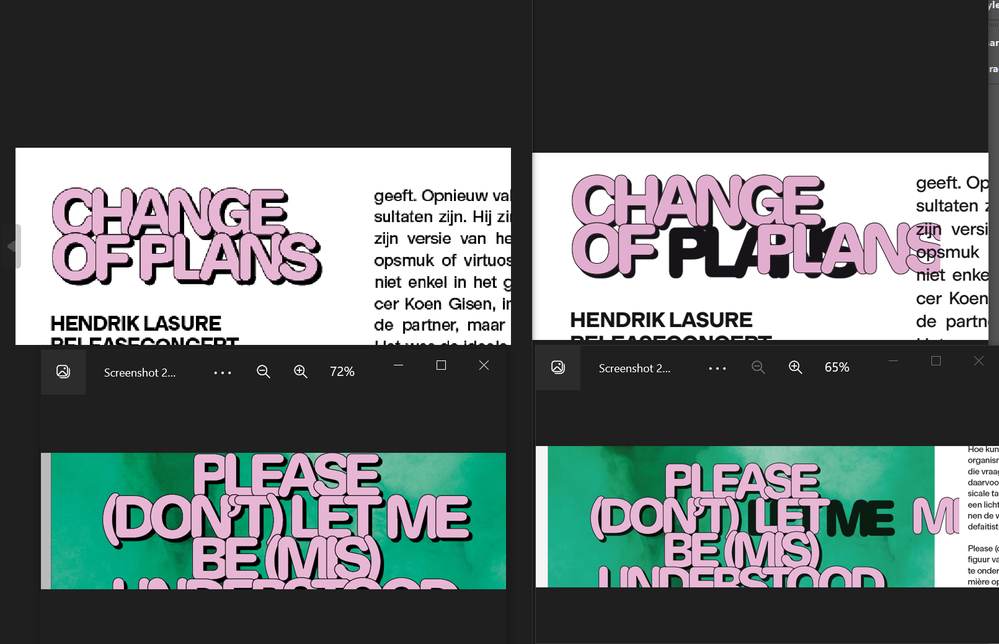
To do this i have hardcoded the white (fill) and black (outline) into the font in glyphs. Then i found a way to color this font. I use an inner shadow and just offset the shadow to the maximum allowed distance. All was going well up until the time that i exported the file to pdf. 

On the screenshot you can see the bug on the right hand side, the letters get pushed a random distance to the right, i tried different effects but it all seems to have the same result when i export. 


Any thoughts? 

Kind regards. Screenshot 2023-04-26 140449.png


TOPICS
Bug , Import and export , Print
314
Translate
Report
Community guidelines
Be kind and respectful, give credit to the original source of content, and search for duplicates before posting. Learn more
community guidelines
Community Expert ,
Apr 26, 2023 Apr 26, 2023

Hi @Jan5E40 , does it happen if you export a flattened PDF, e.g. PDF/X-1a?

Translate
Report
Community guidelines
Be kind and respectful, give credit to the original source of content, and search for duplicates before posting. Learn more
community guidelines
New Here ,
Apr 26, 2023 Apr 26, 2023
LATEST

hello Rob, just finished some tests with different exports. 
Indeed: "Press quality - PDF/X-1a:2001 - Transparancy flattener preset: High resolution" seems to do the trick. 


Translate
Report
Community guidelines
Be kind and respectful, give credit to the original source of content, and search for duplicates before posting. Learn more
community guidelines
