Hi Imagine,
What is really fun with InDesign swatches is that, depending on how the user manipulates the document, it may sometimes verify the following assertion:
doc.swatches.length < doc.unusedSwatches.length
which at first glance seems absurd.
In fact, the concept of swatch has two different scopes according to the context—yes, this is very confusing!
(1) A Swatch_1 (primary meaning) usually refers to an "abstract class" that addresses as well: colors, tints, gradients, mixed inks, mixed ink groups, and even a special instance, the [None] swatch (the only element whose actual cast is Swatch).
(2) A Swatch_2 (secondary meaning) refers to a NAMED Swatch_1, i.e. an element that is shown in the Swatches panel (and whose name property is defined).
The doc.swatches collection only sees Swatch_2 elements, while the doc.unusedSwatches array may also contain Swatch_1 elements, i.e. anonymous colors or tints that are not used in the layout but still exist behind the scene.
To my knowledge, an anonymous Swatch_1 can only be of type Color or Gradient. Each time the user plays with the sliders in the Colors panel or in the Gradients panel, I think InDesign mutely creates the corresponding anonymous Swatch_1 elements, which increases the unusedSwatches count!
Note that unused swatches and anonymous swatches are two really different things. An anonymous Swatch_1 may be in use (e.g. the user locally applies an unnamed color) and conversely a strict named Swatch_2 may be unused (as shown by the "Select All Unused" feature).
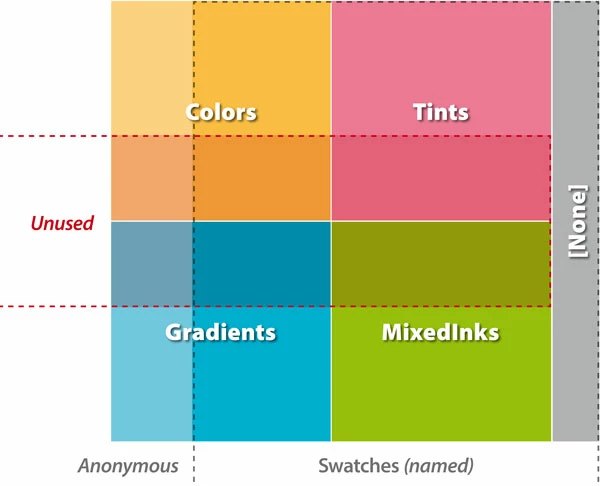
A serious limitation of the DOM is that we have no direct access to all anonymous swatches as such.
It is possible to investigate on the anonymous swatches in use through:
app.menuActions.itemByName("$ID/Add All Unnamed Colors").invoke(); // only target anonymous swatches IN USE
but the obscure swatches which are both anonymous and unused won't appear. Therefore it is quite difficult to analyze in depth these elements via a script. Maybe IDML is more verbose on that question…
@+
Marc


 AdChoices