Exit
  • Global community
    • Language:
      • Deutsch
      • English
      • Español
      • Français
      • Português
  • 日本語コミュニティ
  • 한국 커뮤니티
1

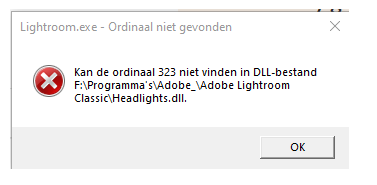
cannot find ordinal

New Here ,
May 22, 2022 May 22, 2022

Version Lightroom Classic: 11.3.1
Platform: Windows 10 21H2 Build: 19044.1706
(2 intel CPU's: intel xeon cpu e5-2640 v4 @ 2.40ghz, 64.0 GB ram, 3 TB storage and a NVIDIA Quadro M4000 version 512.78)

So when I tried to open Lightroom Classic and regular lightroom in Adobe Creative Cloud it just doenst work, nothing happens. But when I do i with the shortcut on my desktop it give me the error " cannot find ordinal 323 inside DLL-file  F:\ .... \ Headlights.dll ". Then I press OK and te next one pops up with " cannot find ordinal 277 inside DLL-file  F:\ .... \substrate.dll " (like in the pictures but its in a other language)and a nother one. The problem is only on this PC because my old one didn't have the error. I have tried reinstalling Adobe Creative Cloud, going 3 version back in Lightroom Classic but didn't work can someone help me? thanks in advance!

TOPICS
Windows
232
Translate
Report
Community guidelines
Be kind and respectful, give credit to the original source of content, and search for duplicates before posting. Learn more
community guidelines
New Here ,
Jan 30, 2024 Jan 30, 2024

I have the same problem with the ordinal numbers. Everything was fine until one day just out of the sudden I cannot open it. I REALLY tried everything :((

Translate
Report
Community guidelines
Be kind and respectful, give credit to the original source of content, and search for duplicates before posting. Learn more
community guidelines
LEGEND ,
Jan 30, 2024 Jan 30, 2024
LATEST
Translate
Report
Community guidelines
Be kind and respectful, give credit to the original source of content, and search for duplicates before posting. Learn more
community guidelines