


- Home
- Lightroom Classic
- Discussions
- Eos R5c CR3 files colour issues on Lightroom
- Eos R5c CR3 files colour issues on Lightroom
Eos R5c CR3 files colour issues on Lightroom

Copy link to clipboard
Copied
There seems to be a greenish tint on the raw files shot on Eos R5C. Is anyone else having the same issues?


 9
Replies
9
9
Replies
9


Copy link to clipboard
Copied
Can you upload a raw to something like Dropbox so others can examine it?
Copy link to clipboard
Copied
hey here is a link for google drive for 2 files. on lightroom and capture one I see a slight tint of green/ magenta
https://drive.google.com/drive/folders/1v2x0OPyNA0PPITLc4EijlT3Dd7l0ShDw?usp=sharing
Copy link to clipboard
Copied
Not seeing this as green, nor do the RGB numbers of the bkgnd back this up (when R=G=B, it is dead nuts neutral):

If anything, a tad blue:
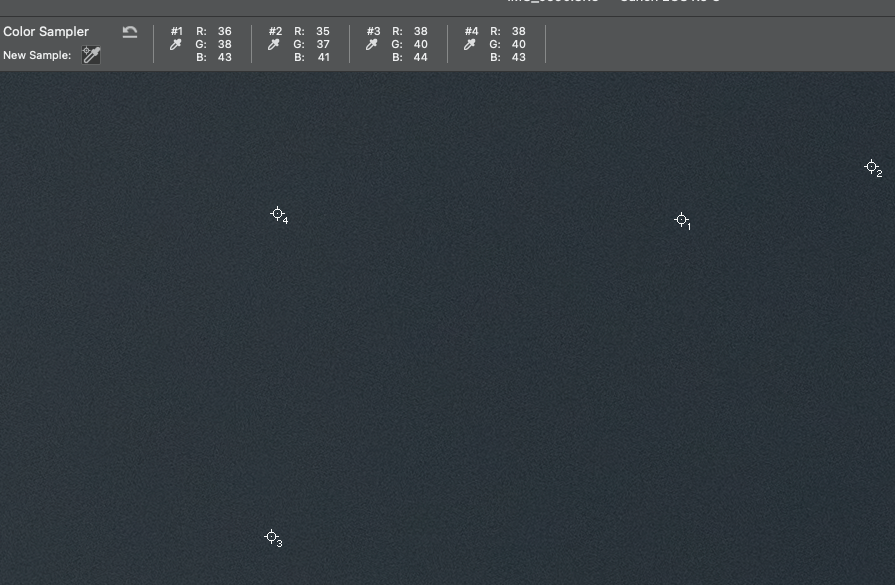
Maybe your GPU or display profile is the issue if you don't see gray.
Copy link to clipboard
Copied
Any advice on what going mage profile I should be using on MacBook Pro M1 chip?
Copy link to clipboard
Copied
GPU or display profile*
Copy link to clipboard
Copied
GPU or display profile*
By @default3j8mxdtvie9z

First, try disabling GPU in the preferences (Performance). Any better?
If not, recalibrate and build a new ICC display profile; the old one might be corrupted. If you are using software/hardware for this task, be sure the software is set to build a matrix, not LUT profile, Version 2, not Version 4 profile.
If turning OFF the GPU works, it's a GPU bug, and you need to contact the manufacturer or find out if there's an updated driver for it. This is why disabling GPU is an option as more and more functionality moves to the GPU in newer versions of many Adobe products. Disable third-party graphics accelerators. Third-party GPU overclocking utilities and haxies aren't supported.
Also see: https://helpx.adobe.com/lightroom-classic/kb/troubleshoot-gpu.html
If the GPU and display profile isn't causing the problem, see:
https://helpx.adobe.com/lightroom-classic/kb/lightroom-gives-error-preview-cache.html
Copy link to clipboard
Copied
So your preview looks very green and not like my screenshot?
Copy link to clipboard
Copied
Not very green but I see a tint of green on the previews both when shooting feathered on capture one and when looking at the files on lightroom. but when exported the files look normal.
I will try disabling the gpu in the morning and let you know if that fixes the issue. Thank you for your help. I'm very grateful.
Copy link to clipboard
Copied
Nothing I've seen or reported have any bearing on Capture One. It is unique onto itself and has zero relationship to Camera Raw.


Find more inspiration, events, and resources on the new Adobe Community
Explore Now
 AdChoices