Exit
  • Global community
    • Language:
      • Deutsch
      • English
      • Español
      • Français
      • Português
  • 日本語コミュニティ
  • 한국 커뮤니티
0

Exporting metadata with photo

New Here ,
May 09, 2020 May 09, 2020

Many times when I export & send a photo I am asked what my camera settings were (focal length, exposure, ISO, etc). Is there a way to include this data with my exported photo? It would be ok if it was "printed" on the photo or just a sidebar with info (or something like that). Thanks. 

1.4K
Translate
Report
Community guidelines
Be kind and respectful, give credit to the original source of content, and search for duplicates before posting. Learn more
community guidelines
LEGEND ,
May 09, 2020 May 09, 2020

First off, when you export your file within lightroomWhen you export a photo within lightroom, the metadata should be hard coded into the file.


Are you sure that your problem is during the export within lightroom, or during publishing? Foe example, if you post to Facebook, lots of metadata is stripped.


Translate
Report
Community guidelines
Be kind and respectful, give credit to the original source of content, and search for duplicates before posting. Learn more
community guidelines
LEGEND ,
May 09, 2020 May 09, 2020

Ah, are you sure the metadata is missing? Some people viewing have no clue as to how to read the metadata.


Translate
Report
Community guidelines
Be kind and respectful, give credit to the original source of content, and search for duplicates before posting. Learn more
community guidelines
LEGEND ,
May 09, 2020 May 09, 2020

And if you sre using s Publish Service in Lightroom, pay attention to metadata options in the particular publishing setup.


Translate
Report
Community guidelines
Be kind and respectful, give credit to the original source of content, and search for duplicates before posting. Learn more
community guidelines
Community Expert ,
May 09, 2020 May 09, 2020

There are multiple ways to include metadata with your photos. You can embed the metadata in the image file so that other applications and websites can display the metadata in their own panel by the image, although not as part of the visible image; or you can have the metadata “printed” on the photo itself.


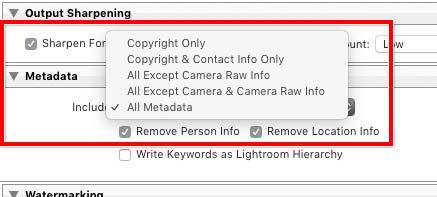
If you want to embed the metadata in the image without showing it on the image, that’s built into Lightroom Classic. But that happens only when you export with the correct settings.
 

Lightroom-Classic-9-export-metadata.jpg


The screen shot above is of the Export dialog box in Lightroom Classic. If you want to invisibly embed the camera metadata you mentioned, I think you have to choose All Except Camera Raw Info or All Metadata. If you choose any of the other three options, the camera metadata will not be embedded in the images.


If you want the camera metadata visible on the image, that is not built into Lightroom Classic. But there is a plug-in that will do it, called LR Mogrify. You would use its Text Annotation option, and you can read about that by going to this link and scrolling down a bit:

https://www.photographers-toolbox.com/products/lrmogrify2.php?sec=quickguide

Translate
Report
Community guidelines
Be kind and respectful, give credit to the original source of content, and search for duplicates before posting. Learn more
community guidelines
Explorer ,
May 10, 2020 May 10, 2020

With Adobe Bridge you can easily check which metadata are contained in an image and which may be missing.

Regards | System: Win10 Pro, NEC 27", LRC 9.2.1, PS 2020 v21.1.2, Canon DSLR
Translate
Report
Community guidelines
Be kind and respectful, give credit to the original source of content, and search for duplicates before posting. Learn more
community guidelines
Advocate ,
May 10, 2020 May 10, 2020
LATEST
Translate
Report
Community guidelines
Be kind and respectful, give credit to the original source of content, and search for duplicates before posting. Learn more
community guidelines
