


- Home
- Lightroom Classic
- Discussions
- Re: Falla visualización en revelar
- Re: Falla visualización en revelar

Copy link to clipboard
Copied
Buenas a todos.
Cuando paso al modulo de Revelar la imagen se ve modificada, mientras que en Bbiblioteca se ve bien. Simplemente eso, he probado de todo.
Gracias de antemano.



 1 Correct answer

Are you saying the Library module and Develop module previews look different? If so try 1) closing LrC, 2) shutdown your sysetm, 3) restart your system, and 4) Import some new image files shot today with File Handling> Build Previews set to Standard. If the Library module previews and Develop module previews still look different go to menu Edit Preferences> Performance> and set 'Use Graphics Processor' to Off. Close all applications, shut down your system, restart your system and try LrC again.
...
 29
Replies
29
29
Replies
29


Copy link to clipboard
Copied
Usually when this type of appearance mismatch between Library and Develop Module happens, you monitor profile is corrupted, and you should re-calibrate your monitor.
Copy link to clipboard
Copied
El monitor está correcto, porque todo se ve bien. No es por tema de colores.
Copy link to clipboard
Copied
I disagree. Your monitor profile is the most likely culprit here.
Copy link to clipboard
Copied
¿Donde puedo calibrar la pantalla? Por probar no pierdo nada...
Copy link to clipboard
Copied
Maybe you should state, in words, what you see as the difference between the two photos.
Also, the screen capture is in the Develop Module. You are showing two different edits, the photo before editing and the photo after editing. This seems to be the wrong comparison.
Can you show us the photo in the Library Module and the photo in the Develop Module?
Copy link to clipboard
Copied
La foto de la izquierda es la de la Biblioteca y la de la izquierda de Revelar. Con la captura de pantalla no se aprecia bien, pero hay mas contraste y ruido
Copy link to clipboard
Copied
y la de la derecha de Revelar* (me he equivocado)
Copy link to clipboard
Copied
I'm not sure I accept your explanation. Antes and después translate to before and after, and this screen is only available in the Develop Module. Those words do not translate to library module and develop module. So you are looking at the "antes" version of the photo on the left and the "después" version on the right, and they should look different.
Copy link to clipboard
Copied
Lo se y es extraño porque no he modificado nada. El RAW siempre está modificado en Revelar. Creo que puede ser algo relacionado con la GPU.
Copy link to clipboard
Copied
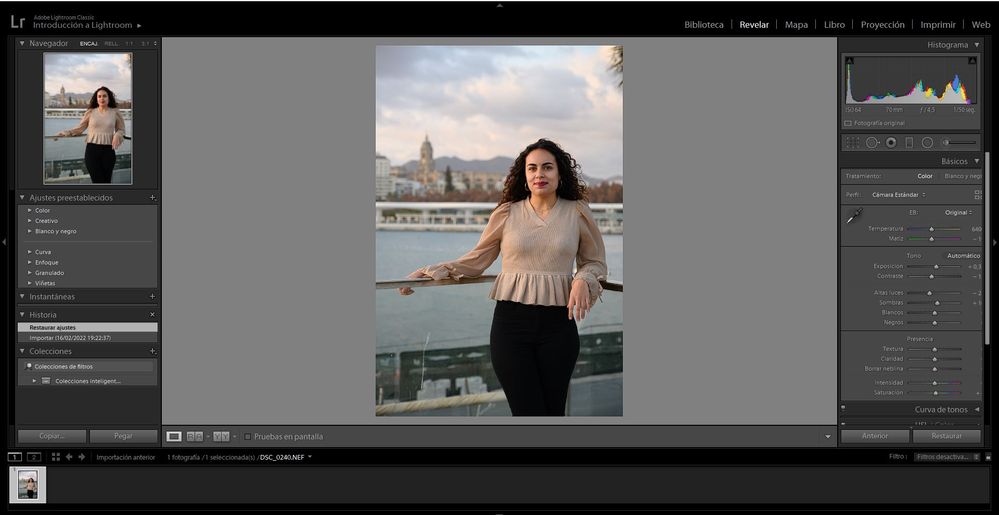
Show a screen capture of this photo in the Develop Module, so we can see the WHOLE screen, including the History Panel on the left and the sliders on the right.
Copy link to clipboard
Copied
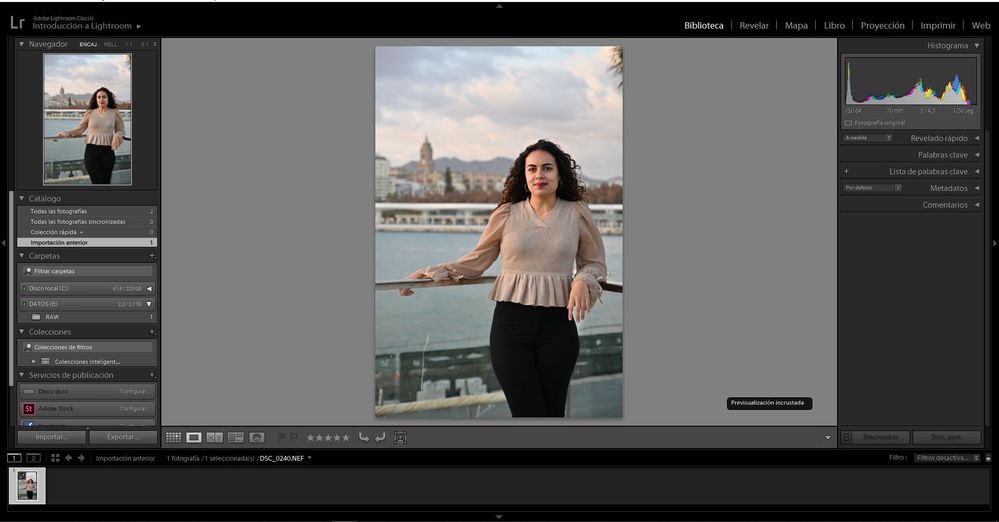
Biblioteca y Revelar
Copy link to clipboard
Copied
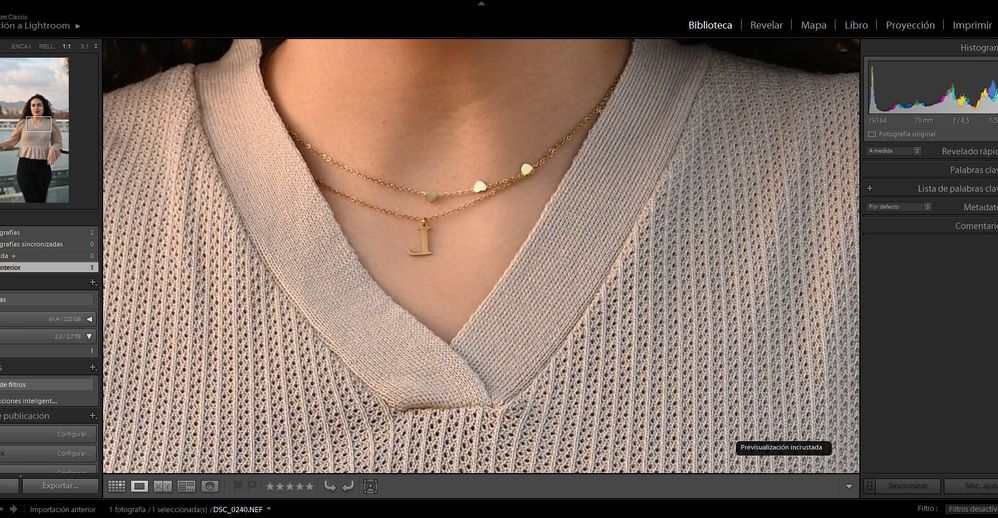
If you zoom in to 1:1 view in both the Library and Develop Module, does the problem go away?
If not, show me the 1:1 zoomed image in both the Library and Develop Module.
Copy link to clipboard
Copied
No desaparece, la imagen se muestra con el problema igualmente

Copy link to clipboard
Copied
So I think we are back to the monitor calibration being corrupted, or perhaps the video driver is not working properly.
Copy link to clipboard
Copied
El problema es la visualizacion del RAW. La pantalla se ve bien en cualquier aplicacion del ordeandor. No se si te refieres a eso.
Y el GPU no se cómo detectar el problema.
Copy link to clipboard
Copied
Ayer vi esto pero no me ha funcionado. Pienso que tiene que ser algo similar...
https://community.adobe.com/t5/lightroom-classic-discussions/problemas-devisualizaci%C3%B3n-en-m%C3%...
Copy link to clipboard
Copied
Yes, with a corrupt monitor profile, the RAW can appear different between library and develop modules. I call @TheDigitalDog and @IanLyons and @Todd Shaner others who may know better.
Copy link to clipboard
Copied
Ok. ¿Con tú mención les notifica esta publicación o les escribo por privado?
Copy link to clipboard
Copied
I think they will be notified that I have mentioned their name and join in. But you should feel free to contact them privately if you'd like.
Copy link to clipboard
Copied
In your screenshot Biblioteca y Revelar the words previsualizacion incrustada apppear. English translation is 'embedded preview.' This means you imported the image files with the Import module File Handling> Build Previews set to Embedded & Sidecar. This causes the imported image files to display the in-camera settings, which will look quite different than the LrC Develop module rendering. Change that setting to 'Standard' to use LrC's rendering in both the Library & Develop modules. Alternatively you can change the raw default setng to use your 'Camera Settings' as outlined at the below article.
https://helpx.adobe.com/il_en/lightroom-classic/help/raw-defaults.html
Copy link to clipboard
Copied
Thank you, @Todd Shaner !
Copy link to clipboard
Copied
Gracias por la respuesta pero el problema sigue. La he importado en estandar y en todos los tipos y sigue viendose mal.
Copy link to clipboard
Copied
Are you saying the Library module and Develop module previews look different? If so try 1) closing LrC, 2) shutdown your sysetm, 3) restart your system, and 4) Import some new image files shot today with File Handling> Build Previews set to Standard. If the Library module previews and Develop module previews still look different go to menu Edit Preferences> Performance> and set 'Use Graphics Processor' to Off. Close all applications, shut down your system, restart your system and try LrC again. If they are still different follow the instructions at the below link to change your display profile to sRGB.
https://www.lightroomqueen.com/how-do-i-change-my-monitor-profile-to-check-whether-its-corrupted/
Copy link to clipboard
Copied
No me lo puedo creer, ¡ha sido un exito! Desde que he desactivado la tarjeta grafica y he reiniciado el PC (no ha hecho falta hacer lo de sRGB). ¿Me recomiendas hacerlo igualmente por si acaso?
Ahora que parece que todo está solucionado, ¿cual era el error? Anteriormente ya habia probado a desactivar la tarjeta grafica pero quizás no lo puse en "Estandar". ¿Esto no perjudica el resultado en lightroom?

-
- 1
- 2

Find more inspiration, events, and resources on the new Adobe Community
Explore Now
 AdChoices