Exit
  • Global community
    • Language:
      • Deutsch
      • English
      • Español
      • Français
      • Português
  • 日本語コミュニティ
  • 한국 커뮤니티
0

Import Problem

Community Beginner ,
Mar 19, 2023 Mar 19, 2023

I have added 9 photos to a folder on my hard drive and I would like to add these to Lightroom Classic. If I select the option to synchronise the folder a box pops up telling me there are 9 new photos to import, and the box next to this is ticked. Yet when I the select synchronise  I get a message telling me that there are no new photos to import, even though they are in the folder. (all photos in the folder, including the new ones, are jpegs)

TOPICS
Windows
585
Translate
Report
Community guidelines
Be kind and respectful, give credit to the original source of content, and search for duplicates before posting. Learn more
community guidelines
Community Expert ,
Mar 19, 2023 Mar 19, 2023

Sounds like Lightroom thinks that a copy of these photos is already in the catalog. Try this: in the synchronize folder dialog, select the option to show the import dialog. When the import dialog comes up, uncheck the option to not import selected duplicates. Do the photo import now?


-- Johan W. Elzenga
Translate
Report
Community guidelines
Be kind and respectful, give credit to the original source of content, and search for duplicates before posting. Learn more
community guidelines
Community Expert ,
Mar 19, 2023 Mar 19, 2023

@JohanElzenga , I guess you are referring to Don't import Suspected duplicates?
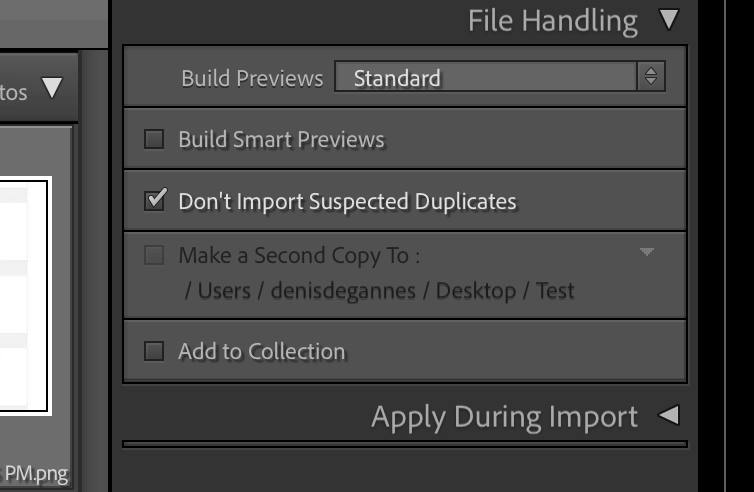
A396E1DF-47DF-429C-A99E-FB25B686B0BD.png


Regards, Denis: iMac 27” mid-2015, macOS 11.7.10 Big Sur; 2TB SSD, 24 GB Ram, GPU 2 GB; LrC 12.5,; Lr 6.5, PS 24.7,; ACR 15.5,; (also Laptop Win 11, ver 24H2, LrC 15.0.1, PS 27.0; ) Camera Oly OM-D E-M1.

Translate
Report
Community guidelines
Be kind and respectful, give credit to the original source of content, and search for duplicates before posting. Learn more
community guidelines
Community Expert ,
Mar 19, 2023 Mar 19, 2023

@DdeGannes Yes, of course. I wrote 'selected' but obviously meant 'suspected'.


-- Johan W. Elzenga
Translate
Report
Community guidelines
Be kind and respectful, give credit to the original source of content, and search for duplicates before posting. Learn more
community guidelines
Community Beginner ,
Mar 19, 2023 Mar 19, 2023
LATEST

I have solved the problem now. LR was looking in the wrong forlder!

Translate
Report
Community guidelines
Be kind and respectful, give credit to the original source of content, and search for duplicates before posting. Learn more
community guidelines
LEGEND ,
Mar 19, 2023 Mar 19, 2023

This happens because you have previously imported these photos. It is NOT a good idea to import photos more than once. You need to find the photos in the LrC Library Module by clicking on "All Photographs" and then searching for the photos by file name using the Filter Bar.

Translate
Report
Community guidelines
Be kind and respectful, give credit to the original source of content, and search for duplicates before posting. Learn more
community guidelines
Community Beginner ,
Mar 19, 2023 Mar 19, 2023

They are new photose which have never been imported previously.

Translate
Report
Community guidelines
Be kind and respectful, give credit to the original source of content, and search for duplicates before posting. Learn more
community guidelines

