Exit
  • Global community
    • Language:
      • Deutsch
      • English
      • Español
      • Français
      • Português
  • 日本語コミュニティ
  • 한국 커뮤니티
0

Keyword add default location problem

New Here ,
Apr 13, 2022 Apr 13, 2022

I use keywords in LR.  When I attempt to add a new keyword to the master list, the keyword always adds the new keyword within Plants, within Flowers, for example.  I must have set the default location at some point but cannot find how to remove default location or change it.  Anyone with similar problem?

TOPICS
Windows
168
Translate
Report
Community guidelines
Be kind and respectful, give credit to the original source of content, and search for duplicates before posting. Learn more
community guidelines
Community Expert ,
Apr 13, 2022 Apr 13, 2022

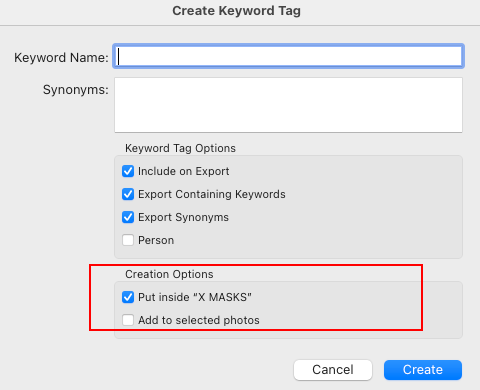
Check how you have configured the 'Create Keyword Tag' panel (see attached screenshot). In this example, with an existing keyword selected, then adding a new keyword will result in it being put inside the existing keyword. To avoid this, simply uncheck the 'Put inside "xxxxx"'


Untitled-1.png

Translate
Report
Community guidelines
Be kind and respectful, give credit to the original source of content, and search for duplicates before posting. Learn more
community guidelines
New Here ,
Apr 13, 2022 Apr 13, 2022
LATEST

Ian, thanks for your prompt reply.  I kept playing about and found the culprit.  When I highlighted the keyword that the new keywords were placed beneath and then right clicked, I saw a check by the field which said "Put new keywords insdie this Keyword" my problem was rectified.  I've been struggling with this off and on for several months.  Thanks for your help.  I did see your suggestion, it was triggered my look into looking at the keyword the new keywords were attached to.

Translate
Report
Community guidelines
Be kind and respectful, give credit to the original source of content, and search for duplicates before posting. Learn more
community guidelines