Exit
  • Global community
    • Language:
      • Deutsch
      • English
      • Español
      • Français
      • Português
  • 日本語コミュニティ
  • 한국 커뮤니티
0

Lightroom permissions

Explorer ,
Apr 13, 2022 Apr 13, 2022

Can't open Lightroom because of this, any ideas? 

Screenshot 2022-04-13 at 2.21.37 pm.png

TOPICS
macOS
419
Translate
Report
Community guidelines
Be kind and respectful, give credit to the original source of content, and search for duplicates before posting. Learn more
community guidelines
Adobe Employee ,
Apr 13, 2022 Apr 13, 2022

Hi there,


We are sorry to hear that you are getting an error while launching Lightroom Desktop.

Would you mind sharing your Lightroom and macOS versions? Have you given access permissions to the application from your system's preferences? Since when is it happening?

Please check this similar discussion: https://community.adobe.com/t5/lightroom-classic-discussions/lightroom-catalog-cannot-be-used/td-p/1...


Let us know if that helps,


Regards,

Ranjisha

Translate
Report
Community guidelines
Be kind and respectful, give credit to the original source of content, and search for duplicates before posting. Learn more
community guidelines
Explorer ,
Apr 13, 2022 Apr 13, 2022

Mac OS Monterey version 12.3.1 (21E258), I think this permissions thing only started after a system update?

Translate
Report
Community guidelines
Be kind and respectful, give credit to the original source of content, and search for duplicates before posting. Learn more
community guidelines
Community Expert ,
Apr 13, 2022 Apr 13, 2022

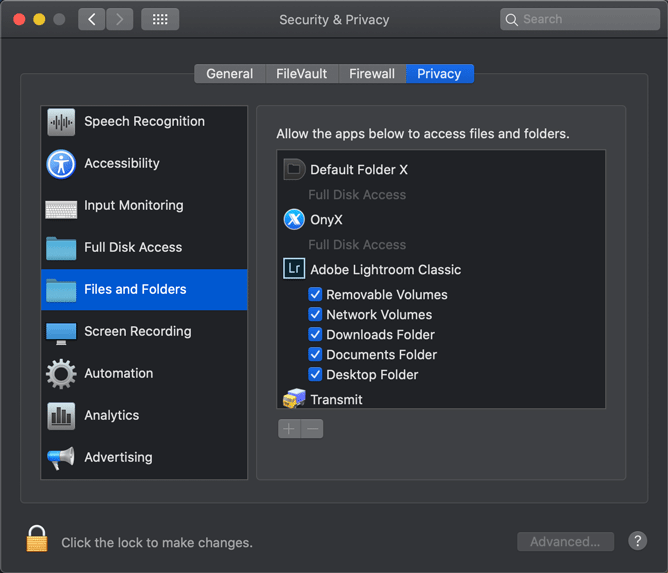
Make sure Lightroom has the necessary permissions in MacOS System Settings - Security & Privacy.


C58E5DBD-D772-499A-9FE4-131F104FBC2E.png

-- Johan W. Elzenga
Translate
Report
Community guidelines
Be kind and respectful, give credit to the original source of content, and search for duplicates before posting. Learn more
community guidelines
Explorer ,
Apr 14, 2022 Apr 14, 2022

Thanks, done that and they're already on there, could do with some advice re: permissions

Translate
Report
Community guidelines
Be kind and respectful, give credit to the original source of content, and search for duplicates before posting. Learn more
community guidelines
Community Expert ,
Apr 14, 2022 Apr 14, 2022
LATEST

I noticed that the path in the error message includes the word "backup" a few times. Do you perhaps also use this disk as a Time Machine backup? If so, that could be the reason of your problem. Time Machine 'owns' the backup disk, and that could cause other apps to be without permissions to access it. Even if they do not access the Time Machine backup itself. Always use Time Machine with a dedicated backup disk.


-- Johan W. Elzenga
Translate
Report
Community guidelines
Be kind and respectful, give credit to the original source of content, and search for duplicates before posting. Learn more
community guidelines