
EnglandBex
Participant
April 16, 2022
Question

Lightroom won’t export

  • April 16, 2022
  • 3 replies
  • 2163 views

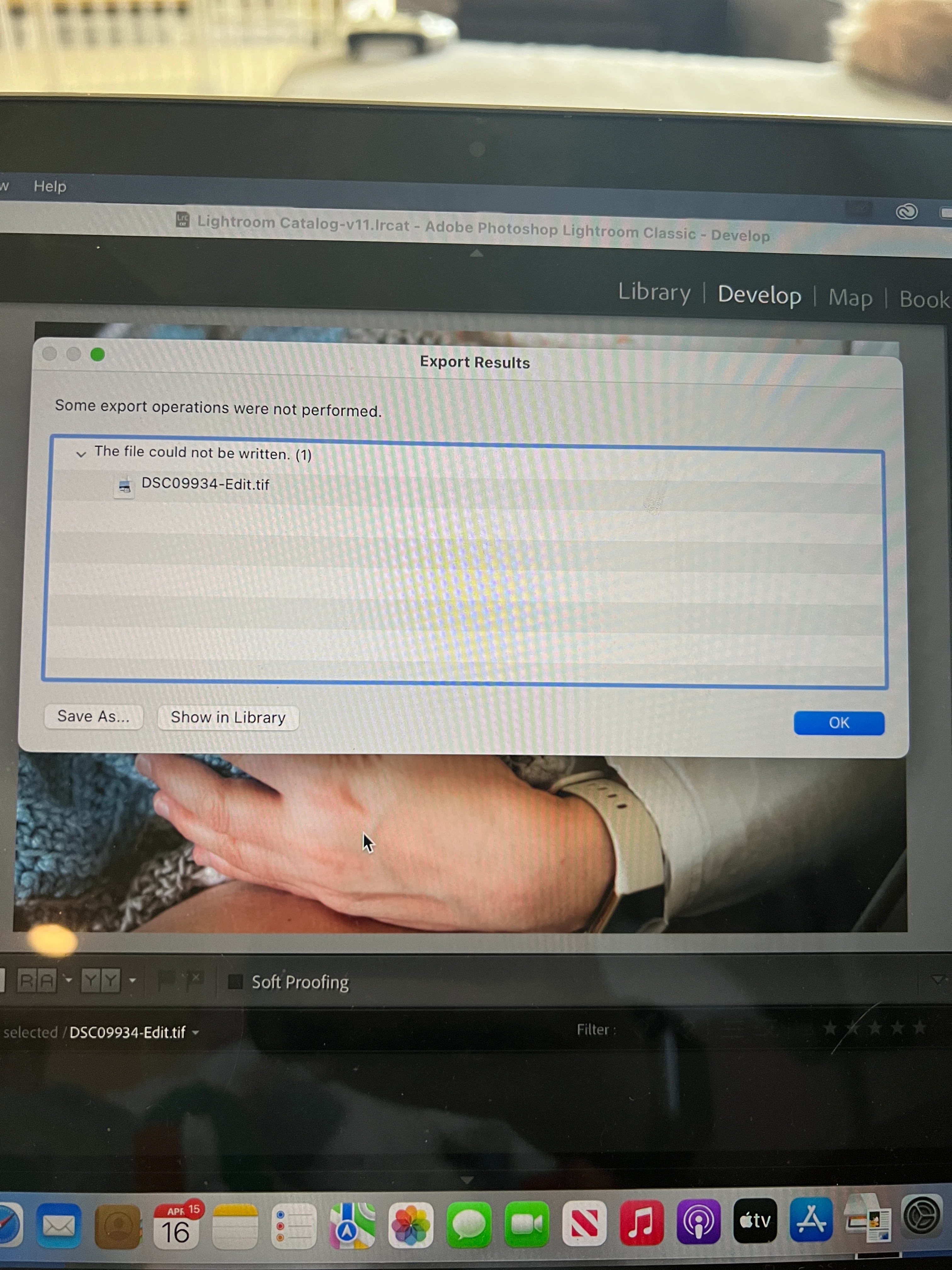
Hi! For some reason after working on a photo in Photoshop and bringing it back into Lightroom it won't export. I am trying to export to my external hard drive and getting this message. Not sure why this started happening or how to fix it. Any help much appreciated!
This topic has been closed for replies.

3 replies

Cory Mondale
Participant
April 17, 2022

I am having the same issue.  I can hit "Edit in Photoshop" and then export it from there. 
I tried the permissions avenue, but no luck.


Rob_Cullen
Community Expert
Community Expert
April 17, 2022

@Cory Mondale Please provide more details.

What is meant by "then export it from there."? From where? Photoshop? or Lightroom-Classic?

And 'where' are you exporting to?

Be specific with answers, especially any error messages.


Please include the following in your question:
Adobe product and Version number.
A Screenshot of the info panel from MENU: Help/System Info...
Operating system and Version number
The full text of any Error Message(s)
What you were doing when the problem occurred
Screenshots of the problem.


Regards. My System: Windows-11, Lightroom-Classic 15.1.1, Photoshop 27.3.1, ACR 18.1.1, Lightroom 9.0, Lr-iOS 10.4.0, Bridge 16.0.2 .
Participant
August 25, 2022

"1. I can't export the file to my normal folder that I have been exporting to for years. (and have tried using other

    folders now that this issue has come up)"

Exporting FROM Lightroom-Classic:

Where is the "normal" folder? If it is not the one stated in your Export!

Your LrC export dialog is set to place the new exported image in a {Desktop > 2022-04} folder. And does that folder have full Read/write permissions?

If you want the new exported file to appear in the Catalog- then check the option- [Add to this Catalog]


"2. I am frustrated, so I try something, I pick "Edit in Photohop". Thus photo appears in Photoshop.

3. From Photoshop I "Export as..." and choose JPG and it exports to the folder I want.  "

Exporting FROM Photoshop:

That is as it should be! BUT the file you [Export As] from Ps will NOT be in the LrC Catalog- Never will be! Unless you then Import the new image file to the LrC Catalog from the folder where you placed it.


So I understand that Photoshop can export to {Desktop > 2022-04} but Lightroom-Classic cannot. Correct?


I updated to Lightroom Classic v11.5 on August 18, 2022, and today I experienced the same issue that Cory Mondale described above while trying to Export a file as a JPEG to my MacBook Pro (16-inch, 2019), running OS Monterey 12.5.1. The error message was exactly as in the image attached above by EnglandRex, displaying an Export Results page which cited, "The file could not be written." 


I did verify that Lightroom Classic has Full Disk Access permission. I worked in both LR and PS less than 24 hours ago, and successfully Exported JPEG versions of the files into a folder on my McBook Pro, from the external drive which contains the RAW and TIF versions, as well as the Lightroom Classic Catalog.

When I saw the error message, I closed down LR, doing a full Catalog backup (with Optimization). The I reopened LR Classic and tried to Export a JPEG file version again (from LR), and the same error message was displayed.


About my MAC:

OS Monterey Version 12.5.1

MacBook Pro (16-inch, 2019)

Processor: 2.4 GHz 8-Core Intel Core i9

Memory: 64 GB 2667 MHz DDR4

Graphics: Intel UHD Graphics 630 1536 MB

Lightroom Classic Version 11.5, Photoshop CC 2022 Version 23.5 (also updated on August 18, 2022)


TheDigitalDog
Inspiring
April 16, 2022

In System Preferences, >Security & Privacy, >Full Disk Access, do you see LR listed? If not, do add it and try again.

Author “Color Management for Photographers" & "Photoshop CC Color Management/pluralsight"
EnglandBex
Participant
April 17, 2022

Yes I do. I'm trying to export to the external drive. I'm not sure why it suddenly started having a problem because it was fine in the past. I'm just trying to export from Lightroom to the external hard drive. 

Rob_Cullen
Community Expert
Community Expert
April 16, 2022

The error message- "...cannot be written..." would indicate a 'Permissions' problem with the destination drive and folder that you are exporting to.

https://support.apple.com/kb/ph25287


Regards. My System: Windows-11, Lightroom-Classic 15.1.1, Photoshop 27.3.1, ACR 18.1.1, Lightroom 9.0, Lr-iOS 10.4.0, Bridge 16.0.2 .
EnglandBex
Participant
April 17, 2022

I also notice now when I create a new folder on the external drive it's no longer automatically popping up in lightroom

Rob_Cullen
Community Expert
Community Expert
April 17, 2022

To comment on the new folder aspect-

1) If you create the 'new' folder in the Mac Finder- then Lightroom-Classic will NOT see or reference the new folder until it contains a photo that you Import to the Catalog.

2) If you create the 'new' folder in the Folder panel of LrC it does appear in LrC even if it is empty of files.


Regards. My System: Windows-11, Lightroom-Classic 15.1.1, Photoshop 27.3.1, ACR 18.1.1, Lightroom 9.0, Lr-iOS 10.4.0, Bridge 16.0.2 .