Exit
  • Global community
    • Language:
      • Deutsch
      • English
      • Español
      • Français
      • Português
  • 日本語コミュニティ
  • 한국 커뮤니티
0

Old On1 extension in Lightroom classic

Community Beginner ,
Mar 13, 2022 Mar 13, 2022

I have been updating On1 raw 2020 to 2022. But in Lightroom classic in my laptop i cannot sent a picture to On1 raw 2022 as it still shows the old extension 2020. The desktop works just fine. There is no problem. 2022 shows. How can i remove the old extension and replace it with the new one. I am working with windows 11

TOPICS
Windows
333
Translate
Report
Community guidelines
Be kind and respectful, give credit to the original source of content, and search for duplicates before posting. Learn more
community guidelines

correct answers 1 Correct answer

Community Beginner , Mar 14, 2022 Mar 14, 2022

thanks. I just erased my disk and reinstalled windows and the other programms.  Now all is working fine. Thanks anyway,

Translate
Community Expert ,
Mar 13, 2022 Mar 13, 2022

You should go to your LrC Preferences and set it up there. The second section set up an additional external editor.

Choose the application from the Applications folder with installed applications.

See the screen capture.

Screenshot 2022-03-13 at 7.53.07 PM.png

Regards, Denis: iMac 27” mid-2015, macOS 11.7.10 Big Sur; 2TB SSD, 24 GB Ram, GPU 2 GB; LrC 12.5,; Lr 6.5, PS 24.7,; ACR 15.5,; (also Laptop Win 11, ver 24H2, LrC 15.0.1, PS 27.0; ) Camera Oly OM-D E-M1.
Translate
Report
Community guidelines
Be kind and respectful, give credit to the original source of content, and search for duplicates before posting. Learn more
community guidelines
Community Beginner ,
Mar 14, 2022 Mar 14, 2022

Thanks for the info but unfortunally this does not work. When i change the application On1 2020 to On1 photo raw 2022 and I close lightroom, then at startup again there is still on1 2020 and not the new settings. 

Translate
Report
Community guidelines
Be kind and respectful, give credit to the original source of content, and search for duplicates before posting. Learn more
community guidelines
Community Expert ,
Mar 14, 2022 Mar 14, 2022

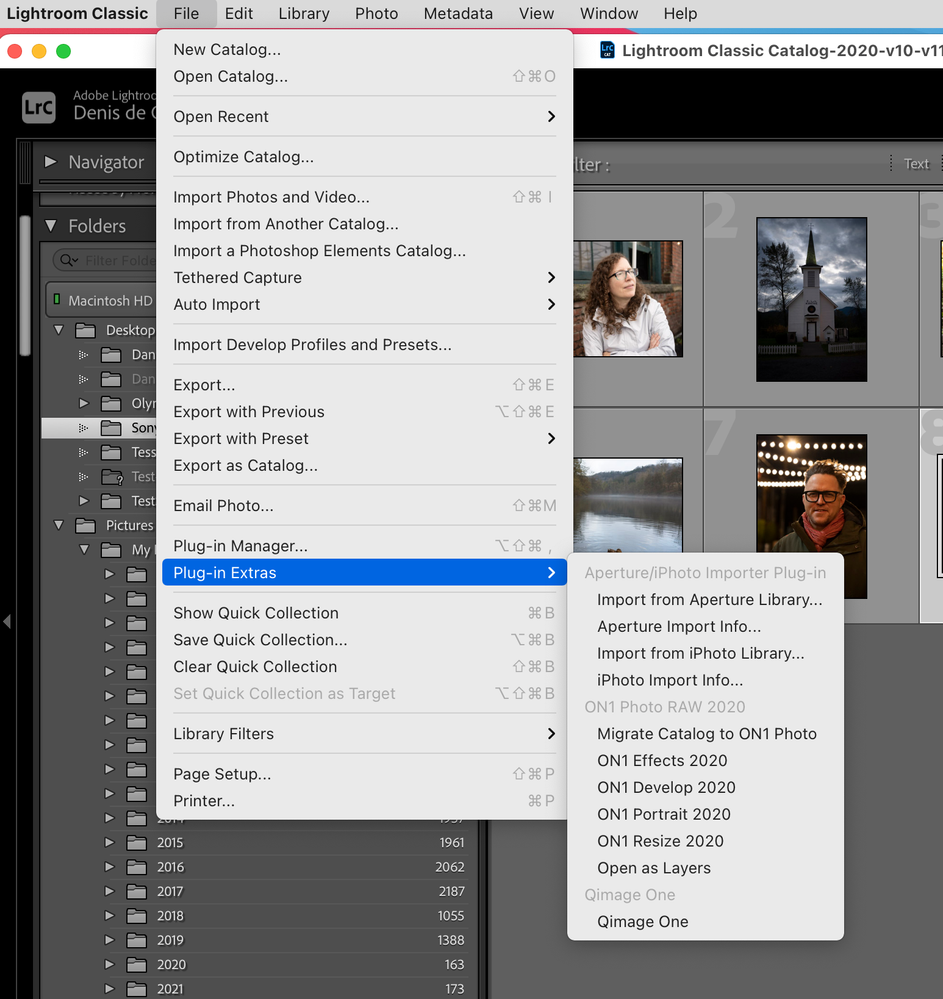
Check and see if it's available in Plugin Extras, see screen capture.

Screenshot 2022-03-14 at 9.00.32 AM.png

Regards, Denis: iMac 27” mid-2015, macOS 11.7.10 Big Sur; 2TB SSD, 24 GB Ram, GPU 2 GB; LrC 12.5,; Lr 6.5, PS 24.7,; ACR 15.5,; (also Laptop Win 11, ver 24H2, LrC 15.0.1, PS 27.0; ) Camera Oly OM-D E-M1.
Translate
Report
Community guidelines
Be kind and respectful, give credit to the original source of content, and search for duplicates before posting. Learn more
community guidelines
Community Beginner ,
Mar 14, 2022 Mar 14, 2022
LATEST

thanks. I just erased my disk and reinstalled windows and the other programms.  Now all is working fine. Thanks anyway,

Translate
Report
Community guidelines
Be kind and respectful, give credit to the original source of content, and search for duplicates before posting. Learn more
community guidelines