Exit
  • Global community
    • Language:
      • Deutsch
      • English
      • Español
      • Français
      • Português
  • 日本語コミュニティ
  • 한국 커뮤니티
0

Open Lightroom in Low Resolution Ventura is not available

New Here ,
Feb 16, 2023 Feb 16, 2023

Hello Everyone,


I don't have the option to open Lightroom Classic in Low Resolution since i have updated to MacOS Ventura.


Anyone know why?


Thanks!

TOPICS
macOS
1.2K
Translate
Report
Community guidelines
Be kind and respectful, give credit to the original source of content, and search for duplicates before posting. Learn more
community guidelines
Community Expert ,
Feb 16, 2023 Feb 16, 2023

I think it’s because Apple removed that option from macOS. Because you are probably not going to be able to find the Open in Low Resolution option for any other application in macOS 13 Ventura.


Open in Low Resolution was probably a temporary option Apple provided while developers got their applications properly upgraded for Retina displays, and Apple probably decided that 10 years after introducing Retina displays in 2012, any applications that hadn’t adapted had to be forced to by removing the Low Resolution option.


A quick Internet search indicates that Apple removed Open in Low Resolution as of macOS 12 Monterey, if so, it’s already been gone for over a year.

Translate
Report
Community guidelines
Be kind and respectful, give credit to the original source of content, and search for duplicates before posting. Learn more
community guidelines
New Here ,
Feb 16, 2023 Feb 16, 2023

Still had it in Monterey. 

Translate
Report
Community guidelines
Be kind and respectful, give credit to the original source of content, and search for duplicates before posting. Learn more
community guidelines
Community Expert ,
Feb 16, 2023 Feb 16, 2023

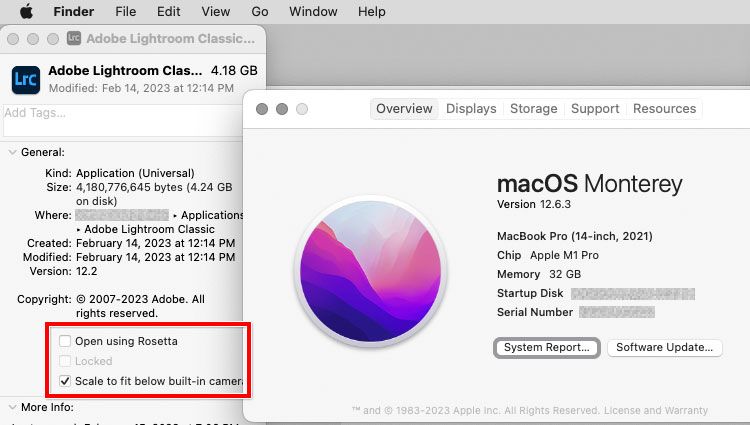
My main Mac is still on Monterey, and what I see agrees with the Internet search…no Open in Low Resolution.


Are you able to find any other applications that have it in Ventura? Even if you install an old application?


Lightroom-Classic-Get-Info-macOS-12.jpg

Translate
Report
Community guidelines
Be kind and respectful, give credit to the original source of content, and search for duplicates before posting. Learn more
community guidelines
LEGEND ,
Feb 16, 2023 Feb 16, 2023

I use a program called Garmin Basecamp.  Garmin is POOR, POOR, POOR at maintaining their software and the maps load slowly on a Retina 5k display.  Basecamp worked great pre Monterey when run in Low Res mode but the ability was removed.  The following was a solution to the issue on Monterey.  


The solution to opening program in Low Res mode is this Terminal command.  I haven't tried this with LrC but it works fine with Basecamp.   Just change the path for the Basecamp App to the LrC App.  I am not sure if works with LrC but it should.


open /Applications/Garmin\ Basecamp.app --args -AppleMagnifiedMode YES


You can turn this line into an app using an Automator run a shell script which is what I have done for Basecamp.  There are probably issues such as dragging photos to the App Icon to open LrC that could be solved with extra arguments to the command.


If you are interested I will post a screen clip of the Automator App that I created

M4 Pro Mac Mini. 48GB
Translate
Report
Community guidelines
Be kind and respectful, give credit to the original source of content, and search for duplicates before posting. Learn more
community guidelines
LEGEND ,
Feb 16, 2023 Feb 16, 2023
LATEST

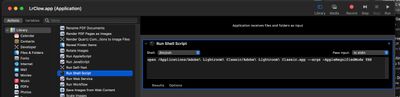
Here are screen clips of creating the Automator App.  May or may not work in Ventura.  Does on Monterey


Open Automator and choose Applications

Screen Shot 2023-02-16 at 2.10.15 PM.jpg


Change App name to your choice.  Not necessary as can be done later in Finder

Screen Shot 2023-02-16 at 2.10.35 PM.jpg


Choose Run Shell Script from long list and cut and paste the following command

open /Applications/Adobe\ Lightroom\ Classic/Adobe\ Lightroom\ Classic.app --args -AppleMagnifiedMode YES

Make sure spacing is correct and no RETURNS (all one line as shown below)

Screen Shot 2023-02-16 at 2.18.11 PM.jpg


Save the APP.  Then use app to open LrC

M4 Pro Mac Mini. 48GB
Translate
Report
Community guidelines
Be kind and respectful, give credit to the original source of content, and search for duplicates before posting. Learn more
community guidelines