

linuxmuffel
Participating Frequently
December 21, 2022
質問

Tastaturbefehl gesucht für "Zurück" und "Vor" Funktion

  • December 21, 2022
  • 返信数 2.
  • 170 ビュー

Hallo Gemeinde,

ich brauche eure Hilfe.

Ich suche die Tastaturbfehle zu folgenden Funktionen, s.h. Fotos:
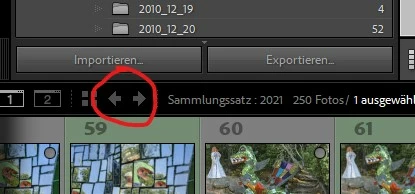
Der Tool-Tip besagt "Zurück" und "Vor" als Funktionsname. Die Befehle gibt´s in allen Modulen.

Unter den Tastaturbefehlen konnte ich nichts ausfindig machen :-(.


Vielen Dank im Voraus für eure Hilfe

Liebe grüße und schon mal frohe Weihnachten

このトピックへの返信は締め切られました。

返信数 2

johnrellis
Legend
December 21, 2022

Also, you might check out the Any Source plugin, which provides the commands Back/Forward To Previous Source/Filter/Selection.  Many find those commands more useful than the Previous/Next buttons, which don't restore the selection and filter state.  The plugin page explains how to assign keyboard shortcuts to those commands.

johnrellis
Legend
December 21, 2022

Unfortunately, there are no keyboard shortcuts (or menu commands) corresponding to those buttons. For the most authoritative list of keyboard shortcuts, see here:

https://www.lightroomqueen.com/keyboard-shortcuts/


or use the Any Shortcut plugin, which generates the tables shown above.

johnrellis
Legend
December 22, 2022

[This post contains formatting and embedded images that don't appear in email. View the post in your Web browser.]


I'm sorry, my previous post was wrong -- I was fooled by the Google translation "The tool tip says "Previous" and "Forward" as the function name."


The commands do appear in the English Window menu as Go Back and Go Forward, or in German:


That shows the Windows shortcuts as Ctrl Alt Links (left arrow) and Ctrl Alt Rechts (right arrow).


Any Shortcut and the Lightroom Queen tables show that as well (when you use the correct command name):