Exit
  • Global community
    • Language:
      • Deutsch
      • English
      • Español
      • Français
      • Português
  • 日本語コミュニティ
  • 한국 커뮤니티
4

Tethered Capture - Camera not found or disappears after a few shots

Explorer ,
Sep 09, 2022 Sep 09, 2022

I've been trying to use Tethered Capture with my Nikon Z7 to digitise old slide films. The problem is that either the camera is not found or if it is, it disappears after a few shots. I get the "Detecting Camera" window and the spinning gear wheel.

I searched all the tutorials, help and forums, checked and updated all software and firmware but the problem persisted. Importing pics by the USB cable works perfectly. Eventually I realised that the camera was connected to my Mac Pro through a USB3 hub. Connecting the camera directly to the Mac has solved the problem 🙂

I've suggested that the "Troubleshoot tethered capture" page emphasises that the camera should be directly connected.

Hope this helps others.


TOPICS
macOS , Windows
235
Translate
Report
Community guidelines
Be kind and respectful, give credit to the original source of content, and search for duplicates before posting. Learn more
community guidelines
LEGEND ,
Sep 10, 2022 Sep 10, 2022

[This post contains formatting and embedded images that don't appear in email. View the post in your Web browser.]


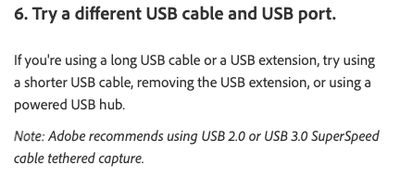
Glad you got it resolved and thanks for posting your experience -- that could help others. I think you're referring to step 6 of this page:

https://helpx.adobe.com/lightroom-classic/kb/troubleshoot-tethered-capture-lightroom.html


johnrellis_0-1662826260756.png


Translate
Report
Community guidelines
Be kind and respectful, give credit to the original source of content, and search for duplicates before posting. Learn more
community guidelines
Explorer ,
Nov 01, 2022 Nov 01, 2022
LATEST

Yes, that step does cover the problem. I clearly found this page but somehow missed the help :-(.


Still think it would be good to emphasise this point in teh instructions rather than just hidden in the troubleshooting.

Translate
Report
Community guidelines
Be kind and respectful, give credit to the original source of content, and search for duplicates before posting. Learn more
community guidelines