Exit
  • Global community
    • Language:
      • Deutsch
      • English
      • Español
      • Français
      • Português
  • 日本語コミュニティ
  • 한국 커뮤니티
0

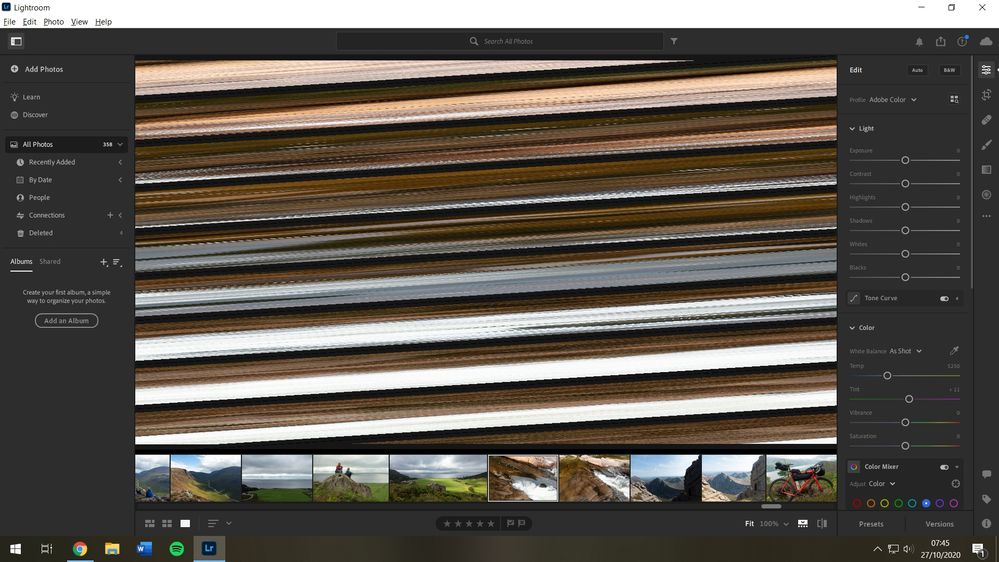
Diagnonal distortion in all new and old library images since the update.

New Here ,
Oct 27, 2020 Oct 27, 2020

See screenshot for my issue, of distorted diagonal lines. I've done some reading online and have found noone with the same exact problem. It is not my card reader because images that I imported 4 months ago also appear identically distorted. Thumbnails are all fine, it's just in the larger edit mode that the issue occurs. It has only been a problem since the update. Files are all .ARW.


Image 1.jpg

269
Translate
Report
Community guidelines
Be kind and respectful, give credit to the original source of content, and search for duplicates before posting. Learn more
community guidelines

correct answers 1 Correct answer

Community Expert , Oct 27, 2020 Oct 27, 2020

Try going to Lightroom's Preferences>Performance tab and setting the "Use Graphics Processor" to "Off". If that fixes the problem, you could then visit your graphic card manufacturer's web-site to see if there is an updated driver for your card. If there is, and you install it, you could try turning that option back on again.

Translate
Community Expert ,
Oct 27, 2020 Oct 27, 2020

Try going to Lightroom's Preferences>Performance tab and setting the "Use Graphics Processor" to "Off". If that fixes the problem, you could then visit your graphic card manufacturer's web-site to see if there is an updated driver for your card. If there is, and you install it, you could try turning that option back on again.

Translate
Report
Community guidelines
Be kind and respectful, give credit to the original source of content, and search for duplicates before posting. Learn more
community guidelines
New Here ,
Oct 27, 2020 Oct 27, 2020
LATEST

Thank you so much Jim, sorted!

Translate
Report
Community guidelines
Be kind and respectful, give credit to the original source of content, and search for duplicates before posting. Learn more
community guidelines