Adobe Community

- Home
- Lightroom ecosystem (Cloud-based)
- Discussions
- Fixed: DNG imports after 6.2 update doesn't show t...
- Fixed: DNG imports after 6.2 update doesn't show t...

Copy link to clipboard
Copied
I follow the instructions to download presets and add them to my Lightroom mobile app. I open the DNG file in Lightroom, click the three dots on the top right, click create preset and save it as a new preset. But then when I go to my photos to use the preset, the photo doesn't change. The preset doesn't add any filter to my photo. Any ideas how to make the presets work??
{Moderator note: Edited the thread title, LRMI-4201708, 4201709}


 3 Correct answers


Hi,
you will need to update to the 6.2.1 version over the App Store if you don't already have it.
All presets created with 6.2.0 need to be deleted and recreated.
Thanks,
Ignacio

Hi,
please try out our latest version that has a fix for this issue.
Thanks,
Ignacio

Greetings,
Lightroom Mobile for iOS (iPhone & iPad) 6.2.1 was released earlier today and contains a fix for this issue.
If you previously downloaded Lightroom 6.2 you should install this update as soon as possible to avoid this issue.
Note: To fix images that were affected you need to do the following:
- Install 6.2.1
- Delete the file and move to trash
- Re-import the file again
Thank you for your patience.
Akash
 109
Replies
109
109
Replies
109

Copy link to clipboard
Copied
This sounds odd.
Is there a difference if you use e.g. Previous feature from the toolbar on the image?
If this always happens, please attach a screen recording of the issue.
Which version of the app are you using and which OS/version?
Thanks,
Ignacio
Copy link to clipboard
Copied
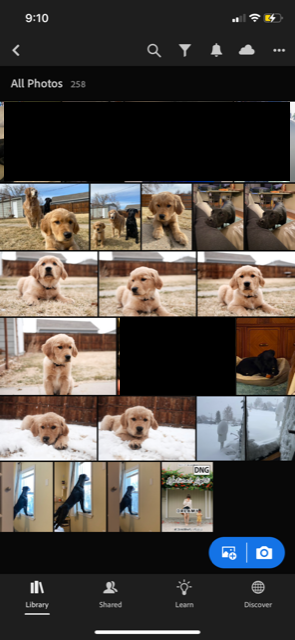
I took screen shots of each step I'm taking so you can see. I believe I have the latest version of Lighroom (it will not allow me to update so it must be on it's latest version), and my iOS is 14.4.1.
- picture 1 shows the dng file uploaded to my lighroom files on the bottom right of the screen.
- picture 2 shows the preset open ready to save
- picture 3 shows me opening the menu to "create preset"
- picture 4 shows me naming the new preset and saving it in a new preset group
- picture 5 shows the message that it's successfully saved the preset
- picture 6 shows the photo I want to edit
- picture 7 shows me finding the preset I just saved
- picture 8 shows the photo with the preset applied, unchanged from the original photo.
Copy link to clipboard
Copied
Would it be possible for you to share the preset DNG image with me over private messaging so that I can verify if this is a bug?
Thanks,
Ignacio
Copy link to clipboard
Copied
It won't allow me to send a private message to you with a dng file, it also won't allow me to attach the dng file here... is there another way to send to you?

Copy link to clipboard
Copied
I am having the exact same issue. Spent HOURS trying to figure it out. Nothing. Once I open the imported photo, it doesn't show any of the previews edits either. So I can not even copy-paste presets.
Copy link to clipboard
Copied
Exactly! I tried all of their preset files and not one worked. I tried coping and pasting the preset settings as well but like you said, there doesn't seem to be any edits to the preset file, so it won't make changes to my photos when I paste.
Copy link to clipboard
Copied
Yup. So frustrating.
Copy link to clipboard
Copied
@Nicole5EF5 I've pinged you privately again on how to continue.
@Gisele5E36 In case you also want to share your DNG, please ping me privately over the forum.
Copy link to clipboard
Copied
I've messaged you just now. Thank you.
Copy link to clipboard
Copied
It seems to be the issue is with the new Lightroom App 6.2 update.
I am having the same issue with any DNG file being uploaded to the new 6.2 Versions.
My husband is still running 6.1 and is having to issues with DNG files.
I cannot view or save any settings from DNG files and I do save them as a Preset they are saving blank. I am chatting with Adobe right now and will update if I get an update from them.
If you are using the Free Version of Lightroom Adobe has now disabled the use of RAW or DNG photos unless you pay for the App.
Copy link to clipboard
Copied
@Sara Lou
"My husband is still running 6.1 and is having to issues with DNG files."
Do you mean
"is having no issues"?
Thanks,
Ignacio
Copy link to clipboard
Copied
Yes, so sorry! No issues with 6.1
Copy link to clipboard
Copied
The issues are related to the new 6.2 Lightroom App update
Copy link to clipboard
Copied
This is what I got back from Adobe:
"Thank you for replying, Sara. I understand that you have tried the same on Android and works fine. However, this option is no longer available on iPhones."
Copy link to clipboard
Copied
Also this
"There might be an update that would bring this feature to ios platforms."
Copy link to clipboard
Copied
Soooo. We can't import presets anymore?! Great!
Copy link to clipboard
Copied
Yes that is correct. Not on ios but they did say there might be a new update coming for ios to being to be able import Presets like you can on an Android.

Copy link to clipboard
Copied
Hello Sara.
I have a iPhone and I can't use my presets either. And so I read all of the information from here because I have the same problem.
So, as I understood you have to pay for the app to download the presets? Is that it? I have a iPhone.
Thank you 😊
Copy link to clipboard
Copied
@Ignacio B. sorry. New to this. Just messaged you. Thank you

Copy link to clipboard
Copied
@Ignacio B. the same happens to me, help me

Copy link to clipboard
Copied
I am having the same issues. Presets will not save or apply to photos.

Copy link to clipboard
Copied
I had 7 customers for the first time communicating the same error. There is something broken with the new app. The dng files are fine. But the way the dng files are being imported is corrupted

Copy link to clipboard
Copied
Updating to LR 6.2 is causing DNG files to not import settings! This is a huge issue, especially for many businesses that I hope they resolve within the next 24 hours! 😩

Copy link to clipboard
Copied
They confirmed DNGs are not supported anymore.


 AdChoices