Exit
  • Global community
    • Language:
      • Deutsch
      • English
      • Español
      • Français
      • Português
  • 日本語コミュニティ
  • 한국 커뮤니티
0

Lightroom 4.1 running on macOS Big Sur (11.2.2): Need to connect to the server

Community Beginner ,
Mar 09, 2021 Mar 09, 2021

I've just opened LIghtroom for the first time and I get this message:
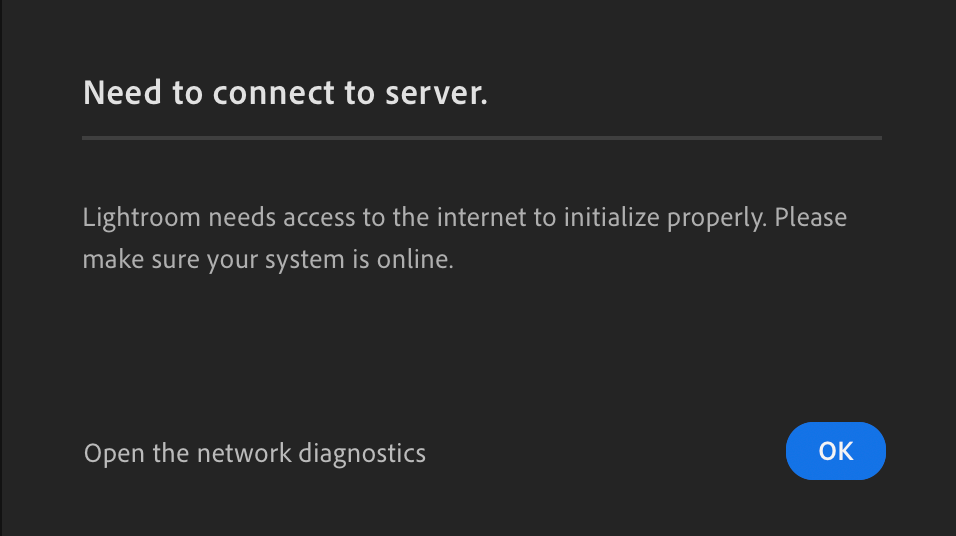
 

Screenshot 2021-03-09 at 10.37.51.png

I am connected to the internet (which is how you're able to see this!) and have a dcent connection speed, so this is a bit annoying.


It's Lightroom version 4.1 and I'm running macOS Big Sur (11.2.2). All other Creative Cloud apps are running without problems. I've tried quitting and re-opening without success.


Hope someone can help.

289
Translate
Report
Community guidelines
Be kind and respectful, give credit to the original source of content, and search for duplicates before posting. Learn more
community guidelines
Mar 09, 2021 Mar 09, 2021

Hi there,


We're sorry for the "Can't connect to the server" error with Lightroom Desktop 4.1 on macOS 11.2.2. Could you please sign out and sign in from the Adobe Creative Cloud Desktop app and check if that helps.


Also, take a look at the following feedback link and try the offered suggestions: https://feedback.photoshop.com/conversations/lightroom-desktop-cloudbased/lightroom-desktop-no-netwo...


Let us know if that helps.

Thanks,

Akash

Translate
Report
Community guidelines
Be kind and respectful, give credit to the original source of content, and search for duplicates before posting. Learn more
community guidelines
Community Beginner ,
Mar 09, 2021 Mar 09, 2021

Many thanks Akash. I tried signing out and in again, but no change unfortuantely – exactly the same thing happens.


I took a look through the other link you supplied too. I generated the mini diagnostics report, but I'm not sure what to do with it…

Translate
Report
Community guidelines
Be kind and respectful, give credit to the original source of content, and search for duplicates before posting. Learn more
community guidelines
Community Beginner ,
Mar 17, 2021 Mar 17, 2021

I still have this problem.

Translate
Report
Community guidelines
Be kind and respectful, give credit to the original source of content, and search for duplicates before posting. Learn more
community guidelines
Community Beginner ,
Apr 07, 2021 Apr 07, 2021
LATEST

I have now upgraded to version 4.2 and I still have this problem. I've tried restarting, but nothing works. All my CC apps are up to date and so is my OS.  Can you please help me?

Translate
Report
Community guidelines
Be kind and respectful, give credit to the original source of content, and search for duplicates before posting. Learn more
community guidelines
