 Adobe Community

- Home
- Lightroom ecosystem (Cloud-based)
- Discussions
- Re: using photoshop lightroom cc
- Re: using photoshop lightroom cc
using photoshop lightroom cc

Copy link to clipboard
Copied
I have used LR5 for some time. I know how to import and export using it however I cant seem to find how to export from CC after I have made my corrections


 7
Replies
7
7
Replies
7



Copy link to clipboard
Copied
What seems to be confusing about it? You click on File/Export and choose your options.


Copy link to clipboard
Copied
Lightroom 5 has become Lightroom Classic these days (version 10.x) and the export process hasn't changed. So I'm going to assume you mean Lightroom version 4.x (there is no longer a "CC" version).
Tou can refer to this link to the Adobe help pages for how to export photos in the format of your choice. Note that the functionality is quite limited compared the Lightroom Classic:
https://helpx.adobe.com/lightroom-cc/using/save-share-photos.html#export_photos
Copy link to clipboard
Copied
I cannot seem to find the panels that allow me to rename the pics as well as apply watermarks or even sync a group of pics from a corrected pic, then convert it to JPEG and export them all to photoshop, this new animal is a beast and I cant seem to understand it.
Copy link to clipboard
Copied
First of all, you do not export to Photoshop. Right-click on the image and choose the option to edit in Photoshop. It is possible to choose the file format when you are truly exporting images when you choose thee export option. And you can rename the image when the box opens to save it. Yes, it's quite a bit different from Lightroom 5. Follow the instructions in the link that was provided.

Copy link to clipboard
Copied
Your post words indicate you are running Lightroom v4.2- The 'Cloud' Version that is totally new, and different in many ways to the 'old' Lr5. (It does NOT replace or upgrade Lr5) I think you are using the wrong Lightroom!
As stated by@Michael J. Hoffman "Lightroom 5 has become Lightroom Classic these days (version 10.x)"
And see my instructions for installing Lightroom-CLASSIC in your other post.
Which Lightroom version am I using? | The Lightroom Queen
COMPARE LR & LR-CLASSIC (Lr Queen)
Copy link to clipboard
Copied
camera, 5D mark 4 uses files that are not compatable with LR5. So do you
recommend Lightroom and photoshop classic?
Copy link to clipboard
Copied
do you recommend Lightroom and photoshop classic?
No, I recommend Lightroom-CLASSIC v10.2 and Photoshop v22.4!
All of the current Photography software supports your camera.
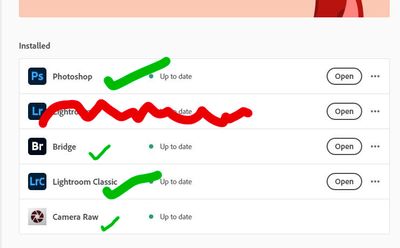
But finally the choice of software is down to you, but the 'Upgrade' to Lr5 is Lightroom-CLASSIC v10.2


 AdChoices