Exit
  • Global community
    • Language:
      • Deutsch
      • English
      • Español
      • Français
      • Português
  • 日本語コミュニティ
  • 한국 커뮤니티
4

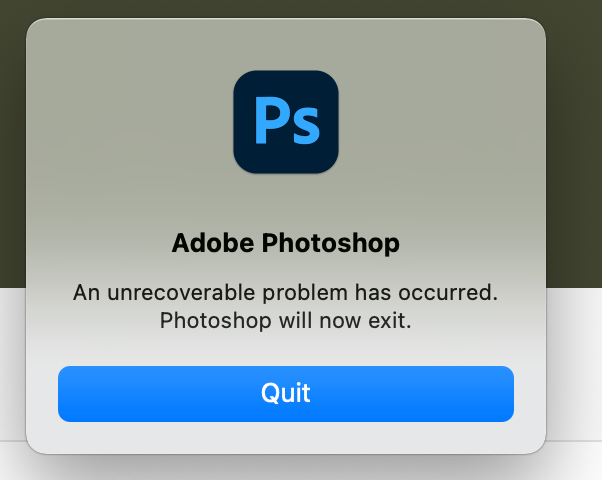
An unrecoverable problem has occurred photoshop

Community Beginner ,
Dec 02, 2020 Dec 02, 2020

How do I fix this? Tried uninstalling and reinstalling multpile times

17.9K
Translate
Report
Community guidelines
Be kind and respectful, give credit to the original source of content, and search for duplicates before posting. Learn more
community guidelines

correct answers 1 Correct answer

Community Beginner , Oct 25, 2021 Oct 25, 2021

I updated to macOS Monterey, and it finally worked!


Thank you!

Translate
Adobe
Guest
Dec 02, 2020 Dec 02, 2020

Hi

What exact version of Photoshop and operating system do you have

Translate
Report
Community guidelines
Be kind and respectful, give credit to the original source of content, and search for duplicates before posting. Learn more
community guidelines
Community Beginner ,
Dec 02, 2020 Dec 02, 2020

22.0.1

Windows

Translate
Report
Community guidelines
Be kind and respectful, give credit to the original source of content, and search for duplicates before posting. Learn more
community guidelines
New Here ,
Jan 04, 2021 Jan 04, 2021

Same thing is happening for me. Same version. Uninstalled already. Definitely wasn't expecting to pay $20 and not be able to start the software. Hope I can find a fix for this soon.

Translate
Report
Community guidelines
Be kind and respectful, give credit to the original source of content, and search for duplicates before posting. Learn more
community guidelines
New Here ,
Jun 03, 2023 Jun 03, 2023

Photoshop cc 2021

Translate
Report
Community guidelines
Be kind and respectful, give credit to the original source of content, and search for duplicates before posting. Learn more
community guidelines
Community Beginner ,
Dec 03, 2020 Dec 03, 2020

bump

Translate
Report
Community guidelines
Be kind and respectful, give credit to the original source of content, and search for duplicates before posting. Learn more
community guidelines
New Here ,
Jan 04, 2021 Jan 04, 2021

I ended up seeing a thread here where the user's install was referencing the wrong disk so they copied it from C: to D:. I  decided to try it because why not, rebooted, and it worked. I had tried rebooting previously to no avail. This thread was from 2018 so I would doubt it's the exact same issue but maybe it's worth a shot.

Translate
Report
Community guidelines
Be kind and respectful, give credit to the original source of content, and search for duplicates before posting. Learn more
community guidelines
New Here ,
Jan 04, 2021 Jan 04, 2021

Must have misread my own source. That article is from only a few months ago.

Translate
Report
Community guidelines
Be kind and respectful, give credit to the original source of content, and search for duplicates before posting. Learn more
community guidelines
Community Beginner ,
Oct 21, 2021 Oct 21, 2021

How can we do this using Mac OS? Can't find another solutions.

Translate
Report
Community guidelines
Be kind and respectful, give credit to the original source of content, and search for duplicates before posting. Learn more
community guidelines
Adobe Employee ,
Oct 21, 2021 Oct 21, 2021

What is the issue you are seeing? Is Photoshop crashing? Freezing and needs to be force quit? If you're seeing a crash, please submit all Crash Reports along with your email address: https://helpx.adobe.com/photoshop/kb/submit-crash-reports.html 

Translate
Report
Community guidelines
Be kind and respectful, give credit to the original source of content, and search for duplicates before posting. Learn more
community guidelines
Community Beginner ,
Oct 25, 2021 Oct 25, 2021

It is showing:

Screen Shot 2021-10-25 at 12.45.28 PM.png

Translate
Report
Community guidelines
Be kind and respectful, give credit to the original source of content, and search for duplicates before posting. Learn more
community guidelines
Adobe Employee ,
Oct 25, 2021 Oct 25, 2021

Still not seeing any crash reports. Please submit all Crash Reports along with your email address: https://helpx.adobe.com/photoshop/kb/submit-crash-reports.html That will help us troubleshoot.

Translate
Report
Community guidelines
Be kind and respectful, give credit to the original source of content, and search for duplicates before posting. Learn more
community guidelines
Community Beginner ,
Oct 25, 2021 Oct 25, 2021

The crash reporter dialog box is not showing/popping up.


I even followed the instructions on the link you sent and ticked the "Always show dialog box", yet it still doesn't show when the error is happening. The only button active is "Quit" (as shown on the image I sent above).


Thank you!

Translate
Report
Community guidelines
Be kind and respectful, give credit to the original source of content, and search for duplicates before posting. Learn more
community guidelines
Adobe Employee ,
Oct 25, 2021 Oct 25, 2021

Try running Photoshop from a new Admin user account: https://helpx.adobe.com/photoshop/kb/basic-troubleshooting.html#permissions Does the problem persist?

Translate
Report
Community guidelines
Be kind and respectful, give credit to the original source of content, and search for duplicates before posting. Learn more
community guidelines
Community Beginner ,
Oct 25, 2021 Oct 25, 2021

I updated to macOS Monterey, and it finally worked!


Thank you!

Translate
Report
Community guidelines
Be kind and respectful, give credit to the original source of content, and search for duplicates before posting. Learn more
community guidelines
Guest
Jun 08, 2023 Jun 08, 2023

Can you try run as compatibility mode Windows 8 or earlier?
I had a same errors, but I ran photoshop 2023 as Windows 7 compatibility mode, it works.


it looks like you've disabled dwm unofficially (or otherwise)

Translate
Report
Community guidelines
Be kind and respectful, give credit to the original source of content, and search for duplicates before posting. Learn more
community guidelines
New Here ,
Aug 18, 2023 Aug 18, 2023

An unrecoverable problem has occurred. Photoshop will now exit

Translate
Report
Community guidelines
Be kind and respectful, give credit to the original source of content, and search for duplicates before posting. Learn more
community guidelines
Guest
Aug 18, 2023 Aug 18, 2023

Same! Just after update. 

Translate
Report
Community guidelines
Be kind and respectful, give credit to the original source of content, and search for duplicates before posting. Learn more
community guidelines
New Here ,
Aug 18, 2023 Aug 18, 2023

после обновления фотошоп бета 25 с24.7

появляется диологовое окно и не запускается фотошоп

Translate
Report
Community guidelines
Be kind and respectful, give credit to the original source of content, and search for duplicates before posting. Learn more
community guidelines
Community Beginner ,
Aug 18, 2023 Aug 18, 2023

How to fix pleae?

Translate
Report
Community guidelines
Be kind and respectful, give credit to the original source of content, and search for duplicates before posting. Learn more
community guidelines
New Here ,
Aug 19, 2023 Aug 19, 2023

I solved the problem by going back to the previous version.

Translate
Report
Community guidelines
Be kind and respectful, give credit to the original source of content, and search for duplicates before posting. Learn more
community guidelines
New Here ,
Aug 19, 2023 Aug 19, 2023

same here ,, happend after update 

Translate
Report
Community guidelines
Be kind and respectful, give credit to the original source of content, and search for duplicates before posting. Learn more
community guidelines
New Here ,
Aug 19, 2023 Aug 19, 2023

и при мен е така !някои знае ли как да го оправя?

 

Translate
Report
Community guidelines
Be kind and respectful, give credit to the original source of content, and search for duplicates before posting. Learn more
community guidelines
New Here ,
Aug 21, 2023 Aug 21, 2023

Same here after update Photoshop Beta!

Translate
Report
Community guidelines
Be kind and respectful, give credit to the original source of content, and search for duplicates before posting. Learn more
community guidelines
New Here ,
Aug 20, 2023 Aug 20, 2023

same

Translate
Report
Community guidelines
Be kind and respectful, give credit to the original source of content, and search for duplicates before posting. Learn more
community guidelines